Every single day, I see casual content creators and everyday smartphone users complaining about how frustrating basic mobile video editing has become. The main hassle is that a simple task—like trimming a 30-second family clip, merging two quick holiday videos, or adding a basic background track—often forces you to jump through ridiculous technical hoops. Most modern apps in this category require a steep learning curve or make you create complicated multi-track timelines just to handle a straightforward crop.
I decided to try out VideoShow (listed on the Google Play Store under its package name, com.xvideostudio.videoeditor) to see if it actually fixes this daily annoyance. It brands itself as an all-in-one, highly practical tool that balances simple, ready-made video templates with standard advanced functions like audio extraction, speed adjustment, and basic video reverse tools. I spent a full two days putting it through regular, everyday tasks to see if it remains an accessible utility for a casual phone fan or if it irritates you with bugs and strict barriers.
My Phone Testing Setup
I installed VideoShow onto my personal Moto G85, which is running Hello UI based on Android 14. To replicate an authentic user routine, I actively monitored the software across a continuous 2-day testing window while shifting between my local home Wi-Fi network and a capped mobile data connection during afternoon walks. I deliberately avoided clearing out my device’s background memory, letting standard communication apps, background music players, and standard social feeds run concurrently to see how the software behaves during ordinary multitasking routines.
Real-World Hands-On Analysis
Compressing a Large Vlog on Mobile Data
I opened the application while relaxing on a park bench to see how comfortably it handles high-resolution video compression when away from home Wi-Fi. I loaded a heavy 3-minute video file shot on my phone and selected the tool to reduce its file size. The interface accurately populated a preview slider, allowing me to scale the video quality down so it would be easier to share on messaging networks. The processing bar advanced steadily without freezing, and the app generated a compressed file that kept a clean balance between clarity and storage efficiency without crashing halfway through.
Quick Audio Extraction at My Desk
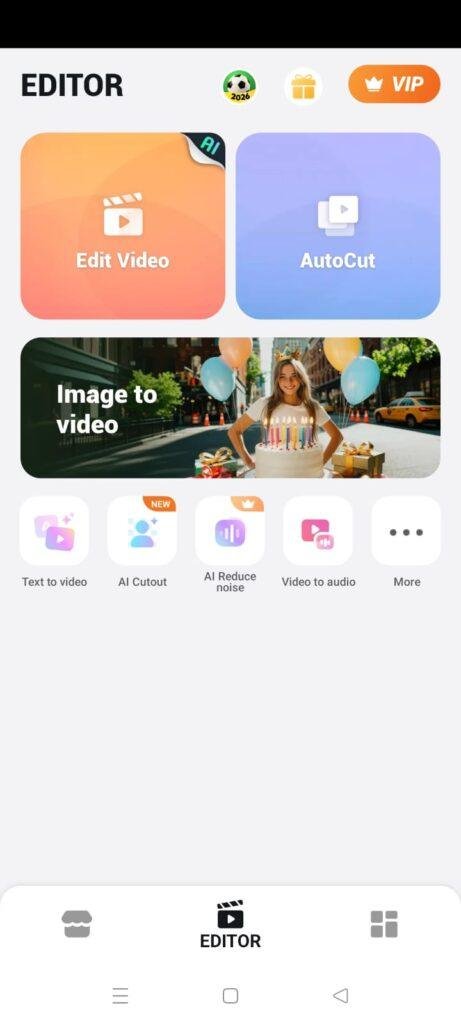
While working at my desk, I tested the app’s ability to pull an independent audio track directly out of an old video clip I had saved. Navigating through the home layout to find the “Audio Extractor” took just a single tap, and selecting my source video file from my local album was straightforward. The tool processed the conversion to a standard audio format in under a few seconds, playing back the isolated sound accurately. The overall menu arrangement felt highly accessible, as I didn’t have to wander through deep nested settings tabs to execute this single, specific function.
Late-Night Template and Text Overlay Testing
I spent an hour in the evening testing out the ready-made templates, adding scroll text overlays and basic stickers onto a short compilation clip. Typing out subtitles felt responsive, and adjusting the text color or scrolling speed with the on-screen sliders did not cause any visible interface lag. When I layered multiple stickers onto the clip timeline, the screen layout remained simple to read, letting me adjust the physical boundaries of each element on the screen with my thumb without accidentally shifting the main video track out of place.
App Permissions & Device Safety
During my 2 days of testing, the app triggered a series of standard access prompts when opening specific media paths. Here is the objective breakdown of these hardware requirements formatted as clear bullet points:
- Photos and Videos Access: The app requests permission to view your local device media files. This is mandatory for a video editor, as the software needs direct observation of your internal storage folder to load your clips, photos, and soundtrack elements into the editing timeline.
- Microphone Access: This prompt pops up only when you tap on the “Video Dubbing” or live voice-over tool. It captures your local voice input so you can record commentary directly over your active video track in real-time.
- Network and Internet Access: Triggered automatically upon launch. The app relies on an active internet connection to download extra visual filters, asset styles, licensed background songs, and to stream full-screen video ads.
- Storage Access (Legacy Devices): On older software builds, it requests broad write access to save the final rendered video projects back into your phone’s media directories, though on my device, it utilized standard scoped storage boundaries.
Speed & Everyday Performance
The practical, day-to-day speed of VideoShow feels snappy during core menu navigation, though performance fluctuates during resource-intensive rendering stages. Here is the operational breakdown of how the software behaves on standard hardware:
- Download & Install Time: The application package pulls down from the marketplace under a few seconds on an ordinary broadband network and sets up its initial directory layout without delay.
- Setup Speed: The app launches almost instantly, taking around 1 minute to clear its splash panel, though you do have to manually skip a full-screen premium upsell window before hitting the home menu.
- Menu Smoothness: Tapping options, switching between the toolbox tabs, and exploring the template marketplace feels lightweight and highly responsive.
- Memory Load: While editing basic clips, the memory load is modest. However, if you minimize the app for more than a couple of minutes to read an email while a project is open, it will occasionally refresh and drop you back to the home screen upon return.
- Active Battery Drain: Processing and rendering files consumes a noticeable amount of power, dropping your battery meter down faster than a standard social media app would over the same time window.
- Phone Warmth: The back area of my phone near the main processor core stayed cool during light crops, but became noticeably warm to the touch during a continuous 15-minute 1080p export session.
- Background Behavior: When you exit the app cleanly via the back key, it releases its main processor hold, though its internal download manager stays partially active if you are in the middle of pulling down a heavy asset pack.
- Overall Stability: The editing workspace proved stable during simple trims, though I noticed minor timeline hiccups when stacking three or more graphic layers simultaneously.
Storage Space & Cache Build-Up
When you first grab VideoShow from the storefront, the initial download size is relatively modest, varying with your specific device build but generally hovering between 50 MB and 80 MB. However, after installing the files and running the app through its initial setup script, the total disk footprint on my phone expanded to roughly 180 MB. This is a standard baseline for media editors, as they must host localized video decoding files and standard user interface components.
Over my 2-day evaluation window, the app’s data folder gathered an additional 45 MB of temporary cache and data files. This build-up expands quickly because every time you preview an online audio track, load a stylized theme template, or download an animated emoji sticker, the files are kept locally so they load faster during your next edit. Over a few weeks of active editing, this cache directory can easily balloon past several hundred megabytes, so it is highly recommended to clear it out manually through your device settings menu if your internal memory starts filling up.
Battery Life & Daily Warmth
Active video editing is inherently demanding on mobile hardware, and VideoShow reflects that during long compilation sessions. A standard 20-minute workflow of importing clips, trimming edges, and adjusting filter values consumed roughly 6% to 7% of my phone’s total battery capacity. When the application was left entirely idle on standby with the screen off, it did not cause any unexpected background battery drain.
The physical temperature of the device tracks closely with what you are doing inside the editor. If you stick to basic tasks like pulling audio or reversing short clips, the phone remains completely cool. However, when compiling multiple clips into a high-definition video track with active transitions, the internal processor area becomes warm to the touch within ten minutes, reminding you that the phone is actively rendering visual elements frames apart.
offzack.in Quick Tip: To keep your device cool and save battery life while editing complex projects, lower your system screen brightness to about 50% and turn off your phone’s location services while inside the editing room. This stops auxiliary hardware loops from drawing power while the processor handles video frames.
Network Needs & Data Usage
While the core mechanics of cutting and merging local phone videos function without an internet connection, VideoShow still depends heavily on data networks for its full feature set:
- Initial Setup Access Cost: Low. Downloading the core application and passing the intro menus uses less than 90 MB of data.
- Daily Usage Data Footprint: On the free tier, data consumption scales up significantly due to the continuous streaming of long, full-screen video ads between menu transitions, alongside video ads required to unlock premium filters.
- Additional Asset Downloads: Every time you select an external music track from the cloud library or tap a stylized transition effect, the app pulls fresh assets down, consuming anywhere from 2 MB to 15 MB per item.
- Offline Support: The basic trim, merge, speed adjustment, and local audio extraction tools run completely offline without internet access. However, you lose access to cloud-based themes, and the app will lock out specific premium asset categories until you go back online.
Monetization & User Security Review
The monetization model of the free tier of VideoShow is highly aggressive and forms a major hurdle during daily usage. The platform operates on a traditional freemium structure heavily saturated with programmatic inline banner advertisements, full-screen pop-up countdown blocks, and recurring video ads that force you to watch an advertisement just to export your work or remove watermarks. Furthermore, many advanced features, high-definition 4K export presets, and premium sound effects are locked behind a strict VIP membership paywall that constantly prompts you to buy a weekly or lifetime premium subscription.
Regarding user security and data profiles, the application allows for clean guest access, meaning you do not have to register a personal account, enter an email, or hook up your social media accounts just to edit a local clip. According to the app’s official Play Store Data Safety section, the software may collect basic device identifiers, application performance logs, and approximate location data for advertising metrics. It is important to note that the store listing indicates that user data cannot be deleted directly through an automated in-app button, which is an important consideration for privacy-conscious mobile users.
Mistakes I Noticed During Testing
During my 2 days of hands-on usage, I encountered three specific operational mistakes, layout flaws, and system bugs that disrupted my editing flow:
- The Media Sync Refresh Loop: If I opened a large local storage folder containing more than a few hundred video clips, the app’s media selection screen would occasionally get stuck in a loading loop. The grid would flash repeatedly, forcing me to close the application completely and move my target clips into a smaller, dedicated album to get them to load.
- The Export Advertising Freeze: On two separate occasions, after waiting for a video export to reach 100%, the app instantly launched a full-screen third-party video advertisement. When the ad finished, the close button failed to register my tap, freezing the screen layer and forcing me to force-close the app via system menus, leaving me unsure if my project had saved correctly.
- Timeline Scrubbing Disconnect: When dealing with multiple added text boxes on a single clip, dragging the timeline slider backward with my thumb caused the preview window to get out of sync. The audio track would jump to the correct spot, but the text overlays from a few seconds prior would remain stuck on the screen for a short moment before updating.
Main Features Explained
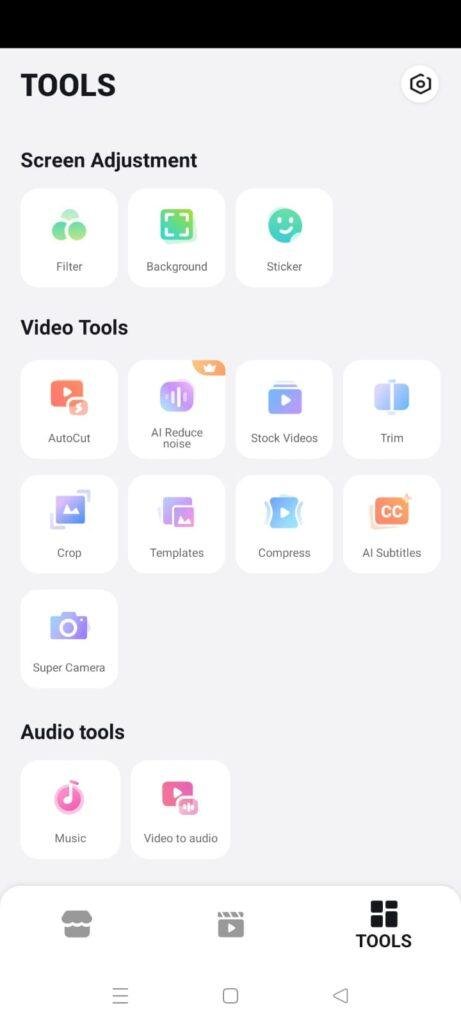
- All-In-One Toolbox Room: Groups individual utility tools like quick video trimming, fast merging, and direct file rotation into separate, single-purpose menu icons on the home screen for fast deployment.
- Integrated Audio Extractor: Allows you to isolate the background soundtrack from any video file saved on your phone and convert it instantly into an independent audio clip for secondary projects.
- Ready-Made Material Marketplace: Hosts an extensive collection of fully licensed background music tracks, themed transitions, expressive fonts, and animated stickers that you can download directly into your timeline.
- Video Speed Control Adjuster: Features fine-grained motion sliders that let you speed up your clips into fast motion or slow them down into precise slow-motion sequences down to individual frame layers.
- Live Dubbing Overlay: Features an on-screen audio recording room where you can watch your video playback frame-by-frame while recording a voiceover track with customizable voice-changer effects.
Pros & Cons
What I Liked
- Accessible Layout for Beginners: The straightforward button structure means you can edit, crop, or reverse a clip within seconds without dealing with complex multi-layered timeline tracks.
- Versatile Audio Extraction: The conversion tool is fast and works perfectly for turning old recorded video clips into standalone background sound files.
- Broad Feature Toolbox: Packs multiple side functions like GIF creation, photo slideshow building, and video compression inside a single interface.
What Could Be Better
- Intrusive Commercial Ad Walls: The volume of full-screen pop-up ads and countdown walls between editing steps severely breaks up your creative focus.
- Watermarks on Free Exports: The free version leaves a noticeable branded watermark on the corner of your final exported video unless you watch promotional ads to remove it.
- Occasional Background Refreshing: The app struggles to preserve your un-saved workspace if you briefly switch away to another tool, sometimes resetting your timeline.
Industry Comparison (The Competitor Matrix)
Here is a direct paragraph comparison highlighting how VideoShow performs against three major alternatives operating in the mobile media editing market:
VideoShow vs CapCut
CapCut is heavily geared toward modern vertical short-form editing, offering an incredibly deep collection of trending audio tracks and automated auto-captioning tools for free. While CapCut dominates when making quick TikTok-style content, its multi-track timeline requires a bit more thumb precision. VideoShow provides a simpler, more traditional grid-based toolbox that is much easier for total beginners who just want to do a basic trim or file compression without learning a full timeline layout.
VideoShow vs InShot
InShot offers a very similar all-in-one approach to mobile video and photo editing, specializing in quick border adjustments and simple canvas scaling for social media. InShot’s free tier is slightly less aggressive with full-screen pop-up countdowns during the editing stage compared to VideoShow. However, VideoShow holds a minor advantage when it comes to long, scrolling text subtitles and complex built-in voice-changer effects for live video dubbing.
VideoShow vs KineMaster
KineMaster is built as a heavy, landscape-oriented advanced video editor that mimics professional desktop editing panels with multiple video overlay tracks and chroma key options. KineMaster offers far more precision for complex storytelling but feels bloated and overly complex for everyday crops. VideoShow remains completely vertical for its core tools, making it a much lighter, more convenient choice when you just want to perform a two-minute modification with one hand on a commute.
Audience Recommendations
Who Should Install It?
- Total Editing Novices: Perfect for smartphone users who find modern multi-layer video editors intimidating and prefer large, clearly labeled utility buttons.
- Quick Toolbox Seekers: Ideal for individuals who frequently need to perform single, isolated tasks like converting a clip into an MP3 or reversing a short funny video.
- Slideshow Enthusiasts: Great for casual creators who want to quickly combine a dozen family photos with a pre-set music theme for a holiday greeting.
Who Should Skip It?
- Pro Short-Form Content Creators: Those who require frame-accurate audio syncing, advanced keyframe tracking, or modern automated AI captions will find the free features too limiting.
- Ad-Sensitive Users: Anyone who easily loses patience when full-screen video ads disrupt transitions should pass on the free version of this software.
Common FAQs
Will my video projects be lost if I accidentally close the app while editing?
VideoShow features a draft saving mechanism, but it is not infallible. If the application undergoes a sudden system crash or is forced shut by your device’s memory optimizer, any edits made since your last manual save checkpoint may be lost.
Can I export my finished video project in crisp 4K resolution on the standard free tier?
No, high-definition 4K exports and specific 1080p high-bitrate outputs are strictly locked behind the premium VIP membership paywall. Standard users are generally limited to exporting their creations in everyday HD quality.
Does the app require an active mobile data plan to extract audio from a local video?
The core audio extraction utility processes your media files locally on your phone’s processor. You can turn a video into an MP3 file while completely offline or in airplane mode without using a single byte of cellular data.
Official Store Access
The deployment configurations and operational feature versions of this media editor can shift depending on marketplace updates.
VideoShow is accessible across major mobile application storefronts. You can acquire the software build through the official Google Play Store or view regional listings via the Apple App Store for iOS systems.
The offzack.in Final Verdict
VideoShow functions as a highly straightforward, useful mobile toolbox for anyone who needs to handle basic video edits without learning a complex professional interface. If you just want to trim family clips, extract audio tracks, or compress files on the fly, you should download it today. However, if you are easily irritated by persistent full-screen advertisements or need advanced, frame-accurate syncing tools for competitive short-form social video pipelines, you should completely skip the free tier and look for less intrusive options instead.
Final Scorecard
- Ease of Use [4.4/5]: The grid layout is incredibly easy to understand, making it very simple for beginners to jump right into a task with zero prior experience.
- Speed & Performance [3.8/5]: Basic transitions are snappy, but heavy rendering tasks heat the device up and switching apps mid-project can cause interface refreshes.
- Features [4.2/5]: Packs an excellent collection of utilities, ranging from audio extraction to reverse play, though advanced export choices require a premium account.
- Privacy & Safety [3.7/5]: Allows full guest access without forced email log-ins, but shares device analytics for ad tracking and doesn’t offer an in-app data deletion button.
- Value for Money [3.5/5]: The application is technically free to use for basic cuts, but the heavy density of unskippable ads and watermarks reduces the value of the free tier.
- Overall offzack.in Score: 3.9 / 5