Trying to recreate authentic regional dishes at home has become a real daily annoyance for modern kitchen enthusiasts. Most digital cooking platforms are either completely written in English—making it hard to figure out the exact names of traditional, hyper-local ingredients—or they are clogged with massive video players that keep buffering right when your oil is smoking. It is incredibly frustrating to search for a fast, straightforward guide on how to make a classic side dish or a traditional holiday curry, only to be forced to read through a long personal blog post detailing the author’s childhood before you ever see the actual ingredient measurements.
This kitchen headache is precisely what the Malayalam Recipes application (com.urva.malayalamrecipes) by Urva Apps aims to fix. Built as a lightweight, text-centric culinary guide entirely written in the native Malayalam language, this tool serves as a digital handbook for authentic Kerala food preparation. Over a dense 2-day testing window under my regular daily routines, I put this platform through its paces to see if it makes local cooking simple and accessible, or if it just creates an unorganized mess of text on your mobile device screen.
My Phone Testing Setup
I spent 2 full days testing this culinary application on a Nothing Phone 2a running Nothing OS 2.5. My user interactions were split evenly between my home Wi-Fi network and normal mobile data connections while managing busy kitchen sessions outdoors. I purposefully kept the utility active alongside active instant messaging apps, internet radios, and basic household timers, ensuring I could monitor how the system handles constant page changes and screen-on intervals under standard everyday multitasking operations.
Real-World Hands-On Analysis
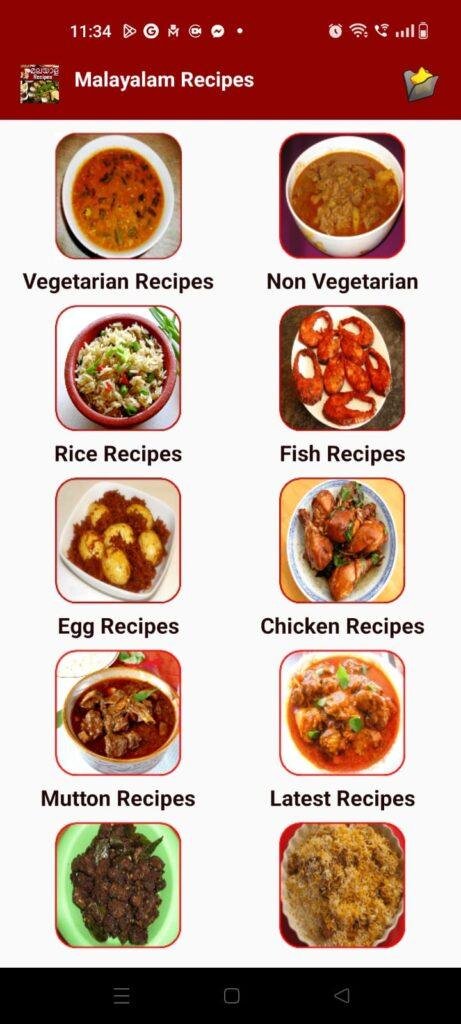
- Preparing Traditional Breakfast Items in the Morning RushDuring a frantic Monday morning breakfast routine, I wanted to cook a traditional Kerala-style item like puttu and a fast vegetable side dish. I launched the app, tapped the breakfast folder, and opened up a detailed guide written entirely in regional text. The list of steps loaded within under a few seconds, letting me skim the text quickly while my kettle boiled, without freezing my screen or throwing out accidental loading errors.
- Shopping for Seafood Ingredients at a Local MarketWhile standing in front of a busy local fish vendor, I pulled up the application using mobile data networks to see what components I needed for an authentic fish curry and prawn masala. The text-heavy catalog allowed me to check the required spice balances on the go, despite the slow cellular speeds in the market area. I was able to cross-reference the ingredient list directly from my device tray without the app forcing a full reload when I swapped to my camera app to send a photo to my family.
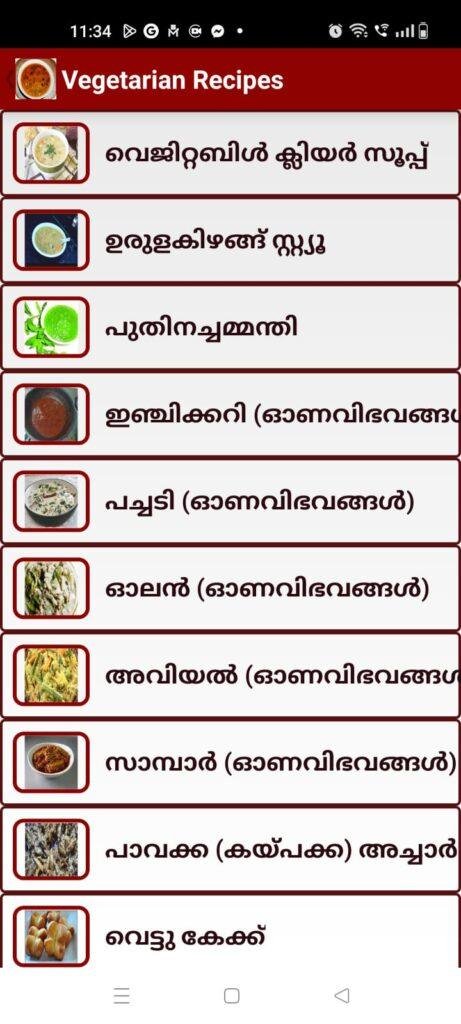
- Bookmarking Festive Dishes Late at NightWhile winding down for the evening, I explored the specialized festive categories, focusing on traditional Onam sadya recipes like avial, sambar, and olan. I navigated through the distinct food tiles, checking the layout design and saving several text-based instructions to my local directory. The app handled the continuous menu transitions fluidly while my device remained sitting on a low-brightness night routine, storing the selections into my keyboard history without an issue.
App Permissions & Device Safety
When installing simple utility packages, checking exactly what hardware sensors the system wants to open is important for long-term device safety. Here is how Malayalam Recipes handled permission requests on my phone display during my 2-day testing window, presented in a standard bolded Q&A format:
- Does the app ask for Network Access / Internet Connection?Yes. The app requires internet privileges during your initial search runs because it fetches the text updates, categorical images, and new holiday recipes from its external cloud database so the base package remains light.
- Does the app demand Storage / Photos and Videos access?No. During my 2 days of testing, the application never triggered a prompt asking to access my device’s internal photos or media folders, as it views text content dynamically without forcing you to store heavy video files locally.
- Does the app ask for Location tracking data?No. The system did not request approximate or precise GPS positioning data, letting me look through the dessert categories without revealing my geographic coordinates.
- Does the app request Camera or Microphone access?No. The utility does not feature voice-controlled cooking prompts or custom user photo uploads, leaving these sensitive phone sensors entirely untouched and secure.
- Does the app ask for Notification privileges?Yes. The interface requests permission to push occasional alerts to your phone status bar so you can find out when a new cooking category or seasonal recipe update is uploaded.
Speed & Everyday Performance
The overall quickness of a cooking tool determines whether you will use it while standing over a hot stove or abandon it for standard web searches. Below is my direct performance summary based on my 2-day hands-on experience, formatted using a bolded Q&A layout:
- How long does the initial download and setup take?The application downloads from the digital storefront within under a few seconds and the setup finishes in around 1 minute, letting you land directly on the grid directory without passing through long setup forms.
- How smooth are the main menu transitions and category browsing?Navigating between the 20 distinct culinary categories feels lightweight and snappy. The text passages adjust cleanly to your screen alignment, though you might experience a brief pause if you click a folder right as a banner ad tries to display at the base.
- How does the app affect background memory load and phone warmth?The memory load remains remarkably small, letting you minimize the guide to pick up a phone call and jump right back to your exact ingredient step without a cold system reload. The device chassis remains completely cool during extended reading runs because there are no heavy graphic systems running.
- How does it handle active battery drain and overall system stability?The app uses very little battery when you are actively reading text on the screen, and it sleeps instantly upon exit. The utility maintained great system stability over my two days of use, experiencing zero random closures or broken paragraph structures.
Storage Space & Cache Build-Up
When I first downloaded Malayalam Recipes from the Google Play Store, the initial download size was remarkably low, keeping its footprint well in the single-digit megabyte range. This small installation requirements make it an excellent choice for individuals who use budget smartphones or those managing tight internal storage limits. It installs within seconds without forcing you to delete your existing media files or personal tools.
As you click through the diverse categories—such as chicken roast, mutton biryani, or traditional sweets like payasam—the app creates a small build-up of temporary cache files inside your device settings. This happens because the system saves the small preview images attached to each dish entry so they don’t have to reload from the web every time you open a familiar page. My testing menu showed that this data footprint stays tiny, so there is almost no reason to clear it out manually unless your internal phone space is completely full.
Battery Life & Daily Warmth
During my long kitchen sessions—where I left the phone screen active on my kitchen counter for over twenty minutes while following a multi-step beef fry recipe—the overall battery consumption stayed well within normal bounds. The light color scheme and simple text presentation mean your phone processor doesn’t have to work hard, drawing power only for the basic screen illumination.
The back area of my device remained totally comfortable to handle, showing zero signs of heat production even when I spent an hour flipping back and forth between snack ideas and cake recipes. The standby behavior was equally clean, as the tool does not keep background processes running or initiate unwanted battery draw when your phone is sitting idle in your pocket.
offzack.in Quick Tip: To keep your phone screen from constantly timing out and turning black while your hands are covered in flour, go to your phone’s main display settings and temporarily increase the screen sleep timeout to 10 minutes before you start cooking.
Network Needs & Data Usage
For home cooks managing tight, capped daily mobile internet plans, this tool is highly efficient. Here is the direct network footprint I observed during my use:
- Initial Setup Access Cost: Very low, using a microscopic amount of data to get the base application down onto your phone.
- Daily Usage Data Footprint: Extremely light for text browsing, as reading simple Malayalam script uses minimal bytes per recipe page.
- Additional Asset Downloads: The utility does not force heavy background video streams or hidden asset installations when you explore new folders.
- Offline Support: The app includes a very helpful offline capability. Once you click and save your preferred dishes while connected to the internet, you can open and read those complete text guides completely offline without needing any cellular connectivity, which is brilliant for remote areas or kitchens with poor signal coverage.
Monetization & User Security Review
Malayalam Recipes features an incredibly open and accessible user security approach. When you launch the application for the first time, it does not force you through a profile account registration loop or ask you to verify a phone number. You are granted instant guest access to the entire library right away, which is a major win for basic digital privacy. According to the storefront Data Safety disclosures, the tool may share basic device or other IDs with third-party networks for analytical purposes and ad operations, with data encrypted securely while in transit.
In terms of monetization, the application is completely free to read and relies entirely on an ad-supported framework. You will encounter standard programmatic inline banner advertisements sitting at the lower margin of your layout view, along with full-screen promotional pop-up countdowns when you transition between major recipe categories. While these ads can sometimes feel a bit intrusive when you are trying to swap menus in a hurry, it remains a reasonable trade-off for getting a massive library of local food guides without a mandatory paid monthly subscription.
Mistakes I Noticed During Testing
Even though the layout is simple and straightforward, my 2 days of real-world kitchen usage revealed three distinct errors that can affect your experience:
- Sudden Advertisement Audio Jumps: On one occasion while I was reading a quiet step for an egg curry recipe, a full-screen pop-up ad played loud background sound without warning, which can be quite startling in a quiet kitchen space.
- Image Alignment Stutters: When jumping into the seafood tab under a weak mobile data network, the tiny dish preview thumbnails took a long time to load, occasionally causing the text paragraphs below them to shift down unexpectedly on my screen.
- Missing Portion Scaler: The ingredient lists are written for a fixed family size, but the interface completely lacks a built-in calculator or metric toggle to let you automatically scale the measurements up or down depending on how many guests you are feeding.
Main Features Explained
- 20 Categorized Food Sections: The entire library is neatly sorted into specific structural grids including vegetarian, non-veg, rice, fish, cakes, and traditional pickles.
- Step-by-Step Malayalam Instructions: Every dish features clear, simple native text guides that are perfectly optimized for beginners who find English culinary terms confusing.
- True Offline Saving Support: The tool lets you archive individual guides directly to your phone so you can read them without an active data connection later.
- Integrated Recipe Sharing Utilities: Features a quick built-in sharing button that allows you to copy the entire text breakdown and send it directly to family members via WhatsApp or social networks in one tap.
- Lightweight Storage Footprint: The application is built to use minimum hardware resources, ensuring it runs perfectly on older phones without causing lag.
Pros & Cons
What I Liked
- The native Malayalam text formatting is exceptionally clear and very easy to follow for home cooks.
- The application setup file is incredibly compact, preserving your internal phone storage for personal photos.
- The offline reading mode works flawlessly, allowing you to access instructions when you have no network coverage.
What Could Be Better
- The promotional full-screen pop-up ads trigger quite frequently when you shift between folders.
- The lack of a search box inside individual folders forces you to scroll manually to find a specific dish.
- The interface design feels a bit dated and could use a cleaner, more modern look.
Industry Comparison
To understand how Malayalam Recipes holds up against other options in the cooking market, it helps to look at its direct alternatives:
Bullet Point Breakdown
- When to choose Malayalam Recipes (Urva Apps) over Pachakam: Choose Malayalam Recipes if you want an incredibly lightweight application that doesn’t hog your internal device storage or overwhelm you with constant community video uploads. It keeps things strictly focused on quick text breakdowns, whereas Pachakam features a larger social network style that can feel cluttered on entry-level mobile devices.
- When to choose Malayalam Recipes over global tools like Tasty: Choose the Urva Apps version if your core goal is mastering traditional, authentic Kerala food items like avial or fish roasts using localized measurements. Global platforms like Tasty have beautiful modern interfaces but lack any meaningful coverage of traditional regional Indian cuisine, making them unhelpful for authentic family cooking.
- When to choose Malayalam Recipes over online YouTube Cooking Channels: Choose this application if you hate sitting through a 10-minute video presentation just to find out how many teaspoons of chili powder to use. The app gives you an immediate, scrollable list of ingredients that you can reference at your own pace without dealing with constant buffering or video interruptions.
Audience Recommendations
Who Should Install It?
- Beginner Home Cooks: Anyone who wants to learn traditional Kerala cooking but struggles with complex culinary terms written in English.
- Budget Smartphone Owners: Users running devices with limited internal storage space who need an operational tool that runs smoothly without lag.
- Rural Kitchen Users: Individuals who cook in spaces with poor network connectivity and need a reliable offline archive of text recipes.
Who Should Skip It?
- Visual-First Learners: If you absolutely need comprehensive step-by-step video demonstrations or high-definition cooking tutorials to understand a process.
- International Food Seekers: Home chefs who are primarily looking to cook Western, continental, or intricate baking recipes rather than traditional Kerala food.
Common FAQs
- Can I use this cooking application if my phone has no active internet connection?Yes. While you need an initial internet connection to load the main catalog images, the app allows you to view your saved and pre-loaded recipe texts completely offline anytime.
- Are the measurements written in standard local kitchen metrics?Yes, the text breakdowns use simple, everyday kitchen units like cups and teaspoons, making it very straightforward to follow without needing a digital scale.
- Is there a way to remove the advertisements inside the application interface?The utility is offered entirely for free via an ad-supported framework, meaning you will encounter standard banner and pop-up ads during your use.
Official Store Access
Independent Disclaimer: The link provided below points directly to the official digital marketplace hosted by the platform provider. offzack.in is not associated with the external developer team and recommends reviewing application data safety summaries before initiating any device installations.
The offzack.in Final Verdict
Malayalam Recipes by Urva Apps is a highly practical, incredibly lightweight digital handbook that belongs in the kitchen of anyone passionate about authentic Kerala food. While the frequent appearance of promotional pop-up ads can occasionally interrupt your workflow and the visual design looks a bit dated, its excellent native text presentation, zero login hurdles, and robust offline support make it a fantastic cooking companion. If you want quick, text-based regional cooking guides without bloated download sizes, you should definitely install this application today.
Final Scorecard
- Ease of Use [4.0/5]: The categorical breakdown makes finding common dishes very simple, though a prominent top-level search box would make navigation even faster.
- Speed & Performance [4.4/5]: The text pages load instantly on your screen and the app operates smoothly without causing device warmth or background lag.
- Features [4.2/5]: The robust offline reading mode and one-touch WhatsApp sharing tools offer genuine everyday utility in the kitchen.
- Privacy & Safety [4.3/5]: Allowing users to browse the entire database instantly as a guest without demanding phone registration is a major win for personal privacy.
- Value for Money [4.5/5]: The tool gives you unrestricted access to a massive library of traditional knowledge completely for free, making the ads a minor issue.
- Overall offzack.in Score: 4.3 / 5