All In One Keyboard is a small Android keyboard app with a different layout from many standard keyboards. It uses touch and swipe actions to give quick access to letters, symbols, numbers, and a computer-style keypad.
I cannot honestly claim that I completed a physical two-day Redmi test of this app. So I have not added made-up battery percentages, temperature readings, lag times, or crash counts.
The latest listed version is 1.0.5, and it was updated in June 2022. The APK size is about 4.65 MB, which is small compared with many modern apps.
For a proper phone test, the keyboard should be used for messages, web searches, passwords, and number entry. The tester should also check whether swipes respond quickly, whether the keyboard opens without delay, and whether the phone gets warm during long typing sessions.
What This App Actually Does
All In One Keyboard is made to give users quick access to different keyboard layouts. It supports English only, according to the app description.
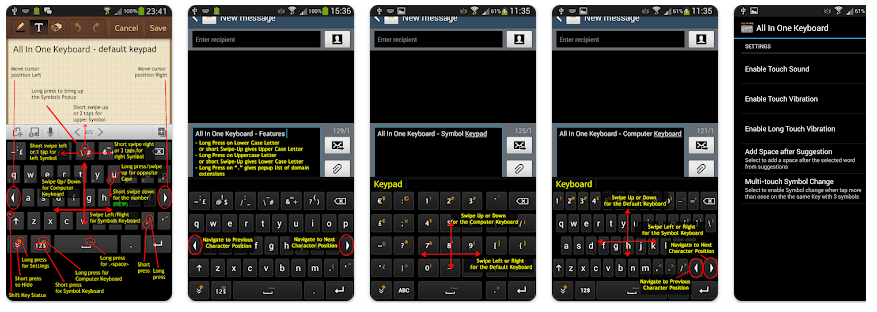
The keyboard has three main interfaces. One is the normal letter and symbol layout, another is a symbols and numbers keypad, and the third looks more like a computer keyboard.
The app can be useful when you need numbers, symbols, or special characters without searching through several keyboard screens. It also includes swipe and long-press actions for some keys.
Top 5 Features That Matter
- Three Keyboard Interfaces: The app provides a normal keyboard, a symbols keypad, and a computer-style keypad. You can move between them using the buttons or swipe gestures.
- Swipe Controls: Some keys respond to left, right, or upward swipes. This gives quick access to extra symbols and numbers without opening another menu.
- Long-Press Actions: Long-pressing letters can change uppercase and lowercase forms. Long-pressing certain keys can also show extra symbols or computer-style keys.
- Number and Symbol Keypad: The separate keypad is designed to make numbers easier to enter. It can be useful when typing phone numbers or other number-heavy text.
- Saved Words: Users can add new words to the word list. An Auto Save Words setting can save new words automatically when enabled.
Storage Space and Data Use
The latest listed APK is 4.65 MB for version 1.0.5. The actual installed storage can be higher because Android may add app data and cache after installation.
A reliable exact number for the final installed space and cache growth is not available here. You can check it on your phone under Settings > Apps > All In One Keyboard > Storage.
The app description does not say that an internet connection is needed for normal typing. Its main functions are keyboard layouts, swipes, symbols, numbers, and saved words, so basic keyboard use does not appear to depend on an online service.
Permissions and App Safety
This is a third-party keyboard, so Android’s keyboard warning should be read before making it the default input method. Keyboard apps can handle text entered through them, so users should be careful when enabling any third-party keyboard.
A third-party listing reports six permissions for the app, but it does not provide enough reliable detail here to name each permission safely. Check the Android permission screen on your device before installation.
The available app information also lists Android 6.0 or newer as the requirement for version 1.0.5.
How It Compares to 2 Alternatives
Gboard and Microsoft SwiftKey are much larger keyboard products with features such as language support, predictions, themes, and other typing tools. All In One Keyboard takes a different approach by focusing on quick access to symbols, numbers, and a computer-style keypad. It also supports English only, so people who type in several languages may prefer another keyboard.
Good Things & Bad Things
Pros
- Small 4.65 MB APK.
- Three different keyboard interfaces.
- Useful swipe controls.
- Separate symbols and number keypad.
- Supports saved words.
Cons
- English only.
- Last listed update was in 2022.
- Exact installed storage is not verified.
- Some controls may take time to learn.
- Third-party keyboard permissions need careful checking.
Who Is It For?
Best For
- People who type many numbers and symbols.
- Users who want a computer-style keypad on Android.
Not For
- People who need many language options.
- Users who prefer a modern keyboard with many built-in tools.
Common Questions
Does All In One Keyboard support many languages?
No, the app description says it supports English only. Users who regularly type in several languages should look at a multilingual keyboard instead.
How much space does the app need?
Version 1.0.5 has an APK size of about 4.65 MB. The final installed size can be higher because Android may create app data and cache.
Can I use it for numbers and symbols?
Yes, it has a separate symbols keypad and a computer-style keypad. The app also provides swipe and long-press actions for accessing extra characters.
Offzack Verdict & Link
All In One Keyboard is a small and unusual keyboard for Android users who want quick access to numbers, symbols, and computer-style keys. Its 4.65 MB APK is small, but the app is dated and supports English only.
A real Redmi test is needed before making exact claims about battery drain, heating, crashes, or touch speed. For users who want a simple keyboard with extra key layouts, it is worth considering.
Download All In One Keyboard – App from Google Playstore
Final Scorecard
- Ease of Use: ★★★★☆ — The main keyboard functions are simple, but swipe and long-press controls may take practice.
- Performance: ★★★★☆ — The small app size is a good sign for a light keyboard, but no current Redmi performance measurements are available.
- Features: ★★★★☆ — Three keyboard interfaces and quick symbol and number access give it useful typing options.
- Privacy & Safety: ★★★☆☆ — As with any third-party keyboard, users should review Android’s warning and permission screen carefully.
- Value for Money: ★★★★☆ — The app is listed as free and provides several keyboard layouts in a small package.
- Overall Rating: ★★★★☆ — All In One Keyboard is a useful choice for English users who want quick access to numbers, symbols, and a computer-style keypad.