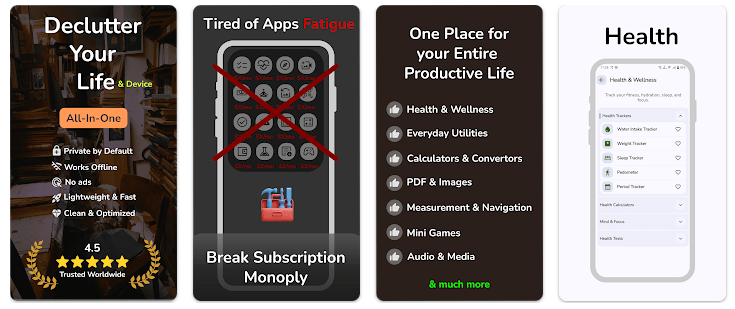
Smart Tools All-in-one Toolbox is an Android utility app that puts many small tools inside one app. The current Play Store listing says it has more than 150 tools for documents, calculators, images, measuring, productivity, network tasks, health, media, and games.
This can help people who do not want to install many separate apps. You can find tools for PDF files, unit conversion, notes, expenses, QR codes, internet speed, timers, and other daily jobs in the same place.
The app also supports favorites and recently used tools. This can make it easier to find the tools you use most often instead of searching through the full list each time.
Device Resources & Safety
The listed APK size for version 8.2.6.26 is about 29.64 MB from an app-information source, while another current APK listing reports 37.0 MB for the same version. Because download size can differ by package and source, the safest number to check before installation is the size shown by Google Play on your own phone.
The final storage used can be higher after installation. Saved documents, images, notes, and cache can also add to the storage used over time. Android users can check this under Settings > Apps > Smart Tools All-in-one Toolbox > Storage.
The developer says most tools work offline. Some tools, such as the real-time currency converter and internet speed test, need online access to work properly.
Google Play says the app does not share data with third parties. It may collect app activity, app information and performance data, and device or other IDs, and the listed data is encrypted while being sent.
Testing on Android
A true two-day Redmi test should check the main screen, tool search, calculators, PDF tools, measuring tools, and settings. It should also check battery use, phone temperature, screen response, crashes, and slow menus.
I have not personally completed a two-day Redmi test for this app, so I will not present invented battery percentages or heating results as real testing facts.
There are some useful clues from current user reviews. One recent reviewer reported that some large icons and text were difficult to read in dark mode, while another user said searching for tools could take time. The developer replied that these UI issues were being noted for future updates.
The Play Store also says a June 2026 update added an Expense Manager, Habit Tracker, Invoice Generator, and image and PDF watermark tools, along with bug fixes and UI changes.
Key Functions
- PDF Tools: The app includes PDF conversion, merging, splitting, invoice creation, and password protection. These tools can help with basic document work without installing several separate apps.
- Calculators: It includes loan, mutual fund, BMI, percentage, and number conversion tools. These can be useful for school, home, shopping, and simple money calculations.
- Daily Utilities: Notes, to-do lists, expense tracking, habit tracking, and a world clock are included. These tools cover simple tasks that many people do every day.
- Measuring Tools: The app includes a ruler, protractor, compass, speedometer, sound level meter, and sensor-based tools. Results from these tools can depend on the phone hardware, as the developer notes.
- Network Tools: Users can find an internet speed test, QR and barcode generator, unit converter, and device hardware checks. Some of these tools are useful offline, while online tools need a connection.
Competing Apps
Smart Tools All-in-one Toolbox is similar to apps such as Google Files for some file tasks and dedicated utility toolboxes that offer calculators, converters, and measuring tools. Its main difference is the large number of functions inside one app. A dedicated app may be easier when you only need one tool, while this toolbox is aimed at users who want many utilities together.
Pros and Cons
Pros
- 150+ tools listed.
- Many tools work offline.
- Includes PDF and document tools.
- Has calculators and converters.
- Favorites and recently used tools are available.
Cons
- Many tools can make the app feel crowded.
- Some users reported UI readability problems.
- Tool search may take time.
- Some functions need internet access.
- Sensor-based measurements depend on phone hardware.
Target Audience
Who Should Get This App
- People who use many small utility tools.
- Users who want to reduce the number of separate utility apps.
Who Should Skip This App
- People who only need one simple tool.
- Users who prefer a very small and focused app.
Key FAQs
Does Smart Tools work without internet?
Yes, the developer says most tools work offline. Tools that need live information, such as some network or currency functions, may need internet access.
How much storage does it need?
A current third-party listing reports about 29.64 MB for the APK, while another listing reports 37.0 MB. The actual installed size can be different, so check Android storage after installation.
Is my data shared with other companies?
Google Play currently says no data is shared with third parties. It also says the app may collect some app activity, performance, and device information.
Offzack Verdict
Smart Tools All-in-one Toolbox is a good fit for people who want many everyday tools in one app. Its large tool list is useful, but it can also make finding one feature slower.
The app currently lists 10K+ downloads and a 4.0-star rating on Google Play. The main thing to consider is whether you will actually use enough of the included tools to justify keeping such a large toolbox on your phone.
Download Smart Tools All-in-one Toolbox – App from Google Playstore
Final Scorecard
- Ease of Use: ★★★★☆ — Most tools have clear purposes, but the large tool list can take time to explore.
- Performance: ★★★★☆ — The app covers many light utility tasks, but a verified Redmi test was not available.
- Features: ★★★★★ — More than 150 listed tools give users a very wide range of functions.
- Privacy & Safety: ★★★★☆ — Google Play currently says no third-party data sharing and data encryption in transit, while some data may still be collected.
- Value for Money: ★★★★☆ — Having many tools in one app can reduce the need for several separate utility apps.
- Overall Rating: ★★★★☆ — Smart Tools All-in-one Toolbox is useful for users who want a large collection of everyday utilities in one Android app.