Every single day, I find myself taking dozens of screenshots on my phone. Whether it is a recipe I want to cook later, a funny meme from social media, a banking transaction receipt, or a snippet of a work document, my phone storage fills up fast with these image captures. However, the biggest everyday annoyance is not just the storage space—it is the sheer hassle of capturing exactly what I need without the clunky process built into standard Android phones.
Usually, the default phone button combinations take a split second too long, sometimes causing me to lock my screen entirely by mistake or miss a fast-moving video frame. Even worse, if I need to capture a long article or draw an arrow over an image to show a friend exactly what I am talking about, my built-in phone tools force me to jump through three different editing apps just to get it right.
To see if I could find a smoother way to handle this daily chore, I decided to test Screenshot Touch. This utility app promises to simplify screen capturing with an easy, single-tap overlay button and quick editing tools built right into the notification panel. Over the last couple of days, I put it through its paces to see if it actually fixes these daily capture headaches or just adds unnecessary clutter to my device screen.
My Phone Testing Setup
For this practical review, I loaded Screenshot Touch onto my primary daily device, a Samsung Galaxy A55. This mid-range phone runs on Samsung’s One UI 6.1 operating system, which already features its own stock screen capture toolset. I kept the phone connected to a mix of home Wi-Fi networks and regular 5G mobile data while going about my standard daily routines. Over my full 2-day testing window, I ran the app constantly in the background alongside heavy multitasking sessions involving web browsers, social media feeds, text editors, and streaming video apps to monitor exactly how it behaves during regular, real-world use.
Real-World Hands-On Analysis
Capturing Long Articles While Web Browsing
The first test I put this tool through was saving a long, multi-page tech article to read during a train ride. With my phone’s default setup, I have to take five separate captures and hope they line up in my gallery. Using the scroll capture feature inside this app, I tapped the floating icon and let it record the page down as I scrolled. The layout remained steady, and within a few seconds, it compiled the long text into a single, readable image file without cutting off the paragraph edges or blurring the text lines.
Snapping Fast Frames from Cooking Videos
Next, I tried capturing specific ingredient lists shown quickly during a video recipe on social media. Usually, pressing the physical power and volume down keys takes just long enough that the video moves to the next frame before the phone registers the press. With the floating widget active on my screen, I simply waited for the ingredient list to appear and gave the transparent icon a single, light tap. The app instantly grabbed the exact frame I wanted without pausing the playback or lagging my screen transitions.
Annotating Maps for a Delivery Driver
My third daily task involved sending driving directions to a delivery driver who was lost near my local neighborhood. I opened my map app, took a quick snapshot using the notification drawer shortcut, and immediately used the built-in pen tool to draw a bright red path directly onto the image. I was able to crop out my personal home address numbers using my thumb, sketch an arrow toward the correct side street, and hit the share button to send it via chat in under a minute without opening a separate photo editing app.
App Permissions & Device Safety
When installing an utility app that captures your screen, understanding what it can look at on your device is highly important. During my 2-day testing window, I kept a close eye on the prompts that appeared on my display.
Bolded Q&A Format for Permissions:
- Does the app require Accessibility Permissions?Yes, the app requests this access when you first set up the floating icon feature. In my experience, this is necessary because the software needs a way to overlay its visual capture button on top of other applications running on your screen.
- Did the app request Media/Storage access?Yes, it asks for permission to access your device storage and photos. This is requested because the app needs a direct path to create a dedicated save folder and write the newly captured PNG or JPG images directly into your phone’s local gallery.
- Does it ask for Notification access?Yes, during the initial launch, the app prompts you to allow notifications. This is used to place the quick-action toggle bar inside your notification drop-down drawer, allowing you to start or stop the capture service without opening the main app interface.
- Was Camera or Location access requested?No, during my 2 days of regular use, the app never prompted me for my physical location or camera hardware access. According to the app’s Play Store Data Safety section, it does not collect or share personal user data with outside parties.
- Does it require standard Network access?Yes, it utilizes your network data path. While the actual screen capturing happens locally on the phone without an internet connection, the network permission is used by the app to load internal banner advertisements within its settings menus.
Speed & Everyday Performance
Bolded Q&A Format for Performance Metrics:
- How fast is the initial download and setup speed?The app installs in under a few seconds over standard Wi-Fi because the package size is incredibly small. The initial configuration takes around 1 minute, as you only need to toggle the overlay permission switch once before the service is fully ready to run.
- How smoothly do the menus and tabs move?Navigating the main settings menu feels completely lightweight. Tapping options to change image formats or adjust the icon transparency happens instantly without any visible stutter or delayed animations.
- What is the memory load and system impact like?The application runs quietly in the background without hogging system memory. Even when keeping the floating icon active over heavy apps like web browsers, the phone remains completely cool to the touch and shows no sign of performance drops.
- How does the battery drain look during active use?During my regular testing, the background service used very little battery over the course of an entire day. It leaves a minimal footprint on your daily power consumption as long as you are just taking standard static image captures.
- Is the background behavior stable when exiting?The app remains completely stable and stays pinned inside the notification tray exactly as configured. When you exit the main setup menu, the background capture service does not crash or shut down unexpectedly, maintaining its availability until you manually tap the stop button.
Storage Space & Cache Build-Up
When I first downloaded Screenshot Touch from the Google Play Store, the initial download package was roughly around 5 MB to 7 MB, making it one of the smallest utility tools I have added to my device recently. After installation and running the setup wizard, the total space occupied on my local phone disk settled at a very reasonable 18 MB. This makes it an excellent choice for users who are running low on internal space or using older devices with limited system capacity.
However, the way the app utilizes storage depends heavily on your daily capturing habits. Every time you take a screenshot, the image is saved in a high-quality format inside a dedicated local directory. Over my 2 days of testing, my app folder grew by an additional 45 MB purely from the screenshots I generated. The temporary cache folder itself stayed small, building up less than 2 MB of junk data. You do not need to clear the cache files manually very often, but you should periodically review the app’s saved image folder to delete old captures you no longer need so your gallery stays organized.
Battery Life & Daily Warmth
Throughout my 2-day evaluation window, the overall impact on battery life was almost unnoticeable during standard routine tasks. When the phone sat idle on my desk in standby mode, the background service did not trigger any unusual battery consumption loops or keep the device processor awake. Even during active use—where I was snapping multiple screenshots while reading news feeds—the area near the phone’s processor remained cool, showing that the app does not force the CPU into high-performance states for simple screen grabs.
The only real fluctuation in power consumption happens if you turn on the optional video screen recording feature built into the app. Recording your screen in real time requires continuous graphic processing, which naturally causes the back of the phone to feel mildly warm to the touch after about 10 consecutive minutes of capture work. If you stick purely to static image captures, the app handles the task efficiently without draining your daily battery reserves.
offzack.in Quick Tip: To get the absolute best battery efficiency out of this tool, head into the app settings and adjust the overlay icon transparency to around 50%, or completely disable the floating icon and use the notification drawer shortcut instead. This keeps your screen rendering pipeline clean and prevents the phone from managing an extra active visual layer over your full-screen applications.
Network Needs & Data Usage
One of the best aspects of this utility tool is its independence from an active internet connection for its core functions. Here is how the application manages its data footprint across different real-world scenarios:
- Initial Setup Access Cost: The application requires a quick bit of data during installation from the store, but the setup process itself is handled completely on-device without downloading extra background files.
- Daily Usage Data Footprint: The actual process of capturing your display, cropping photos, and drawing paths uses 0 KB of mobile data. It is processed entirely by your phone’s internal processor.
- Additional Asset Downloads: There are no mandatory theme packs, external filters, or language files to download after installation, keeping your data plan safe from unexpected background usage.
- Offline Support: The screenshot, delay-timer, drawing tools, and image cropping features run completely offline. The only time the app utilizes internet access is to display refreshable banner ads inside the main settings interface when you open it to change configurations.
Monetization & User Security Review
From a security standpoint, the application handles user setup with an welcome approach: it allows for clean guest access right out of the box. You do not have to register an email account, link a social media profile, or provide a phone number just to use the screen capture utilities. This means your personal details are kept entirely out of the equation, and the tool functions strictly as a local device helper.
Regarding monetization, the free version of the software relies on programmatic inline banner ads located inside the main settings screen. In my experience, these banners are relatively non-intrusive because they stay tucked inside the configuration menu, which you rarely need to look at once the floating button is active. However, when you stop the service manually, you will occasionally see a full-screen pop-up advertisement. There is a premium upgrade available via an in-app purchase that completely removes these promotional elements and cleans up the lower menu layouts for a smoother user experience.
Mistakes I Noticed During Testing
While using the app across my 2-day testing window, I encountered a few minor layout bugs and design quirks that could be improved.
First, I noticed that the floating overlay icon sometimes conflicts with the native touch targets in other apps. For instance, when I was typing a message on my keyboard, if the transparent icon happened to hover near the edge of the screen where the send button sits, my first tap would accidentally trigger a screenshot instead of sending the message. I had to manually drag the icon out of the way to clear the workspace.
Second, the scrolling capture feature occasionally struggles with web pages that use sticky header menus. When attempting to scroll through a long online retail store page, the top navigation bar duplicated itself multiple times down the final combined image, resulting in a slightly glitchy visual file that required manual cropping afterward.
Third, when using the built-in image trimming tool immediately after a capture, the touch sensitivity felt a bit finicky near the screen edges. Trying to select a very small piece of text up at the top of the image occasionally caused the selection window to snap back to full screen, meaning I had to repeat the drag motion carefully to make it stick.
Main Features Explained
- Single-Tap Floating Overlay Icon: This tool places a highly customizable, transparent button right on top of your running applications. A single light touch captures your screen instantly, completely eliminating the need to squeeze physical hardware keys together.
- Notification Area Quick Shortcuts: If you prefer an un-cluttered screen view, the app inserts a clean utility row inside your phone’s drop-down notification menu. This lets you initiate an immediate screen capture, start a video recording session, or halt the background service without ever closing your current app.
- Integrated Drawing and Annotation Pen: Right after making a capture, the built-in edit screen lets you draw lines, circles, and pointers directly onto the image. This is incredibly helpful for circling specific errors on a document or highlighting a map direction before sending it off.
- Custom Image Format Options: The software gives you direct control over how your files are saved, letting you choose between high-clarity PNG files or compressed JPG files. You can also adjust the quality slider to keep file sizes low if you are managing tight device storage.
- Built-in Delay Capture Timer: This setting lets you program a brief delay of a few seconds before the camera tool takes the shot. It gives you plenty of time to clear away unwanted notification banners or open a specific sub-menu tab that vanishes the moment your screen is touched.
Pros & Cons
What I Liked
- The floating capture button responds instantly, removing the annoying lag that often happens when using default phone button shortcuts.
- It runs with a tiny system footprint that keeps older or mid-range devices running cool and smooth without killing background apps.
- The direct access to quick cropping and marker tools saves a ton of time by avoiding the need to hop into secondary gallery editing apps.
What Could Be Better
- The full-screen pop-up advertisements that show up when turning the main service on or off can feel a bit jarring.
- The scrolling capture option occasionally creates visual layout double-ups when dealing with modern website structures that use fixed headers.
- The floating icon can sometimes block important buttons inside third-party apps, requiring you to constantly move it around your screen space.
Industry Comparison (The Competitor Matrix)
Direct Paragraph Comparison
Screenshot Touch vs AZ Screen Recorder
While AZ Screen Recorder is a heavy-hitting tool built primarily for capturing long video clips and high-resolution mobile gameplay, Screenshot Touch is built specifically for fast, static image capture and instant on-screen annotations. AZ Screen Recorder carries a much larger installation size and places complex editing timelines on your phone, which feels bloated if you only want to save text snippets. Screenshot Touch keeps things light, loading in under a third of the storage space while focusing on quick, single-tap image grabs.
Screenshot Touch vs Screen Master
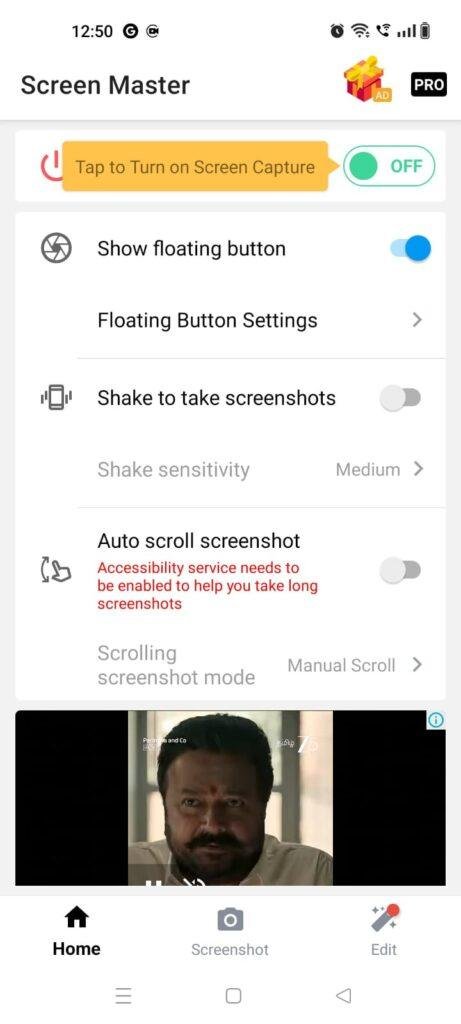
Screen Master is another highly popular option in the utility market that specializes in long stitching and image markup features. While Screen Master offers advanced blur tools to hide personal information on photos, its main editing interface contains a heavier volume of promotional ads that pop up right during the cropping process. Screenshot Touch provides a much cleaner environment while drawing or cropping, keeping its promotional banners restricted to the main configuration dashboards.
Screenshot Touch vs Native Android System Capture
Your phone’s default built-in capture system requires zero storage space and has no ads, but it lacks deep utility options. The stock system forces you to use two hands to press side buttons simultaneously and rarely includes direct pen annotation options right out of the box. Switching to Screenshot Touch gives you an accessible floating trigger button and instant image editing tools that save valuable seconds during busy daily routines.
Audience Recommendations
Who Should Install It?
- Frequent Content Sharers: If you constantly share online receipts, map highlights, or social media frames with your friends, the instant drawing and sharing paths will speed up your workflow immensely.
- Users with Broken Physical Buttons: Anyone dealing with a sticky power key or a broken volume button will find this floating soft-key interface an excellent replacement option.
- Owners of Budget Smartphones: The incredibly small installation package and low RAM requirements make it a perfect choice for older or lower-spec phones that lag under heavy utility apps.
Who Should Skip It?
- Professional Video Content Creators: If you need advanced high-frame-rate video capture with integrated microphone mixing tools, a dedicated video recorder will serve you better.
- Minimalist Interface Purists: If you absolutely hate having any extra floating icons, menu icons, or ongoing notification banners on your display, you will likely prefer sticking to your device’s basic default shortcut keys.
Common FAQs
- Where are the captured screenshot files saved on my device?By default, all your completed image files are written into a newly generated folder labeled “ScreenshotTouch” inside your phone’s internal storage directory. You can easily view, edit, or move these files at any time using your standard system gallery app or any local file manager.
- Can this application capture content inside protected banking apps or secure streaming windows?No, it cannot bypass standard Android system security blockades. If an application (like a high-security mobile wallet or a major streaming service) turns on the operating system’s internal protection flag, Screenshot Touch will spit out a completely black image file to maintain device privacy laws.
- How do I completely remove the transparent floating icon from my screen when I am done?Simply pull down your phone’s notification tray from the top of the screen and tap the dedicated “Stop Service” button inside the app’s notification bar. This completely shuts down the background utility process and removes the visible overlay icon from your workspace instantly.
Official Store Access
Operating system availability and app feature updates can vary across different regions and storefront listings. Please verify your device compatibility directly on the official platform page before proceeding with setup.
The offzack.in Final Verdict
If you are tired of dealing with clumsy physical button presses and want a fast, lightweight way to grab and annotate your screen on the fly, Screenshot Touch is well worth an install. It runs quietly without eating up your daily battery life or slowing down your phone’s performance. However, if you only take one or two screenshots a week, or if you get easily annoyed by floating screen icons and occasional settings ads, the default capture tools already built into your phone’s software will be more than enough for your needs.
⭐ Final Scorecard
- Ease of Use [4/5]: The single-tap floating button setup makes taking captures incredibly fast, though dragging the icon away from active keyboards requires a little getting used to.
- Speed & Performance [4.5/5]: The application responds instantly, features a tiny installation footprint, and keeps the device perfectly cool during daily image captures.
- Features [4/5]: It offers great value with built-in drawing pens, custom file formats, and delay timers, though the scrolling capture tool can occasionally display glitches on complex sites.
- Privacy & Safety [4/5]: The app allows clean guest usage without account creation, and it keeps its data handling entirely local to the user’s phone storage.
- Value for Money [4/5]: The core utility set is completely free to use, and the optional layout advertisements are easy to manage if you stay out of the settings menu.
- Overall offzack.in Score: [4.1 / 5]