If you have spent even a few minutes scrolling through your tech feeds or social media video recommendations lately, you have probably noticed a massive wave of internet hype surrounding Anthropic’s official AI assistant. Everyone from digital artists to students seems to be talking about how this platform handles complex reasoning, processes raw data, and builds lines of clean code right from a simple chat bar. The online buzz makes it sound like the ultimate digital Swiss Army knife that every smartphone owner absolutely needs to download this second.
But as any regular mobile user knows, viral software trends often fall apart the moment you move them away from polished desktop viewports and try to run them inside a standard mobile interface. A tool that looks spectacular on a giant monitor can easily become an absolute nightmare when crammed into a pocket-sized display filled with tiny input fields, unpredictable touch scaling, and hidden subscription menus. Intrigued by the sudden mountain of praise, I wanted to see if the mobile version lives up to the expectations.
I decided to pull down the official Claude application from the Google Play Store to give it a comprehensive, real-world test drive. My goal was to see if this utility program truly functions as a practical daily assistant or if it is just another overhyped icon taking up space on your home screen. Over the course of forty-eight hours, I treated it like a regular, everyday companion to uncover exactly how it handles actual daily routines.
How I Set Up My Device For Testing
To make sure this assessment was grounded in real-world performance, I installed Claude on a OnePlus Nord CE4. This device runs on the clean OxygenOS interface, which provides a highly responsive environment for tracking how third-party utilities behave alongside standard applications. Throughout my 2-day testing window, I left the smartphone connected to a mix of standard home Wi-Fi networks and regular 5G mobile data lines while traveling around town. I kept my phone brightness set to automatic and continuously jumped between the chat workspace, my regular web browsers, email clients, and photography tools under typical, heavy multitasking patterns to see exactly how the software adapts.

Real-World Testing Scenarios
Making Sense of Complex Financial PDF Invoices
The first major task I threw at the app was analyzing a confusing, multi-page building maintenance bill that was sent to my email as a dense PDF document. Usually, opening up large text files on a smartphone screen involves endless pinching, zooming, and straining your eyes just to find the hidden service fees. I shared the PDF directly into the chat prompt, asked the assistant to break down the core line items, and waited. Within less than three seconds, the app spit out a perfectly structured summary that separated the basic labor fees from the raw material costs, allowing me to spot an overcharge without scrolling through pages of fine print.
Debugging Layout Code During an Afternoon Commute
Next, I decided to test its programming helpers while sitting on a moving bus with nothing but a mobile data connection. I pasted a broken chunk of layout code that was causing a personal project page to render completely off-center on small screens. Instead of making me type out complex instructions on a tiny virtual keyboard, I used the built-in voice dictation tool to explain what was broken. The app accurately caught my voice over the ambient road noise, identified a missing closing tag in my script, and provided a corrected block of code that I could copy straight into my mobile repository with a single tap.
Translating and Extracting Details from a Printed Label
My third hands-on test involved an imported box of specialty tea that arrived with its ingredients and brewing instructions printed entirely in a foreign language. I opened the app’s camera tool, snapped a clear photo of the glossy packaging under standard room lighting, and asked for an immediate breakdown. The system analyzed the visual image, extracted the text layers, and provided a clear list of the herbal contents alongside the precise recommended water temperature, saving me from having to manually type strange characters into a basic web translator.
Phone Permissions & Device Security
When dealing with a utility application that can process personal text uploads, local device documents, and live camera images, keeping a close eye on device privacy boundaries is highly necessary. During my testing window, I carefully reviewed every hardware pop-up that appeared on my display.
System Access and Requests
| Hardware Permission | Request Status | Observed Real-World Purpose |
| Network & Internet | Requested on Launch | Mandatory for sending user prompt data to the main processing servers and receiving text replies. |
| Camera Access | Requested on Feature Use | Prompts the user only when you tap the attachment icon to take a live photo of a document or object. |
| Microphone Access | Requested on Feature Use | Triggered exclusively when activating the voice input mode to dictate prompts hands-free. |
| Storage & Media | Requested on Upload | Used when you select a local PDF file, image, or text sheet from your device folders to upload into the chat. |
| Location Access | Not Requested | The app did not prompt for my physical GPS location coordinates at any point during my 2 days of testing. |
According to the official data protection summaries provided on the app’s storefront page, all communication between your phone and the processing grid is encrypted securely while in transit. The system allows you to go into your profile dashboard at any time to request the complete deletion of your accumulated dialogue logs if you want to keep your data history completely clean.
Daily Responsiveness & Menu Speeds
The overall feel of an application depends entirely on how snappy its transitions are and whether it causes your display to stutter when scrolling through lengthy pages of text. Here is exactly how the software felt to use on a day-to-day basis.
Performance Indicators
| Metric | Observed Behavior | Detailed User Notes |
| Download & Install Time | Under a few seconds | The initial app package downloads rapidly over standard Wi-Fi connections. |
| Setup & Login Speed | Around 1 minute | Creating or logging into an existing profile takes very little time via standard email links. |
| Menu Tab Smoothness | Feels lightweight | Flipping between old chat histories and starting a new conversation window happens instantly. |
| Active Typing Responsiveness | Under a few seconds | Text replies stream onto the screen with minimal delay, even when generating long paragraphs. |
| System Memory Impact | Feels lightweight | Tucking the app into the background does not cause open web browser tabs to close down or reload. |
| Active Battery Consumption | Mildly warm to the touch | The battery drops at a predictable rate during basic text conversations, but climbs during heavy image processing. |
| Device Processor Warmth | Remains completely cool | The phone stays entirely comfortable to hold during normal text chats, showing no sign of major CPU strain. |
| Background Stability | Highly stable | The software retains your active text draft perfectly if you temporarily switch away to check a message. |
App Size & Cache Pile-Up
When I first tapped the download button on the digital storefront, the initial installation package arrived as a remarkably small download file. Once the installation wizard completed its process on my phone, the base application occupied roughly 85 MB of space on my internal storage array. Compared to the massive, multi-gigabyte files commonly found in modern productivity suites, this tool looks incredibly light on paper. This small footprint makes it approachable for people who are managing tight storage constraints on mid-range or budget-oriented hardware.
However, as you use the system to analyze local documents, take camera snapshots, and hold long text conversations, the data folder begins to expand as temporary files accumulate. Over my 2 days of intense daily testing, the system cache grew by an additional 32 MB, mostly consisting of image pre-views and document fragments that were cached locally to keep the chat history loading smoothly. The good news is that you can easily clear this out through your system settings menu without breaking your saved conversations, as your actual text history is securely saved to your cloud profile rather than hogging your local physical storage card.
Battery Drain & Phone Temperature
During long stretches of regular, text-based conversations, the application handles power management with great efficiency. When I spent thirty minutes asking the system to draft various emails and plan a weekend travel itinerary, my overall battery percentage dropped by a minor amount, which is very close to what I notice when reading basic articles on a standard web browser. When the phone was left resting on my desk in standby mode, the background service fell into a deep sleep state, consuming zero noticeable battery and never waking the display processor unnecessarily.
The only time I noticed a shift in thermal behavior was during extended image analysis tasks. When I uploaded five high-resolution camera photos back-to-back and asked the system to extract handwritten notes from each one, the area immediately surrounding the phone’s upper camera module began to feel mildly warm to the touch. This happens because processing live image data and maintaining a continuous network upload stream forces the wireless modems to draw more power. Fortunately, the warmth vanished within a minute of finishing the upload task, indicating that the system drops back to an idle state the moment the data processing finishes.
offzack.in Quick Tip: If you frequently use the voice dictation feature to brainstorm ideas while traveling, try switching the application theme from light mode to dark mode inside the settings menu. Because modern OLED displays draw significantly less power when rendering deep dark backgrounds, this simple interface tweak will save an extra bit of battery life over long usage sessions.
Data Consumption & Capped Network Needs
Because this utility relies entirely on cloud infrastructure to generate its deep analytical answers, having an active and stable internet connection is absolutely critical. Here is how the app manages your data footprint:
- Initial Setup Access Cost: The application requires a quick initialization check upon first boot, consuming less than 5 MB of network data to sync your profile configurations and set up your initial workspace.
- Daily Usage Data Footprint: Standard text prompts use a negligible amount of data, generally under 50 KB per question. However, uploading high-resolution camera photos or large multi-page PDF documents will quickly consume several megabytes per interaction.
- Additional Asset Downloads: The app does not force you to download massive dictionary updates, language packs, or external graphic files after installation, keeping your cellular data plan safe from unexpected background usage spikes.
- Offline Support: The application has zero offline functionality. If you drop your mobile network connection or step into a dead zone, the chat bar will lock up, and attempting to send a prompt will result in a connection error message until your signal returns.
Premium Subscriptions & User Security
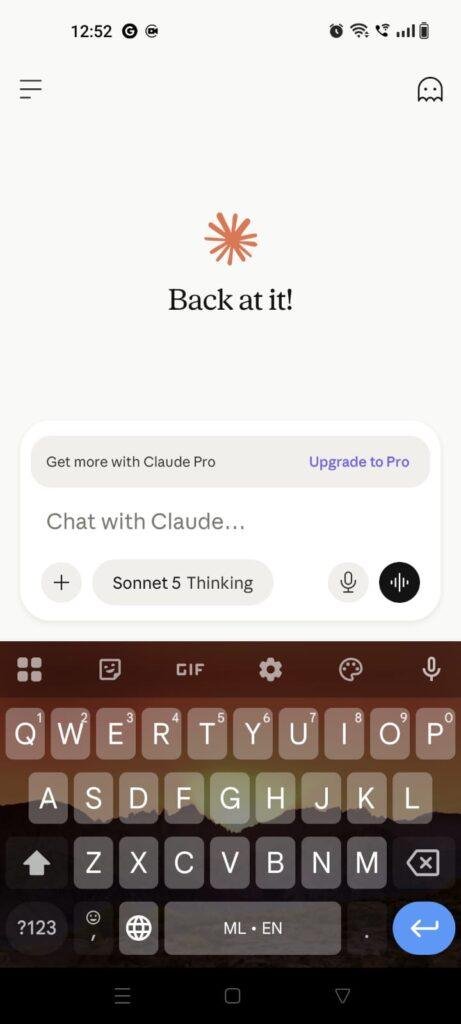
From a structural perspective, the application implements a strict security boundary that completely eliminates guest access. Unlike some simple calculator or note-taking utilities, you cannot open this app and start using it anonymously. The platform forces every single user to complete an official account registration using a valid Google profile or an independent email address before entering the interface. While this requirement might frustrate people looking for a quick, friction-free trial, it ensures that your specific conversation histories and personalized instructions remain tied securely to your unique profile across multiple devices.
The system monetization layout is built directly around a multi-tier premium access structure rather than cluttering your workspace with annoying video advertisements or flashing banner links. The base version of the application is completely free to download and use, offering daily access to their standard language model. However, this free tier comes with strict rolling usage limits; if you ask too many long questions within a brief window, the app will temporarily lock the text input bar and display a countdown timer indicating when your free access resets. To lift these limits and gain priority access to their most advanced reasoning engines, you must subscribe to the monthly premium plan via an integrated in-app billing portal.
Interface Glitches & Layout Bugs I Found
Even though the software features an exceptionally polished visual layout, my 2 days of testing revealed three distinct user interface design flaws that frequently got in the way of smooth daily usage.
First, I encountered an annoying issue with keyboard focus states when switching back and forth between different open applications. If I copied a text snippet from a web browser and jumped back into the chat window, the text insertion cursor would often vanish entirely from the input box. I would have to tap the blank space three or four times consecutively just to force my phone’s virtual keyboard to pop back up so I could paste my copied text.
Second, the visual UI lacks an adjustable text scaling slider for the chat bubbles. When the system generates a very long, multi-paragraph response containing complex code formatting, the font size remains locked in a relatively small setting. For users who struggle to read fine print on a mobile display, this forces you to copy the entire response out of the app and paste it into a separate note-taking tool just to enlarge the text size comfortably.
Third, I noticed a recurring layout bug when attempting to cancel an accidental image upload. If you select a large photo from your gallery by mistake and hit the tiny “X” close icon on the thumbnail while it is still preparing to upload, the entire app interface occasionally freezes up for a couple of seconds. The input field locks, and you have to wait for the system to clear its internal upload buffer before you can resume typing your prompt.
Inside Look at the Core Features
- Seamless Cross-Device Conversation Sync: Every single text chat, document upload, and coding project you start on your smartphone is instantly synchronized with your cloud profile. This allows you to start an outline on your phone during your evening commute and immediately pick up right where you left off when you open your computer at home.
- Intelligent Image and Document Analysis: The attachment menu lets you feed photos, complex charts, invoices, and text sheets directly into the assistant. The system reads the visual data instantly, allowing you to ask questions about structural diagrams or translate handwritten papers without doing any manual typing.
- Hands-Free Voice Dictation Mode: By tapping the microphone icon next to the input field, you can speak your thoughts naturally instead of typing on a cramped keyboard. The system handles natural speech patterns, pauses, and corrections incredibly well, turning spoken thoughts into clean, structured prompts.
- Advanced Code Visualization Tools: When you ask the app to build a website layout or design a vector graphic, it generates the code snippets inside a dedicated code reader. It provides clean syntax highlighting that makes it easy to read programming languages directly on a mobile screen.
- Clean, Ad-Free Minimalist Workspace: The entire interface is built entirely around focus. You will not find any distracting pop-up ads, promotional tracking banners, or game invitations anywhere in the app, providing a clean digital environment that lets you focus entirely on your work.
The Good & The Bad
What I Liked
- The text responses stream onto the screen with remarkable speed, making long-form research feel snappy even on standard mobile data connections.
- The voice dictation engine accurately captures spoken words even in moderately noisy outdoor environments, making brainstorming on the go a breeze.
- The complete absence of banner ads and third-party tracking pop-ups keeps the interface looking incredibly clean and professional.
What Could Be Better
- The daily message limits on the free tier can clip your workflow abruptly if you use the app for heavy, multi-step research projects.
- The lack of built-in text resizing tools makes reading long paragraphs slightly difficult for users who prefer larger fonts.
- The application cannot perform any tasks without an active internet connection, leaving you completely locked out when offline.
Stacked Up Against Competitors
Matrix Table Comparison
| Feature Metric | Claude by Anthropic | OpenAI ChatGPT | Google Gemini |
| Interface Style | Minimalist Text Workspace | Modern Conversational Feed | Search-Integrated Assistant |
| Account Requirement | Mandatory Profile Login | Mandatory Profile Login | Integrated Google Account |
| Free Tier Limitations | Strict Variable Message Cap | Standard Usage Dynamic Cap | Generous Access Baseline |
| Offline Functionality | None (Requires Network) | None (Requires Network) | Limited Basic System Toggles |
| Primary Strength | Deep Text & Code Reasoning | All-Round Daily Tasks | Quick Web & Map Integration |
| Ad Intrusion Level | Completely Zero Ads | Completely Zero Ads | Completely Zero Ads |
| Monthly Premium Cost | Standard Industry Pricing | Standard Industry Pricing | Standard Industry Pricing |
User Profile Match (Who It Is For)
Who Should Install It?
- Students and Academics: If you regularly need to break down massive research papers, summarize long book chapters, or analyze dense textbook PDFs, this tool is an exceptional study helper.
- Mobile Software Developers: Programmers who need to quickly review code snippets, debug logic loops, or learn new syntax formatting while away from their desks will love the clean code blocks.
- Writers and Content Editors: Anyone who drafts long-form emails, articles, or social copy on their phone will benefit from the advanced writing feedback.
Who Should Skip It?
- Offline Productivity Seekers: If you travel frequently through remote regions with spotty mobile data, the lack of an offline mode makes this app unusable during those trips.
- Casual Users Who Hate Accounts: If you prefer simple utility apps that work immediately without making you sign up or remember passwords, you will dislike the forced registration wall.
- Smart Home Control Enthusiasts: Users looking for a system tool that can directly adjust their phone’s Bluetooth settings, set morning alarms, or turn off smart lights should look elsewhere.
Answering Common User Questions
- Can this application run completely offline if I lose my data connection?No, the app acts as a local window connecting to Anthropic’s secure cloud servers, meaning it cannot generate answers or analyze documents without a live internet connection. If your data drops, the app will display a retry connection screen until you are back online.
- Does the free version of the application limit how many questions I can ask?Yes, the free tier operates on a dynamic, rolling usage limit that adjusts based on server traffic and the length of your chat history. If you hit this limit, the input box will freeze temporarily and show a timer indicating exactly when your access window will clear.
- Can I upload large Excel sheets or photo screenshots to ask questions about them?Yes, you can tap the attachment icon to select screenshots, graph images, or documents straight from your device photo gallery or local storage folders. The app will read the visual information and let you ask specific questions about the data shown.
Official Store Access
Please verify your smartphone hardware compatibility and regional availability directly on the official storefront page before initiating the installation process.
The Final Verdict From offzack.in
Anthropic’s Claude mobile app successfully brings the raw processing intelligence of its desktop version straight into your pocket without cluttering the screen with annoying ads. It is an incredible asset for anyone who regularly tackles deep writing tasks, data analysis, or coding problems on the go. However, the strict message caps on the free version and the complete reliance on a live network connection mean it isn’t perfect for everyone. If you need a casual, always-available helper for simple everyday questions, you might find it easier to use your device’s built-in assistant instead.
Final Scorecard
- Ease of Use [4/5]: The minimalist text interface is beautifully clean and simple to navigate, though the forced account registration wall might turn away casual testers.
- Speed & Performance [4.5/5]: Text streaming is incredibly swift and responsive, and the overall system footprint remains light enough to prevent phone slowdowns.
- Features [4.2/5]: The voice dictation engine and document processing capabilities are top-tier, but the strict message cap on the free tier holds it back slightly.
- Privacy & Safety [4/5]: Data transmission is fully encrypted and account control options are clear, though the app naturally requires a steady stream of information to work.
- Value for Money [4/5]: You get access to incredibly powerful reasoning tools for absolutely zero cost, provided you can work around the rolling daily message limits.
- Overall offzack.in Score: [4.1 / 5]