Every single day, I try to create custom sticker layers or design quick clean thumbnail layouts for my social media projects, only to run into the exact same problem: messy image backgrounds. Most full-scale mobile photo editing applications are stuffed to the brim with giant visual engines, heavy filters, and unrelated tools that make your device sluggish. Finding a fast utility that simply isolates a specific person or object from an image without forcing you through a long multi-step design process is a massive everyday annoyance.
This specific utility gap is exactly what the Background Eraser app (com.handycloset.android.eraser) by handyCloset Inc. intends to address. Instead of building a heavy graphic package that slows down your device menus, this single-purpose application focuses entirely on cutting out pictures and turning solid backgrounds into completely transparent image layers. Over my full 2-day testing window under my regular daily routines, I wanted to see if this lightweight tool makes background extraction simple and accurate, or if it just creates an unorganized mess of pixels on your display.
My Phone Testing Setup
I conducted my entire user review using a Nothing Phone 2a, running Nothing OS 2.5. My extraction tasks were split evenly between my home Wi-Fi network and a basic mobile data network while moving outdoors to observe how the utility behaves without a consistent data signal. I purposefully monitored the application across a continuous 2-day testing window under standard multitasking routines, jumping back and forth between messaging channels, local file managers, and light social portals to check background stability and physical device reactions.
Real-World Hands-On Analysis
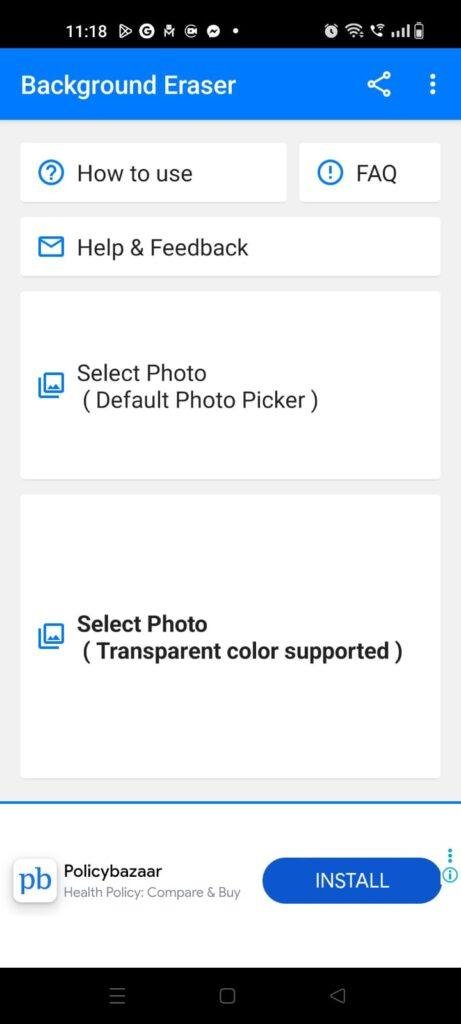
- Scenario 1: Creating a Custom WhatsApp Sticker from a PortraitOn a busy Monday morning, I wanted to isolate a friend’s face from a cluttered outdoor photo to build a custom chat sticker asset. I opened the application, pulled the original image file straight from my local folder directory, and initiated the extraction workspace. The interface loaded the main image canvas instantly on my screen, letting me crop the edges closely within under a few seconds without throwing out rendering errors or slow screen transitions.
- Scenario 2: Isolating Product Graphics on a Moving Public Transit CommuteTo see how well the manual correction tracking holds up under shaky conditions, I attempted to erase the background of a complex gadget photo while riding on a bumpy public bus late in the afternoon. I utilized the offset cursor slider to keep my thumb clear of the actual line view, following the outer edges of the item smoothly. The interface processed my fine-tuning brush movements fluidly, allowing me to save a clean cutout directly into my phone storage despite the physical vibration of the vehicle.
- Scenario 3: Batch Cleaning Group Assets Late at NightWhile winding down for the evening on my bed, I tested the tool’s specialized automated modes on a sequence of five distinct graphical assets featuring solid colored backdrops. I toggled between the rapid automated selection options to clear out uniform color fields instantly. The utility processed the sequential image exports efficiently without heating up my device chassis or closing unexpectedly when I temporarily swapped to an incoming work email card.
App Permissions & Device Safety
When installing simple graphic extraction tools, tracking exactly what parts of your phone’s hardware the software wants to access is vital for long-term device safety. Here is how Background Eraser handled permission queries on my display during my 2-day observation window, presented in a standard bolded Q&A format:
- Does the app ask for Photos and Videos / Storage access?Yes. The app requests media storage access prompts on your phone screen because it requires a safe path to read your original source graphics and write the finished transparent PNG assets directly to your system directory.
- Does the app ask for Network / Internet access?Yes. Full network privileges are requested to manage basic programmatic advertisement delivery, though the primary image processing runs locally on your system hardware rather than passing files to external web databases.
- Does the app demand Location tracking?No. The app did not request storage permission or location inputs to track your physical coordinates, letting you crop items without revealing your geographic position.
- Does the app ask for Microphone or Camera access?No. The system does not feature live audio tracking or an in-app custom camera capture module, leaving these sensitive sensors completely secure and untouched.
- Does the app ask for Notification privileges?No. During my entire 2-day testing routine, the application never pushed annoying alert cards or background notification banners to my device status bar.
Speed & Everyday Performance
The overall responsiveness of an editing canvas determines whether you will use it daily or look for alternative web utilities. Here is a breakdown of how the application performed across key performance checkpoints, detailed in a clean bolded Q&A format:
- How long do the download, installation, and setup take?The base installation package downloads from the market within under a few seconds on a standard connection, passing through your setup queue rapidly. The utility opens into a functional home dashboard in around 1 minute, with zero mandatory registration forms.
- How smooth are the menu transitions and zoom features?Pinching to zoom and dragging across the graphic grid feels lightweight and snappy. The cursor reacts immediately to finger tracking without the input lag common to heavy layer editors.
- How does the app affect background memory load and phone warmth?The processing footprint remains tiny in your phone’s active RAM, letting you minimize the app to check a chat link and return to your precise mask line without a cold system reload. The device remains completely cool to the touch even during lengthy, precise editing runs.
- How are the active battery drain and overall system stability?The software uses very little battery when working on basic layouts, and it enters a deep sleep state immediately upon exit. The utility maintained rock-solid stability during my 2 days of testing, experiencing zero sudden freezes.
Storage Space & Cache Build-Up
When I first pulled this extraction utility down from the Google Play Store, the initial download size was remarkably small, staying well down in a single-digit megabyte bracket. This lightweight layout is an absolute blessing for individuals managing budget smartphones or older hardware with very tight internal storage limits, as it won’t force you to delete your personal applications or primary utilities just to keep an image tool ready.
As you edit multiple high-resolution graphics, saving transparent files and opening complex files, the application creates a small build-up of temporary cache files inside your device settings. This happens because the system holds onto the display pixels of your recent project history so you can execute undo actions seamlessly. My testing menu showed that this data footprint stays very tiny, meaning there is almost no reason to clear it out manually unless your internal phone space is completely full.
Battery Life & Daily Warmth
During my long editing sessions—including a stretch where I sat for half an hour meticulously cleaning up the fine edge details on a series of historical family photos—the battery levels on my phone dropped by a very small margin. Because the interface relies on clean, mostly static button bars and a simple layout that doesn’t require massive 3D graphic rendering engines, the power drop matches basic system idling speeds.
The back area of my device remained totally comfortable to handle, showing zero signs of heat production even when I zoomed in repeatedly to touch up pixel borders. The standby performance was equally clean, as the tool does not keep background processes running or initiate unwanted battery draw when your phone is sitting idle in your pocket.
offzack.in Quick Tip: If you are working on a highly complex image cutout with very intricate outlines, try lowering your phone screen brightness slightly to save an extra bit of battery power during long, focused zooming tasks.
Network Needs & Data Usage
For mobile users operating under strict daily data limits, this application handles your internet data very carefully. Here are the core network parameters I observed during my evaluation, detailed in a clean list format:
- Initial Setup Access Cost: Microscopic, using almost no cellular data to pull the base utility blocks down to your device during the initial store download.
- Daily Usage Data Footprint: Extremely low, as the actual image manipulation, pixel shifting, and border masking take place entirely on your local phone processor rather than uploading files to a cloud network.
- Additional Asset Downloads: The system does not prompt for mandatory background resource updates, premium font packs, or heavy template packages after the initial download.
- Offline Support: The entire user interface, masking toolkit, cursor controls, manual brush sizes, and PNG saving features run completely offline without needing a single byte of data. You can easily edit your entire camera roll in the middle of a remote area with zero cellular connectivity.
Monetization & User Security Review
Background Eraser provides an incredibly user-friendly approach to initial setup access. When you launch the application for the first time, it allows clean guest access right out of the box. You do not have to link your personal email profile, enter a phone number, or create a custom password just to crop an image. This is an excellent structural design for basic data security, as it limits the amount of private metadata you have to share with the developers. According to the app’s Play Store Data Safety section, no data is shared with third parties, and the files you process are handled securely with industry-standard transit encryption.
In terms of monetization, the application is offered completely for free and relies entirely on an ad-supported framework. You will encounter standard programmatic inline banner advertisements sitting at the base of your workspace, along with a full-screen pop-up advertisement when you successfully complete and save a finished image to your phone directory. There are no strict premium paywalls, monthly subscription gates, or locked toolsets blocking you from using the advanced extraction options. While the pop-up ads can sometimes pop up unexpectedly when you are trying to edit a sequence of graphics in a hurry, it remains a fair trade for gaining complete, free access to a professional-grade masking tool.
Mistakes I Noticed During Testing
No mobile utility package is completely perfect, and during my 2 days of regular daily routines, I encountered three specific layout flaws that can affect the overall user experience:
- Sudden Ad Trigger on Quick Saves: The application is built to display a full-screen advertisement right after you hit the save button on a finished image asset. If you are in a rush to copy a cutout into a messaging thread, this sudden video block can break your workflow, requiring you to wait a couple of seconds before you can close the window.
- Color Mode Bleed on Similar Tones: When utilizing the automated color picker tool to clear out a solid backdrop, the selector tool occasionally bleeds into the primary subject if the foreground person is wearing clothing that closely matches the background shade, requiring you to manually switch to the repair brush to fix the outline.
- Lack of Multi-Layer Stacking: The workspace is built to handle exactly one image extraction task at a time. It completely lacks a built-in canvas layer manager, meaning you cannot paste your newly created transparent sticker onto a fresh backdrop graphic without exporting the file first and opening a separate composition tool.
Main Features Explained
- Smart “Magic” Edge Detection: A highly practical selection brush that automatically detects high-contrast image outlines as you glide your finger near the boundary, erasing the background accurately while preserving the primary subject borders.
- Automatic Color Pixel Eraser: A rapid targeted utility that instantly deletes similar adjacent pixels when you drop the crosshair selector onto a solid colored backdrop, clearing out wide horizons in a single tap.
- Manual Offset Cursor Controls: Features a dedicated slider that allows you to shift the active erasing brush tip away from your actual finger placement point, ensuring your view remains completely unobstructed while working on micro-details.
- Integrated Repair & Restore Brushes: A highly forgiving correction tool that lets you paint back over accidental cutouts, restoring original image elements without forcing you to restart the entire project.
- Edge Smoothing Levels: Offers a final adjustment screen before exporting where you can select smoothing intensities from 0 to 5, cleanly blending out jagged pixel steps for a professional transparent finish.
Pros & Cons
What I Liked
- The application setup file and system memory requirements are incredibly lightweight, keeping older devices perfectly snappy.
- The manual offset cursor design allows for immense precision when working around fine hair details or intricate borders.
- The core extraction toolset runs completely offline without forcing mandatory cloud sync loops or user profile logins.
What Could Be Better
- The full-screen promotional ads that pop up right after saving can disrupt your speed when processing graphics in a hurry.
- The automated color picker tool struggles to separate elements when the background tone matches the foreground subject closely.
- The app cannot combine or overlay multiple transparent images together, serving strictly as a single-file extraction tool.
Industry Comparison
Choosing the ideal graphic cutout companion requires seeing how this app stands up against the other major options dominating the modern photo editing space:
Bullet Point Breakdown
- When to choose Background Eraser (handyCloset) vs PhotoRoom: Choose the handyCloset version if you prefer an entirely local, manual tool that doesn’t add forced commercial branding watermarks to your finished exports for free users. PhotoRoom utilizes advanced cloud AI computing to clear backdrops instantly but locks high-resolution clean saves behind a costly premium recurring subscription, whereas Background Eraser gives you complete extraction capabilities for free.
- When to choose Background Eraser vs Adobe Photoshop Express: Choose Background Eraser if you want a lightweight utility that opens in under a few seconds to perform one direct task without demanding a mandatory Adobe user account registration loop. Photoshop Express is a massive, full-scale graphic editor packed with heavy filters and layer sliders that can feel cluttered if you just want to make a quick transparent sticker asset.
- When to choose Background Eraser vs Online Web Removers (like remove.bg): Choose this local application if you frequently edit graphics while traveling through remote areas with zero network connectivity or if you are working with sensitive images you do not want to upload to web servers. Web removers require an active data connection to process files and often restrict your free output downloads to a very low, pixelated resolution, while this tool saves your cutouts at full original resolution.
Audience Recommendations
Who Should Install It?
- Sticker Creators & Digital Designers: Anyone who regularly builds custom reaction assets for chat networks or needs clean isolated graphics for layout projects.
- Space-Conscious Users: Individuals running entry-level or older smartphones who need a fast photo utility that won’t hoard storage or slow down system speeds.
- Privacy-Minded Editors: Home editors who prefer handling their image touch-ups locally on device hardware rather than trusting cloud servers with their personal gallery files.
Who Should Skip It?
- Full-Scale Composition Painters: If you need an application that can handle multiple overlapping image layers, add text blocks, and paint custom backdrops in one workspace.
- Ad-Averse Individuals: Users who absolutely cannot tolerate full-screen promotional video countdowns displaying right after a file save is completed.
Common FAQs
- Will saving images in this app lower the original resolution of my photos?No, the application preserves the exact dimension metrics and quality profile of your original source graphic, exporting your clean cutout at full resolution without compression.
- What is the practical benefit of using the “Magic” brush mode over the manual option?The Magic brush mode automatically snaps to high-contrast edges as you draw nearby, allowing you to quickly trace complex outlines without manually erasing every single adjacent pixel boundary.
- Can I save my finished cutouts in standard formats other than transparent PNGs?Yes, while the system defaults to transparent PNGs for sticker utility, the export confirmation screen allows you to save the file as a standard white-background JPEG asset if you want to conserve disk space.
Official Store Access
Independent Disclaimer: The link provided below points directly to the official digital marketplace hosted by the platform provider. offzack.in is not associated with the external developer team and recommends reviewing application data safety summaries before initiating any device installations.
The offzack.in Final Verdict
The Background Eraser app by handyCloset Inc. is an exceptionally effective, beautifully lightweight utility that successfully handles background extraction without unnecessary feature clutter. While the ad triggers after file saves can test your patience and the lack of a multi-layer composition canvas requires using secondary software, its immense brush precision, offline usability, and zero login barriers offer massive everyday value. If you want a dependable way to turn cluttered photos into clean transparent stickers today, you should definitely install this application.
Final Scorecard
- Ease of Use [4.4/5]: The interface design is incredibly straightforward and highly intuitive, though mastering the fine adjustments on the color picker mode requires a brief learning curve.
- Speed & Performance [4.8/5]: The utility operates with blistering speed on standard hardware, causing zero thermal pressure, background memory lag, or data strain.
- Features [4.2/5]: The clever combination of the offset cursor design, magic edge snapping, and repair brushes provides excellent practical utility.
- Privacy & Safety [4.5/5]: Allowing immediate guest access right out of the box while running all image extraction operations locally on your hardware is a massive win for privacy.
- Value for Money [4.6/5]: The software delivers its entire suite of advanced masking tools completely for free, making the post-save advertisements a minor compromise.
- Overall offzack.in Score: 4.5 / 5