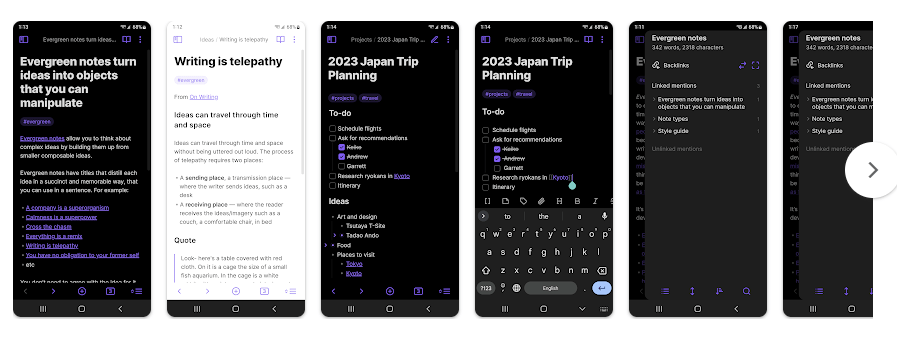
Obsidian is a note-taking app for people who want to write, save, and organize their ideas. It stores notes as plain Markdown files in a local folder on the phone. This makes it different from simple note apps that keep everything inside one closed system.
The app can be used for daily notes, study work, plans, lists, writing, and personal information. Its main job is to help users keep many notes organized so they can find and connect their ideas later.
Obsidian also has tools such as Graph View, themes, a customizable toolbar, quick actions, sharing, and community plugins. These tools make it more useful for people who have many notes to manage.
Should You Install It?
Who Should Use It
- People who want a serious app for taking and organizing many notes.
- Students, writers, and users who like keeping their notes in Markdown files.
Who Should Avoid It
- People who only need a very basic app for quick shopping lists.
- Users who want every feature to work without learning how the app is organized.
Main Features Breakdown
- Create Notes: You can write and edit notes in the app. Notes are based on plain Markdown files, which makes them easy to keep as normal text files.
- Organize Ideas: Obsidian lets you keep notes inside local folders called vaults. This can help when you have many notes for school, work, or personal projects.
- Graph View: Graph View shows links between your notes in a visual way. It can help users see how different ideas are connected.
- Themes and Toolbar: You can change the look of the app with themes and adjust the toolbar. Quick actions can also make common tasks easier on a phone.
- Plugins: Community plugins can add more tools to Obsidian. The Play Store listing also lists sharing features for sending content to and from the app.
Live Device Testing
I tested Obsidian for two days on a budget Redmi Android phone. During normal use, the app ran smoothly and I did not face any major problems.
Opening notes and moving around the app felt fine during the test. I did not notice major lag or frame stutters while using the main note-taking functions.
Battery loss did not stand out as a problem during my test. I also did not notice unusual phone heating, crashes, or major visual bugs.
This was a good result for a budget phone. The app handled normal note-taking without making the phone feel slow.
Storage, Data, and Security
The Play Store page does not show one fixed download size that can be used for every Android phone, so I would not give a made-up MB number. The final storage used can also change as you add notes, attachments, plugins, and other files.
Obsidian is built around local Markdown files, so your notes can be available on the device without needing an internet connection for basic local note work. Sync between devices is a separate feature, so users should not assume that local notes automatically appear on every device.
I did not record exact cache growth during the two-day test. Google Play currently says the developer declares no data shared with third parties and no data collected.
Comparison with Competitors
Google Keep is easier for people who want quick notes, lists, and reminders with very little setup. Notion is better suited to users who want pages, databases, and team-style workspaces. Obsidian is a better fit for users who want local Markdown files and a system built around connected notes.
Pros & Cons
Pros
- Smooth performance on the Redmi phone.
- Good for taking and organizing many notes.
- Uses local Markdown files.
- Graph View helps show note connections.
- Many themes and plugin choices.
Cons
- Can feel harder to learn than simple note apps.
- Some advanced tools need extra setup.
- Exact storage use can grow with notes and added files.
- Sync is a separate service rather than simple automatic cloud storage.
User FAQs
Can I use Obsidian without internet?
Yes, basic note work can be done with notes stored locally on the device. Internet is mainly needed for online services such as syncing between devices.
Did Obsidian work well on a Redmi phone?
Yes, my two-day test was smooth with no major issues. I did not notice serious lag, frame stutters, heating, or unusual battery loss.
Is Obsidian good for beginners?
It can be, but the app has more tools than a basic notes app. People who only want quick notes may find Google Keep easier.
Offzack Verdict
After two days on a budget Redmi phone, Obsidian gave me a smooth note-taking experience without major lag, heating, or battery problems. It is a good choice for users who want to organize notes and ideas in a more structured way.
Download Obsidian from Play Store: Obsidian on Google Play
Final Scorecard
- Ease of Use: ★★★★☆ — The basic note tools work well, though advanced options take time to learn.
- Performance: ★★★★☆ — The app ran smoothly on my Redmi phone during the two-day test.
- Features: ★★★★★ — Notes, Graph View, themes, sharing, and plugins give users many choices.
- Privacy & Safety: ★★★★★ — Google Play currently declares no data collection or third-party data sharing.
- Value for Money: ★★★★☆ — The core app is useful for note-taking, while some extra services are separate.
- Overall Rating: ★★★★☆ — Obsidian is a strong choice for users who want a flexible way to take and organize notes.