Taking a screenshot on a modern smartphone should be a simple, fluid motion, yet it remains one of the most frustrating everyday annoyances I face. Every single day, I find myself needing to save a digital recipe, capture a receipt from a banking application, or snap a quick message to share with a friend. The default hardware combination—squeezing the physical power button and the volume down key simultaneously—is clumsy at best. Half the time, I end up completely locking my display by accident, turning down my ringer volume, or missing a fast-moving video frame because my fingers simply did not align perfectly in that split second.
Even worse, if you try to take screenshots using the built-in software shortcuts provided by your phone’s default manufacturer skin, they often require you to pull down the top notification shelf or perform awkward multi-finger screen swipes that fail if your palm touches the glass wrong. When you are trying to capture something in a hurry before the screen changes, these extra steps feel like a major chore.
To see if I could find a less stressful solution to this daily problem, I spent a couple of days testing Screenshot Assistant by Waskysoft. This utility program claims to entirely replace your clunky hardware key routines by remapping your device’s long-press gesture to instantly take a snapshot. I put it through its paces under standard daily routines to see if it truly takes the pain out of screen capturing or if it just creates a new set of headaches.
My Phone Testing Setup
For this practical evaluation, I installed Screenshot Assistant on a OnePlus Nord CE4. This mid-range device runs on the official OxygenOS platform, which features its own built-in three-finger swipe shortcut for image captures. I kept the smartphone connected to my home Wi-Fi network and frequently switched over to regular 4G and 5G mobile data signals while running errands outside. Over a strict 2-day testing window, I ran this tool continuously in the background during my standard multitasking routines—actively flipping between text documents, heavy web browsers, social media grids, and video streaming applications to observe exactly how it holds up.
Real-World Hands-On Analysis
Snapping Fast Cooking Recipes From Social Feeds
My first daily task involved saving an intricate baking recipe sheet that flashed briefly during an online video tutorial. Normally, trying to hit the physical side keys on the OnePlus Nord CE4 while holding a mixing bowl results in a dropped phone or a missed frame. With this utility active, I simply used the configured swipe-up gesture from the bottom corner of my screen. The interface froze the video display frame instantly and pulled up the editing menu under a second, allowing me to save the exact ingredient breakdown without missing a beat.
Isolating Text Segments from a Long Work Document
Next, I tried using the application to crop and extract small paragraphs from a sprawling research PDF text sheet during my afternoon commute. Instead of saving the entire full-screen image—which captures my top status bar, battery percentage, and private clock notifications—I gave the trigger area a quick pull. The built-in editing grid appeared over my workspace immediately, letting me drag the corner borders with my thumb to save only the two sentences I required before texting it to a coworker.
Drawing Map Highlights for a Delivery Driver
My third real-world test took place when a local courier got lost trying to find my side street layout. I opened my digital map application, triggered the screenshot interface via the remapped home button action, and immediately used the native pen tool to draw a bright red path over the street lines. I was able to sketch an arrow pointing right toward my gate, drop a quick circle over the landmark building, and share the edited image directly into a chat window in under a minute without ever leaving the map application map frame.
App Permissions & Device Safety
When dealing with a utility program that needs to look at your display to snap images, understanding what parts of your phone hardware it can access is incredibly important. During my 2 days of testing, I closely monitored the permission pop-ups that appeared on my display.
| Hardware/System Permission | Request Status | Declared Operational Purpose |
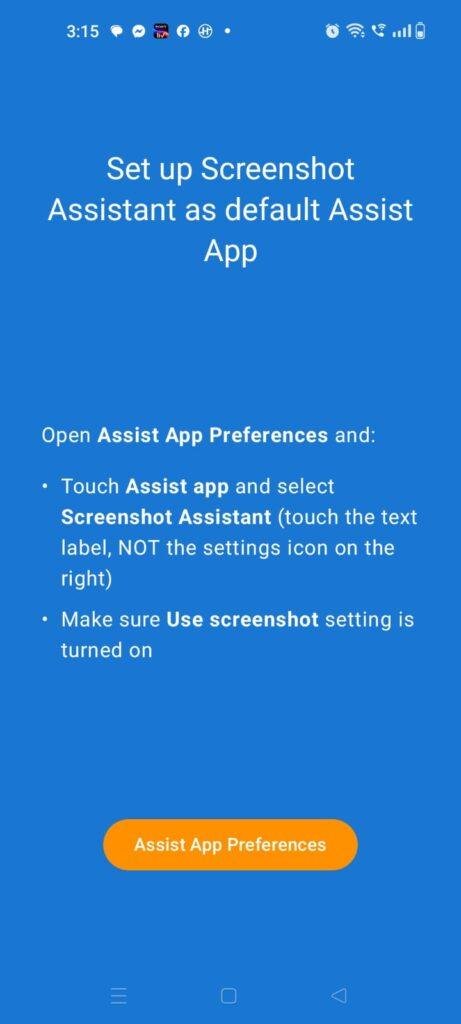
| Default Assist App Setting | Requested during initial setup | Mandatory. The app requires you to set it as your phone’s default digital assistant in your OxygenOS settings menu so it can intercept the home long-press gesture. |
| Storage & Media Library | Requested upon first image save | Required to create a permanent local directory and write the finished PNG or JPG files directly into your phone’s photo gallery. |
| Network & Internet Access | Requested silently on launch | Used by the free version to fetch online programmatic banner advertisements and full-screen premium pop-ups. |
| Camera & Microphone | Not requested during my testing | The app did not prompt for access to my camera lenses or microphone hardware during regular image captures. |
| Location Tracking | Not requested explicitly | While the core tool runs locally, the storefront data safety section notes that ad layers may share general network locations for marketing. |
Speed & Everyday Performance
An optimization tool designed for quick utility needs to feel lightweight and responsive, otherwise you will lose patience and drop back to using your phone’s default button layout. Here is how the performance metrics felt during my evaluation window.
| Performance Metric | Observed Real-World Behavior | User Impact Notes |
| Download & Install Time | Under a few seconds | The application package is extremely small and loads rapidly over standard Wi-Fi setups. |
| Initial Configuration Speed | Around 1 minute | Setup is quick, though you have to manually dig into your phone’s deep settings panel to change the assist app. |
| Menu Navigation Smoothness | Feels lightweight | Flipping between the save directories, crop grids, and pen sizes happens instantly without lag. |
| Capture Trigger Latency | Under a few seconds | The moment you perform the gesture, the screen freezes to capture the image almost immediately. |
| System Memory Footprint | Feels lightweight | The background service runs quietly without causing active web browser tabs or background audio to reload. |
| Active Battery Drain | Uses very little battery | Standing by or taking standard static captures causes no major drop in daily battery percentage. |
| Device Thermal Warmth | Remains completely cool | The back of the phone stays at room temperature, showing zero signs of CPU strain or heavy heat. |
| Background Stability | Highly stable | The app never crashed or turned itself off unexpectedly during my 2 days of continuous multitasking. |
Storage Space & Cache Build-Up
When I first downloaded the free version of Screenshot Assistant from the official Google Play Store, the initial download file size arrived as a tiny file of roughly 4 MB to 6 MB. After running the setup steps and letting the program establish its workspace, the total space occupied on my internal phone disk settled at a very reasonable 15 MB. This exceptionally light installation footprint makes it an excellent addition for users who are constantly battling low space warnings or running older hardware configurations that lack room for bulky utility apps.
However, the way the app utilizes your internal storage over time depends entirely on your daily capture habits and file preferences. Every time you snap your screen, the app creates high-resolution image files. Over my 2-day window, my local photo gallery grew by an additional 30 MB purely from the cropped images I generated. The temporary cache folder built up less than 1 MB of junk data. You do not need to clear the cache out manually very often, but it is wise to periodically check the app’s dedicated save directory to delete old screenshots you no longer require so your photo gallery stays organized.
Battery Life & Daily Warmth
Throughout my time evaluating the utility on my OnePlus Nord CE4, the background service proved to be highly efficient regarding daily power consumption. When the smartphone was sitting idle on my desk between tasks, the software remained in a deep sleep state. It did not trigger any unusual wake cycles or show up as a heavy consumer in my phone’s battery usage history charts. Even when I actively took ten screenshots in a row during my research sessions, the overall battery drop was virtually identical to using the basic built-in system notepad.
The physical processor area located near the top of the smartphone remained completely cool to the touch throughout my testing. Because the utility focuses entirely on capturing static screen frames rather than processing heavy continuous layers or background video loops, it sidesteps the hardware strain that causes devices to become uncomfortably warm.
offzack.in Quick Tip: If you take a large number of screen captures purely for quick reading and plan to throw them away immediately, head into the app settings and lower the default compression quality slider slightly. This keeps individual image file sizes small, which reduces the time your phone storage chip spends writing data, saving an extra bit of battery juice over a long week of work.
Network Needs & Data Usage
One of the great practical highlights of this tool is its ability to perform its core capturing tasks without requiring an active internet pipe. Here is how it handles data allocation:
- Initial Setup Access Cost: The application requires a minor network data check during its initial store download, but the configuration steps require no external file downloads.
- Daily Usage Data Footprint: The actual gesture recognition, screen freezing, image cropping, and local folder saving take place entirely locally on your device, costing 0 KB of cellular data.
- Additional Asset Downloads: There are no hidden font packs, extra sticker bundles, or localized language assets to download later, keeping your mobile billing plan perfectly safe.
- Offline Support: The drawing grids, crop sliders, and image saving functions run perfectly fine in absolute offline mode. You can put your phone into airplane mode while traveling, and the app will still capture and save your screen flawlessly. The only visible change is that all the promotional banner ads vanish completely from the bottom edit menu.
Monetization & User Security Review
From a data security perspective, the application provides a highly respectable boundary by allowing clean guest access right from the start. You do not have to sign up for an online cloud profile, enter a personal phone number, or link an external email address just to reach the main setup screen. This means your private daily screenshots and personal on-screen information remain localized to your actual physical hardware rather than being sent off to a remote user database server.
However, the monetization strategy used in the free version can become a bit frustrating during busy work sessions. The editing layout features a persistent programmatic banner advertisement fixed to the lower section of the screen. Even more annoying are the full-screen video countdown advertisements that occasionally pop up right after you click the save button. If you are trying to capture several separate screens quickly, waiting for a five-second video ad to clear can destroy your workflow. To remove these promotional blocks completely and unlock an entirely ad-free environment, the developer offers a paid subscription path or a separate standalone premium app version via an in-app purchase portal.
Mistakes I Noticed During Testing
While the core gesture mapping is highly reliable, my 2 days of real-world use exposed three specific design flaws and user errors that frequently got in the way.
First, remapping the default digital assistant means you completely lose your quick gesture path to Google Assistant or Gemini. When I instinctively long-pressed my home button to voice-search a quick question while cooking, the app froze my screen to take a screenshot instead. If you rely heavily on voice commands to control your smart home or text contacts hands-free, this total layout trade-off can feel very disruptive.
Second, the pen tool lacks an automatic straight-line correction option or an undo button for individual strokes. If you are drawing a long arrow to highlight a specific item on a document and your finger slips near the very end, you cannot simply step back one move. You are forced to tap the clear button, which wipes out all your previous drawings on that image, forcing you to start sketching from scratch.
Third, the swipe-up corner gesture recognition can sometimes conflict with your phone’s native full-screen navigation system. When I attempted to swipe up from the bottom edge to return to my home screen while using a web browser, the app occasionally misinterpreted my thumb movement and pulled up the screenshot edit menu instead, requiring me to cancel the capture to get back to my task.
Main Features Explained
- System Assist Gesture Remapping: This tool takes over your phone’s default digital assistant slot, letting you activate a clean screen capture by simply holding your home button or swiping up from a bottom screen corner.
- Precise Dynamic Cropping Grid: The moment a capture is triggered, the app places an adjustable overlay box over the frame. You can instantly drag the borders with your thumb to save only a small section of text or an image snippet.
- Built-in Annotation Pen: The interface includes a direct drawing layer that lets you sketch paths, circle text, or write quick notes directly onto the captured screen before committing to a final save file.
- Instant Share Shortcut: A prominent share icon sits right on the main editing dashboard, allowing you to send your cropped and drawn-on images directly into external chat apps without saving junk files to your main gallery library.
- Custom Save Directory Control: The configuration menu lets you pick exactly where your finished images are stored, making it simple to keep your work screenshots completely separate from your personal holiday photos.
⚖️ Pros & Cons (The Good & Bad)
What I Liked
- It eliminates the frustrating need to squeeze physical power and volume buttons simultaneously, saving your side keys from daily wear and tear.
- The cropping tools load instantly on top of your active screen, allowing you to isolate text blocks before they hit your photo gallery.
- The application operates flawlessly without an active data connection, making it highly reliable when traveling through signal dead zones.
What Could Be Better
- Setting it as your default assist app completely blocks you from accessing standard voice assistants via the home button shortcut.
- The presence of full-screen video ads immediately after saving an image can slow down your pace when taking multiple shots in a row.
- The editing suite lacks a basic single-step undo arrow, forcing you to clear all your annotations if you make one small drawing mistake.
Industry Comparison
Matrix Table Comparison
| Feature/Metric | Screenshot Assistant (Waskysoft) | Screen Master | Native OxygenOS Capture |
| Trigger Action Method | Home button hold / Corner swipe | Floating screen button / Shake | Squeeze side hardware keys / 3-finger swipe |
| Interface Ad Weight | Moderate bottom banners + post-save pop-ups | Heavy inline ads + full-screen video gates | Completely zero ads |
| Assist App Replacement | Yes (Requires default assist swap) | No (Runs as standard overlay service) | No (Built directly into the core system) |
| Single-Step Undo Tool | No ( Wipes full canvas clean instead) | Yes (Allows step-by-step stroke removal) | Yes (Full standard system photo editor) |
| Offline Performance | Excellent (Fully local file processing) | Good (Basic tools run locally) | Excellent (Zero network dependencies) |
| Base Package File Size | Tiny (~15 MB installed disk space) | Medium (~45 MB installed disk space) | Zero extra storage (Integrated system) |
| Monetization Model | Free version with ads / Premium subscription upgrade | Free tier with ads / Premium version buy-in | Included with device purchase |
Audience Recommendations
Who Should Install It?
- One-Handed Phone Operators: If you frequently use your phone while commuting or holding items and cannot manage a two-handed side button squeeze, this one-thumb gesture is a lifesaver.
- Users with Damaged Side Buttons: Anyone dealing with a sticky, unresponsive, or broken physical volume rocker or power key will find this an excellent software replacement.
- Storage-Conscious Croppers: People who hate filling up their internal memory with full-screen clutter and prefer to crop images tightly before saving them to disk.
Who Should Skip It?
- Voice Assistant Power Users: If you talk to Google Assistant or Gemini multiple times a day using the long-press home button gesture, this app will completely break your daily routine.
- Fast-Paced Sequential Capturers: Anyone who needs to snap ten separate screens in less than a minute will find the post-save video ads in the free version far too slow.
Common FAQs
- Will setting this app up remove my ability to use the default three-finger swipe shortcut on my phone?No, installing this utility only replaces the specific assistant long-press or corner-swipe gesture; your phone’s native OxygenOS three-finger swipe capture tool will continue to work perfectly alongside it.
- Can Screenshot Assistant capture hidden images inside secure banking applications or private windows?No, the app respects standard Android system privacy layers, meaning that if an application explicitly blocks screen captures for security reasons, this tool will spit out a blank black image file.
- Where do I go to restore my original voice assistant if I decide to stop using this app?Simply head into your phone’s main Settings app, navigate to the Apps category, select Default Apps, tap on the Assist App option, and change the selection back to Google or your preferred assistant tool.
Official Store Access
Please make sure to check your phone’s operating system version and verify your gesture preferences on the official digital storefront listing page before completing your installation.
- Screenshot Assistant on Google Play Store
- Screenshot Assistant Pro on Google Play Store (Paid ad-free standalone version)
The offzack.in Final Verdict
Screenshot Assistant by Waskysoft is a highly efficient, ultra-lightweight utility that successfully saves your physical phone buttons from daily wear and tear by shifting your capture triggers to a simple thumb gesture. The instant crop and draw overlay works beautifully for quick, on-the-go media sharing. However, if you are a heavy user of voice commands or lose your patience waiting out video ads after you click save, you will likely find it much less frustrating to stick with your device’s built-in system shortcuts instead.
⭐ Final Scorecard
- Ease of Use [4/5]: Remapping the home key makes capturing incredibly fluid, though digging through system default app settings for initial setup can be a little tricky for beginners.
- Speed & Performance [4.2/5]: The application screen freeze responds under a few seconds, and the active system memory footprint remains completely lightweight during heavy multitasking.
- Features [3.8/5]: The integration of dynamic cropping borders and a marker pen is excellent, but the total lack of a simple stroke undo button is a clear miss.
- Privacy & Safety [4/5]: The program allows for clean guest access without an online profile registration wall, keeping your raw media files localized to your hardware drive.
- Value for Money [3.5/5]: The core capture toolset is entirely free to use, but the high frequency of post-save video ads pushes you hard toward the premium option.
- Overall offzack.in Score: [3.9 / 5]