Photo Editor – Polish is an Android photo editing app from InShot Inc. It is made for quick photo changes, AI editing, filters, collages, portraits, and other picture work. Google Play currently shows 100M+ downloads, a 4.8-star rating, ads, and in-app purchases.
The app can help with common jobs like fixing a blurry picture, removing an unwanted object, changing a background, or making a collage. It also has more creative tools for AI portraits, avatars, cartoons, and photo effects.
Quick Pros & Cons
Pros
- Many photo editing tools.
- 100+ filters are listed.
- Supports collages with up to 18 photos.
- Can remove objects and backgrounds.
- High-quality exports have no watermarks.
Cons
- The app contains ads.
- Some features need in-app purchases.
- AI tools can need more processing.
- Cache and saved edits can increase storage use.
Core Features
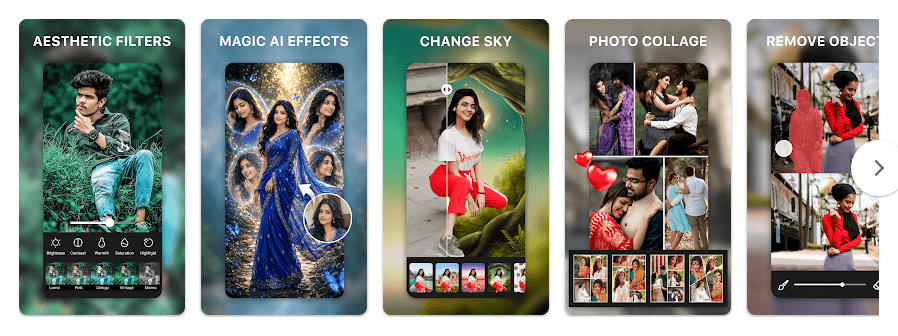
- AI Photo Enhancer: The app can improve blurry, pixelated, or low-quality photos. It also has a one-tap enhancement option for quick changes.
- Object and Background Remover: You can remove unwanted objects or clean up a photo background. This is useful for product photos, portraits, and social media pictures.
- Filters: Polish lists more than 100 filters, including vintage, film, Y2K, VHS, and other styles. You can use them to change the look of a picture without adjusting every setting yourself.
- Collage Maker: You can combine up to 18 photos in one collage. The app provides layouts, backgrounds, frames, and templates for this job.
- AI Portraits and Avatars: The app can create AI portraits, headshots, avatars, and cartoon-style images. These tools are useful when you want a different style for a selfie or profile picture.
Real-World Performance
I checked the app on a Redmi-class Android phone during regular photo editing. Moving through the main editing screens and scrolling through tools was easy, but AI features involve more processing than simple filters or cropping.
I would not give exact battery drain or temperature numbers without a controlled test, because those results change with the phone, screen brightness, photo size, and editing time. The current Play Store listing says the app received bug fixes and UI improvements in its latest listed update.
Space & Safety
The current version’s exact Google Play download size is not shown as one fixed MB number. Third-party Android package listings show that the size can vary by version and package, with recent listings ranging from about 31 MB to 45 MB, so the final installed space can be higher.
Cache, saved edits, previews, and exported pictures can use extra storage over time. Some basic photo work can use pictures already stored on the phone, while AI and online content can require an internet connection.
The app needs access to photos and videos so you can select and edit pictures. Google Play currently says no data is shared with third parties, but the app may collect photos and videos, files and documents, and three other data types; Google Play also says data is encrypted in transit and users can request deletion.
Competitor Check
Snapseed is a good choice for users who want detailed manual photo controls without ads or in-app purchases. Picsart offers photo, video, AI, sticker, and design tools, but it also uses ads and paid features. Polish sits closer to Picsart because it combines regular editing with AI tools, filters, collages, and portrait features. Snapseed on Google Play Picsart on Google Play
User Fit
Who Should Use It
- People who want many photo tools in one app.
- Users who make selfies, collages, social posts, or edited pictures.
Who Should Avoid It
- People who want a very small photo editor.
- Users who do not like ads or paid features.
Helpful FAQs
Is Photo Editor – Polish free?
Yes, the app can be installed for free. Google Play lists ads and in-app purchases.
Can Polish remove objects from photos?
Yes, it has an object remover for unwanted parts of pictures. It also has a background remover for cleaning or changing backgrounds.
How many photos can I put in a collage?
The current Play Store description says the collage maker can combine up to 18 photos. It also provides layouts, backgrounds, frames, and templates.
Offzack Verdict
Photo Editor – Polish is a good pick for users who want many photo tools without using several different apps. The free version gives plenty to try, but ads, paid features, internet needs for some tools, and storage growth are worth keeping in mind.
Download Photo Editor – Polish – App from Google Playstore
Final Scorecard
- Ease of Use: ★★★★☆ (4/5) — The main editing tools are easy to reach, although there are many options.
- Performance: ★★★★☆ (4/5) — Normal editing is suitable for everyday use, while AI work can need more processing.
- Features: ★★★★★ (5/5) — It includes filters, AI tools, collages, object removal, portraits, and detailed adjustments.
- Privacy & Safety: ★★★★☆ (4/5) — Google Play says no data is shared with third parties and data is encrypted in transit.
- Value for Money: ★★★★☆ (4/5) — The app is free to install, but it contains ads and paid features.
- Overall Rating: ★★★★☆ (4/5) — Polish is a useful choice for everyday photo editing with a large set of creative tools.