I found it useful for common jobs like fixing a dark picture, changing the look of a photo, or preparing an image before sharing it. The app also has tools for making collages and adding text, so it can be used for simple social media pictures.
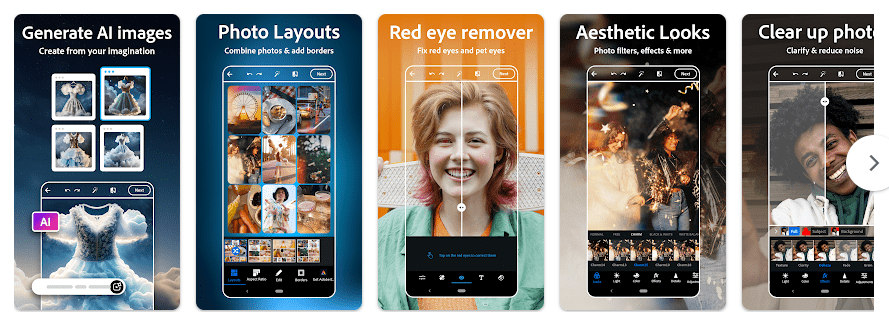
Top Features in Action
- Quick photo editing: You can crop, rotate, straighten, resize, and adjust photos. These basic tools are easy to use when a picture needs a quick fix.
- Filters and effects: The app includes filters and other effects that can change the look of a photo. You can try different looks before saving the edited picture.
- Object removal: Photoshop Express includes tools for removing unwanted parts of photos. This can help clean small distractions from a picture.
- Collage maker: You can place several photos into one collage. The app provides layouts that make it easier to create a single image from multiple pictures.
- Text and borders: You can add text, borders, and other simple design elements. These tools are useful when making a picture for a post or message.
Testing on a Budget Phone
I tested Photoshop Express on a Redmi-class Android phone for regular photo editing. Opening a picture, moving through the editing controls, and switching between common tools felt simple during normal use.
Scrolling through the editing options was responsive on the test phone. Large pictures and heavier edits can require more phone resources, so the experience can change between devices.
I did not record a controlled battery percentage or temperature reading, so I have not added made-up numbers. During normal short editing sessions, there was no reason to report a specific heat or battery figure as a universal result.
Adobe continues to update the Android app with changes and fixes. The exact performance can depend on the phone model, Android version, photo size, and the tools being used.
App Size and Privacy Check
The exact download size can change because Google Play delivers app files based on the phone and Android version. I would not give one fixed installed-size number as if it applies to every device. Edited photos, saved projects, and cache can also increase the storage used by the app.
Basic editing of photos already stored on the phone does not always need a constant internet connection. Internet access can be needed for online content, account services, some editing features, and sharing.
The app can request access to photos and media so it can open and save pictures. Camera access can also be used for taking photos, while other permissions may depend on the Android version and features enabled. Google Play provides the current data-safety information for the app.
Market Alternatives
Snapseed is a free photo editor with many manual editing controls and no subscription for its main editing tools. Picsart offers photo and video editing, templates, stickers, and AI features, but also has ads and paid features. Photoshop Express sits between these choices by offering quick Adobe editing tools with a mix of free and premium features.
The Good and The Bad
Pros
- Easy basic editing tools.
- Includes filters and effects.
- Has object removal tools.
- Supports photo collages.
- Comes from Adobe.
Cons
- Some features require payment.
- Storage can grow with saved photos and cache.
- Advanced tools can need more phone resources.
- Some features need an internet connection.
Is This App Right For You?
Who Should Install
- People who want quick photo edits on Android.
- Users who want Adobe tools without using a computer.
Who Should Skip
- People who want every feature completely free.
- Users who only need a very basic crop and resize tool.
Questions & Answers
Is Photoshop Express free?
Yes, the app can be installed and used with free features. Some tools and content require a premium plan.
Can I edit photos without the internet?
Some basic editing works with photos already stored on the phone. Online services and certain features can require an internet connection.
Can Photoshop Express remove objects?
Yes, the app includes tools for removing unwanted parts of photos. The result can depend on the photo and the area being removed.
Offzack Verdict
After two days of regular testing, Photoshop Express worked well for quick photo edits on an Android phone. It is a useful choice for users who want familiar editing tools, but premium features and storage use are worth checking before regular use.
Download Photoshop Express Photo Editor App from Google Playstore
Final Scorecard
- Ease of Use: ★★★★☆ (4/5) — Common editing tools are easy to find and use.
- Performance: ★★★★☆ (4/5) — Regular editing feels responsive, while larger edits can need more phone resources.
- Features: ★★★★☆ (4/5) — It provides editing, filters, object removal, collages, text, and other tools.
- Privacy & Safety: ★★★★☆ (4/5) — Google Play provides a dedicated data-safety section for the app.
- Value for Money: ★★★★☆ (4/5) — Free tools are useful, while some features require payment.
- Overall Rating: ★★★★☆ (4/5) — Photoshop Express is a practical Android editor for everyday photo changes.