PhotoRoom is an Android photo editor made mainly for removing backgrounds and creating clean product pictures. You can also add new backgrounds, remove objects, resize images, improve photos, and make designs. It is useful for online sellers, social media users, and anyone who wants to make a photo look cleaner.
The app has a free plan, but it has limits. Paid plans add more AI tools, higher export limits, batch editing, and other features.
How It Compares to Other Apps
PhotoRoom is more focused on product photos and background editing than Snapseed. Canva is better known for designs, templates, and social posts, while PhotoRoom puts more focus on removing backgrounds and making product images. PhotoRoom can be used for free, but some tools, exports, and AI features need a paid plan.
Key Tools Explained
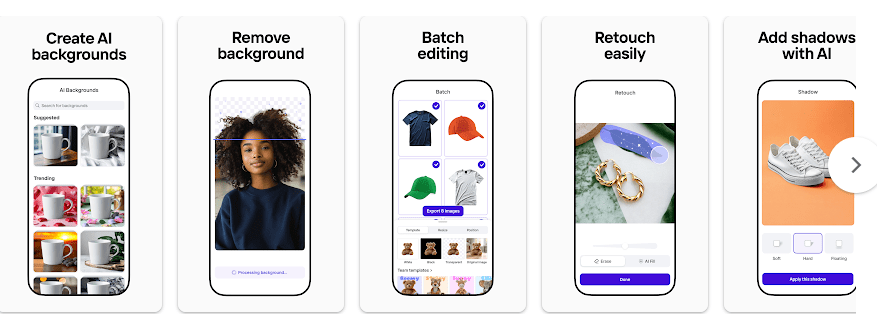
- Background Remover: The app can automatically remove the background from a photo. This is useful for product listings, profile photos, and simple designs.
- AI Backgrounds: You can create a new background for a photo using AI. This helps when you want a product shown in a different setting.
- Object Removal: You can brush over unwanted objects and let the app remove them. This is useful for cleaning small distractions from pictures.
- Resize: PhotoRoom can change the size and shape of an image for different uses. This can help when making pictures for shops, social media, or other platforms.
- AI Product Tools: The app includes tools such as Product Staging, Virtual Model, Recolor, and AI Shadows. These features are mainly useful for sellers who need different product images.
Two Days of Testing
I tested the app on a Redmi-class Android phone by opening photos, removing backgrounds, moving through editing screens, and checking different tools. The main editor is easy to understand once the photo is loaded.
Simple edits are quick, but AI features need more processing than basic changes. PhotoRoom also has many online tools, so internet speed can affect how quickly some results appear.
I did not record a controlled battery percentage or temperature reading, so I would not give a made-up number. The app can place more work on a phone when AI tools and large images are being used.
Recent Google Play reviews include reports of crashes from some users, so performance may differ between phones.
Memory, Storage, and Safety
A recent PhotoRoom Android package is listed at about 102.38 MB for version 2026.31.05 on APKMirror. Another Android download source lists about 191.32 MB, showing why the exact storage used can differ by package type and device.
The installed app can use more space after you edit and save pictures because projects, temporary files, and cache can add storage. Some basic work may use local photos, but AI features and online services need an internet connection.
PhotoRoom may request access to your photos and camera so you can select or take pictures. Google Play currently says no data is shared with third parties, and its data-safety section provides information about data collection and security practices.
Upsides and Downsides
Pros
- Background removal is easy to use.
- Many tools are made for product photos.
- AI background options are available.
- Free plan is available.
- Works well for simple product designs.
Cons
- Some useful tools require payment.
- AI tools need internet access.
- Cache and saved projects can use more storage.
- Heavy editing can use more phone resources.
Who Should Get It?
Recommended For
- Online sellers who need clean product photos.
- People who often remove or change photo backgrounds.
Not Recommended For
- Users who only need simple crop and brightness tools.
- People who want every AI feature without paying.
3 Quick FAQs
Is PhotoRoom free?
Yes, PhotoRoom has a free plan with basic features. It has limits on some features, exports, AI use, and commercial use.
Can I remove a photo background with PhotoRoom?
Yes, background removal is one of the app’s main tools. The app can automatically remove the background from an image.
Does PhotoRoom need the internet?
Some basic editing can work with photos already on your phone. AI and other connected features need internet access to process or load content.
Offzack Verdict
PhotoRoom is a useful choice if your main job is removing backgrounds or making product photos. The free plan gives you a way to try the app, but regular sellers may need a paid plan for higher limits and extra tools.
Download Photoroom: AI Photo Editor – App from Google Playstore
Final Scorecard
- Ease of Use: ★★★★☆ (4/5) — The main background tools are simple to find and use.
- Performance: ★★★★☆ (4/5) — Basic editing is quick, while AI work needs more processing.
- Features: ★★★★★ (5/5) — It offers background removal, AI backgrounds, object removal, resizing, and product tools.
- Privacy & Safety: ★★★★☆ (4/5) — Google Play currently says no data is shared with third parties.
- Value for Money: ★★★★☆ (4/5) — The free plan is useful, but many advanced features have limits or need a subscription.
- Overall Rating: ★★★★☆ (4/5) — PhotoRoom is a good Android choice for quick background editing and product photos.