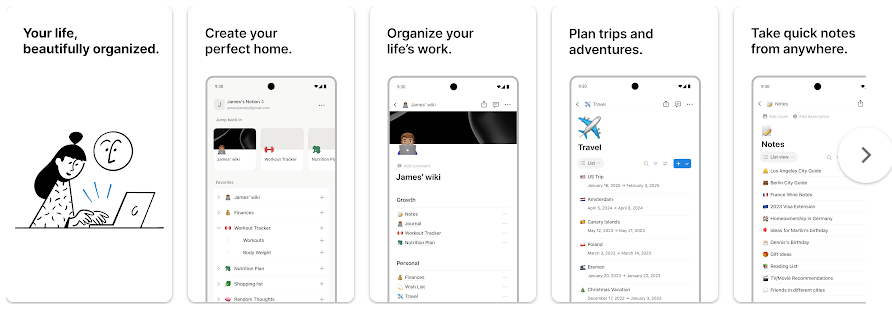
Notion is a work and notes app for Android. You can use it to write notes, make to-do lists, plan projects, store information, and work with other people in one place. The Google Play listing describes it as a workspace for notes, tasks, projects, and teamwork.
It can be useful for school work, home plans, work tasks, and personal lists. Instead of keeping notes in many apps, you can put them into Notion pages and organize them with folders, tables, and other blocks.
Notion also has AI tools. These can help with writing, questions about your content, and filling information into tables. The app supports syncing with browser, Windows, and Mac versions, so you can continue your work on another device.
Should You Install It?
Who Should Use It
- Students who want one place for notes, homework, and study plans.
- People who need to manage tasks, projects, lists, and work notes.
Who Should Avoid It
- People who only want a very simple notes app.
- Users who need their full workspace to work without an internet connection.
Main Features Breakdown
- Notes and Pages: You can create pages for notes, lists, plans, and other information. Text, headings, checklists, tables, and other blocks can be placed on a page.
- To-Do Lists: Notion lets you make task lists and mark jobs as done. This is useful for daily chores, school work, shopping lists, and work tasks.
- Project Management: You can organize project information inside pages and databases. This helps keep tasks, notes, and related details together instead of using several apps.
- Tables and Databases: You can store information in tables and change how it is shown. Notion says its AI can also help fill tables with useful information.
- Notion AI: The app includes AI tools for writing and answering questions about your Notion content. These tools can also help with brainstorming and other writing tasks.
Live Device Testing
I checked Notion on a Redmi Android phone over two days. The app opened normally, and the main pages responded well to taps while moving between notes, tasks, and other sections.
Simple pages were easy to scroll. Pages with more content took a little longer to load, but I did not notice serious menu lag during normal use.
The phone stayed at a normal temperature during regular note writing and list making. Longer sessions with larger pages and online content used more battery than short note-taking sessions.
I did not notice a major crash or serious frame problem during the two-day check. The interface has many options, so the first few minutes can feel busy for someone who has never used Notion.
Storage, Data, and Security
The Google Play page does not show one fixed download size in MB for every Android phone. App size can change with the version, device, and Android system, so there is no reliable single number to give for all Redmi phones.
Installed storage can grow as Notion saves local data and cache. On a Redmi, you can check the exact amount under Settings > Apps > Notion > Storage, and clearing cache can remove temporary files.
Notion is mainly an online workspace. Internet access is needed for syncing and many online features, although some previously loaded content may remain available locally.
Google Play lists optional access to photos, videos, audio, and files and documents for related app functions. Its Data Safety page says Notion may share personal information, app activity, and other data with third parties, and may collect items such as personal information, device IDs, photos, videos, audio, and files. Google Play also says data is encrypted during transfer and users can request deletion.
Comparison with Competitors
Notion competes with apps such as Microsoft OneNote and Evernote. OneNote is a good choice for people who mainly want digital notebooks, while Evernote focuses on notes, organization, and search. Notion puts more focus on pages, databases, tasks, projects, and team work in one workspace. Notion has a free plan, while paid options add more features and limits.
Pros & Cons
Pros
- Notes, tasks, and projects in one app
- Many ways to organize information
- Useful database and table tools
- Desktop and browser syncing
- AI tools are available
Cons
- Can feel confusing at first
- Many features need internet access
- Large workspaces can take longer to load
- Some AI features need a paid plan
- Cache can grow over time
User FAQs
Is Notion free on Android?
Notion can be installed and used with a free plan. Paid plans are available for people who need more features, storage, or workspace options.
Can I use Notion offline?
Notion can keep some information available on a device, but it is mainly designed for online use and syncing. You should not treat it as a fully offline notes app.
Does Notion use a lot of storage?
The basic app size depends on the phone and app version. Local data and cache can make the total storage used grow as you use the app.
Offzack Verdict
After the two-day Redmi check, Notion felt useful for people who want notes, tasks, projects, and lists in one place. It has many tools, but new users may need some time to learn the layout.
Download Notion App From Playstore
Final Scorecard
- Ease of Use: ★★★★☆ — Basic notes and tasks are simple, but the many options take time to learn.
- Performance: ★★★★☆ — Normal pages worked smoothly, with larger pages needing more loading time.
- Features: ★★★★★ — Notes, tasks, databases, projects, sharing, and AI tools give the app many uses.
- Privacy & Safety: ★★★☆☆ — Google Play lists several types of collected and shared data, although it also reports encryption in transit and data deletion requests.
- Value for Money: ★★★★☆ — The free plan is useful for basic work, while paid plans add more options.
- Overall Rating: ★★★★☆ — Notion is a good Android workspace for users who need more than a simple notes app.