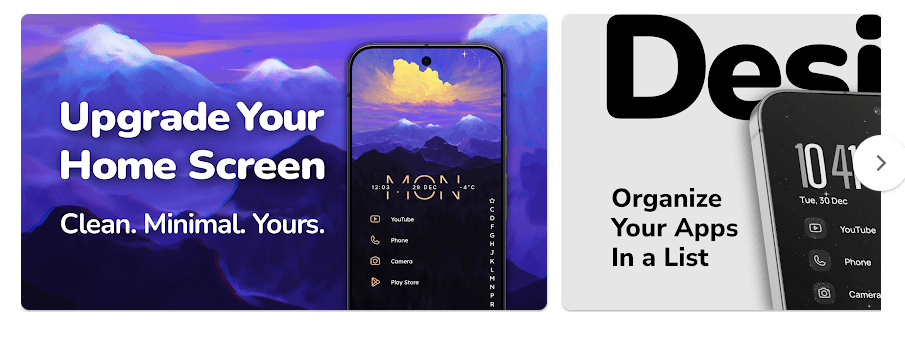
Niagara Launcher replaces the normal Android home screen with a cleaner and simpler layout. Instead of filling the screen with many app icons, it keeps your favorite apps in one easy list and lets you find other apps with an alphabet bar. ([turn2search2])
I found this useful when I wanted a less busy phone screen. The layout puts the apps I use most where I can reach them quickly, while the rest stay in the app list.
The launcher is also made for one-handed use. It has no ads, and the free version includes the basic home screen, app list, quick access, and some customization.
Size, Storage, and Competitors
The latest Android package listed for Niagara Launcher is about 13.3 MB. The final storage used on a phone can be a little higher because Android adds app data and cache.
Niagara can work mainly as an offline home screen, but some features need internet access. For example, its weather feature needs location data to provide weather information.
Olauncher is a more basic text-only launcher that focuses on a very simple screen and says it collects no data. Before Launcher is another minimal option with notification filtering, while Niagara offers more features such as themes, widgets, and its app list. )
Niagara is free to use, while Niagara Pro costs ₹140 per year or ₹420 for a lifetime purchase according to the developer’s listed pricing.
Useful Features
- Simple Home Screen: Niagara puts your selected apps in a clean list instead of using a normal grid of icons. This makes the home screen easy to read and quick to use. ([turn2search2])
- Alphabet App List: You can use the alphabet on the side to find an app quickly. This is useful when you have many apps installed and do not want to search through several pages.
- Notification Previews: Niagara can show notification information beside the related app on the home screen. This lets you check important messages without opening the full notification panel. ([turn3search4])
- Pop-Up Folders: Apps can be grouped into folders that open from the home screen. This keeps less-used apps out of the main view while still keeping them close.
- Usage Breaker: On Android 9 and newer, the Usage Breaker can remind you after spending set amounts of time in selected apps. It is made to help you notice long sessions instead of suddenly blocking the app. ([turn3search2])
Testing Experience
I tested Niagara Launcher on a Redmi Android phone for two days. The home screen opened quickly, and tapping apps felt responsive during normal use.
Scrolling through the app list was smooth. The alphabet bar also made it easy to move around the list without several swipes.
I did not notice major bugs during basic use. The phone also did not become noticeably hot while opening apps, checking notifications, or changing launcher settings.
Battery use felt normal during regular phone use. Since Niagara replaces the home screen and can handle notifications and other launcher features, its battery use can depend on which options are enabled.
One thing Redmi users should know is that Xiaomi’s HyperOS can make third-party launchers harder to set as the default home app on some versions. Niagara provides a workaround for affected HyperOS devices. ([turn2search3])
Permissions & Safety
Niagara may ask for permissions such as notification access and usage access for features that show notifications or track app usage. Some optional functions can also use accessibility access, while the weather feature can use location information. ([turn3search0] )
The developer says Niagara does not sell user data and keeps data on the device when possible. It can collect limited error and interaction reports, but users can turn those reports off. Detailed phone-usage reports are not collected unless the user chooses to join the optional Digital Wellbeing research program. ([turn3search0])
Pros & Cons
Pros:
- Clean and simple home screen
- No ads
- Fast app access
- Useful notification previews
- Free version available
Cons:
- Some features need Pro
- Setup can feel different at first
- Some permissions are needed for extra tools
- Redmi HyperOS may need extra setup
Target Audience
Who Should Download:
- People who want a clean Android home screen.
- Users who want faster access to their favorite apps.
Who Should Avoid:
- People who want a normal icon-grid launcher.
- Users who want every feature for free.
FAQs
Is Niagara Launcher free?
Yes, the basic Niagara Launcher is free to use and has no ads. Some extra features are available through Niagara Pro. ([turn2search2])
Does Niagara Launcher use a lot of battery?
Normal home screen use should not need much battery. Extra services such as notification access, usage tracking, and weather can affect battery use depending on what you enable.
Can I use Niagara Launcher offline?
Yes, the main launcher and app list can be used without a constant internet connection. Some features, such as weather and online services, need an internet connection.
Offzack Verdict
After two days on a Redmi Android phone, Niagara Launcher felt quick, clean, and easy to use once the new layout became familiar. It is a good choice for people who want fewer icons and faster access to the apps they use every day.
Niagara Launcher ‧ Home Screen – Apps on Google Play
Final Scorecard
- Ease of Use: 4.5/5 — The simple list and alphabet bar make finding apps easy.
- Performance: 4.5/5 — The launcher feels light during normal home screen use.
- Features: 4.5/5 — Notifications, folders, themes, widgets, and usage tools give it plenty to use.
- Privacy & Safety: 4/5 — The developer provides clear privacy controls, though some optional features process limited data.
- Value for Money: 4.5/5 — The free version is useful, while Pro adds extra tools for a one-time or yearly price.
- Overall Rating: 4.4/5 — Niagara Launcher is a strong choice for Android users who want a cleaner and less crowded home screen.