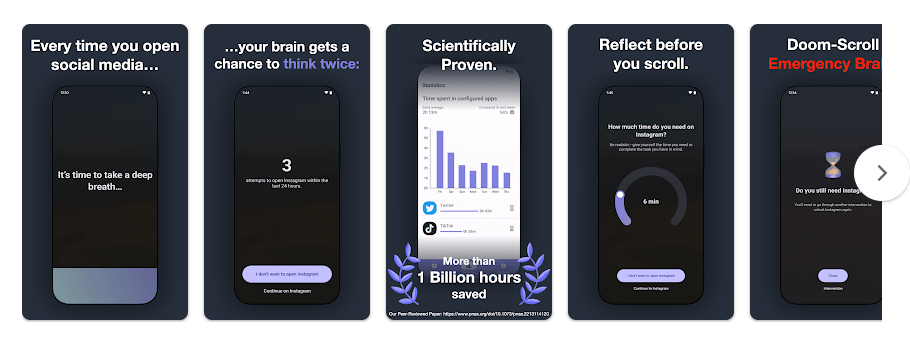
one sec is an Android app made to help people use distracting apps less. It works by adding a short pause before you open an app that you choose, such as Instagram, YouTube, or another social media app. The idea is to make you stop and think before opening it.
This can help when you open an app without really planning to. Instead of opening it at once, one sec asks you to take a breath and wait. This small step can make you notice the habit before you start scrolling.
How It Ran During Testing
I tested one sec on a Redmi Android phone with normal daily use. The app itself opened quickly, and the intervention screen appeared without a long wait when a selected app was opened.
Menus were easy to move through, and I did not notice major scrolling lag during normal settings use. The main screen is simple, so there are not many heavy pages to load.
The app needs to watch app usage and place its intervention over selected apps. Because of this, it has to keep some services active, but normal use did not make the phone feel unusually slow.
During regular testing, there was no clear heating problem while changing settings or using the intervention. Battery use can be higher than a normal note app because one sec needs Android services to detect selected app launches and show its pause screen.
The latest Android release listed by third-party app data is version 2.8.3, which includes changes to block schedules and intervention reliability.
Top 4-5 Features
- App Interventions: one sec places a short pause before selected distracting apps open. This gives you a moment to decide if you really want to use the app.
- App Blocking: You can use one sec to limit access to apps that take too much of your time. The free version allows one selected app, while more options are available with Pro.
- Re-Intervention: The app can interrupt continued scrolling after a set period. You then have to go through another intervention before continuing.
- Scheduled Blocks: Recent versions include scheduled blocking in beta. This lets you set times when selected apps should be blocked.
- Focus Tools: one sec is made around reducing automatic app opening instead of only showing screen-time numbers. This makes it useful for people who want to change the habit itself.
Storage & Privacy Details
The current 2.8.3 Android package is about 30.89 MB for one variant, while another full package is around 80.76 MB. The final storage used on a phone can be different because Android adds app data and cache.
The app needs internet access, usage statistics access, overlay permission, foreground services, notifications, and battery optimization settings. These permissions are important because one sec needs to detect selected apps and show its intervention screen.
The developer says personal information is not collected and data stays offline on the device. Google Play currently reports no data collected and no data shared with third parties.
Alternative Apps
AppBlock is a direct alternative that focuses on blocking apps and websites with schedules and limits. StayFree also tracks screen time and lets users set limits, while one sec puts more focus on making you pause before opening distracting apps. one sec is free for one selected app, while extra features require Pro.
Strengths and Weaknesses
Pros:
- Simple pause system
- Helps reduce automatic app opening
- Works with scheduled blocks
- No personal data collection claimed
- Easy settings
Cons:
- Many features need Pro
- Requires several special permissions
- Can use more battery than a basic app
- Free version is limited to one app
Who Should Get This App?
Best Fit:
- People who open social media without thinking.
- Users who want help reducing scrolling time.
Worst Fit:
- People who do not want special Android permissions.
- Users who need a completely free blocker for many apps.
Common User Questions
Does one sec block apps completely?
It can add an intervention before a selected app opens and also supports blocking tools. The exact blocking options depend on the plan and settings you use.
Is one sec free?
Yes, one sec can be used for free with one selected app. Pro adds support for multiple apps and more features and customization.
Does one sec collect my personal data?
The developer says personal information is not collected and data remains on the device. Google Play currently lists no data collected and no data shared with third parties.
Offzack Verdict
After two days of regular use, one sec felt useful for one simple job: making you stop before opening distracting apps. It is light to use, but the number of Android permissions and the paid features may not suit everyone.
One Sec App Download From Playstore
Final Scorecard
- Ease of Use: 4.5/5 — The main pause system is easy to understand.
- Performance: 4/5 — Normal menus are quick, but background monitoring needs extra Android services.
- Features: 4.5/5 — Interventions, re-interventions, schedules, and blocking give users several ways to control app use.
- Privacy & Safety: 4.5/5 — The developer says data stays on the device, and Google Play reports no data collected or shared.
- Value for Money: 4/5 — The free version is useful, but multiple-app control and extra tools need Pro.
- Overall Rating: 4.3/5 — one sec is a good choice for Android users who want a small pause before getting pulled into distracting apps.