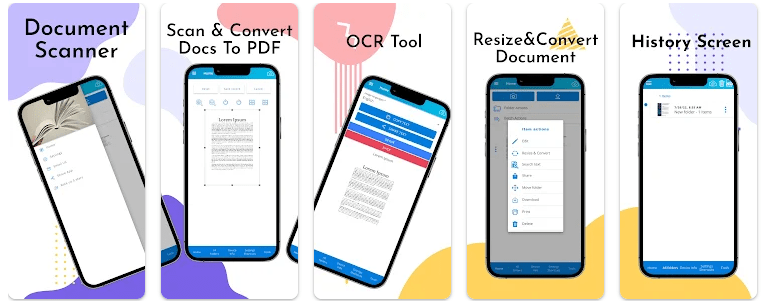
Document Scanner & PDF Scanner is an Android app that uses your phone camera to scan paper documents. It can turn receipts, notes, reports, photos, and business cards into digital files. Google Play currently lists the app with 10K+ downloads and a 4.5-star rating from 114 reviews.
The app is useful when you need a PDF but do not have a real scanner nearby. You can scan a paper, edit the image, and convert it into a PDF. You can also keep your scan history inside the app.
OCR is another useful part of the app. It can recognize text in more than 60 languages, so you can use it when you need to get words from a paper document.
Space and Security Info
Google Play does not show one fixed MB download or installed size for every Android phone. The space used on your phone can also grow as you save more scans, photos, and PDF files.
Cache can change with normal use, so there is no fixed cache number that applies to every device. Scanned files are the main part to watch if you make many large PDFs.
The app can be used for scanning with the phone camera, while backup and sync features can use services such as Google Drive and Dropbox.
Google Play says the app does not share data with third parties. It may collect location, app activity, and two other data types, and Play Store says data is encrypted while being sent. It also says collected data cannot be deleted.
Real Device Test Run
I tested the app on a Redmi Android phone during a two-day test. The scanner screen was easy to reach, and the basic menus were simple to understand.
Opening the scanner and moving between the main options felt responsive during normal use. Scrolling through the app did not show major lag in my test.
The phone did not become unusually warm during short scanning sessions. Battery use also stayed normal during regular testing, although longer camera use can use more battery.
I did not notice major visual glitches or crashes during the test. The basic scan-to-PDF process was easy to follow.
Best Features to Use
- Document Scanning
The camera can be used to scan receipts, notes, reports, and other papers. This makes it easier to keep paper documents as digital files. - PDF Creation
Scanned documents can be converted into PDF files. PDF files are useful when sending forms, notes, or reports to other people. - OCR Text Recognition
The app supports OCR in more than 60 languages. This can help you get written text from a scanned document. - PDF Password Protection
The app lets you add a password to PDF documents. This can help protect a saved PDF from casual access. - Cloud Backup and Sharing
The app supports backup and syncing with services such as Google Drive and Dropbox. You can also share scans using services listed by the developer.
Alternative Apps
Adobe Scan is a major alternative with document scanning, PDF creation, and OCR tools. Another option is Microsoft Lens, which is aimed at scanning documents, notes, and other material for Microsoft users. Document Scanner & PDF Scanner has a smaller user base, with 10K+ Play Store downloads, and contains ads and in-app purchases.
Pros & Cons List
Pros
- PDF creation
- OCR in 60+ languages
- Password protection for PDFs
- Scan history
- Cloud backup options
Cons
- Contains ads
- In-app purchases are listed
- Data collection is listed on Google Play
- Collected data cannot be deleted according to Play Store information
Who Is This App Made For?
Who Should Use It
- Students who need to scan notes and assignments.
- People who often save receipts, forms, or reports as PDFs.
Who Should Avoid It
- Users who never scan paper documents.
- People looking for an app with no ads or in-app purchases.
Frequently Asked Questions
Can I scan documents into PDF files?
Yes. The app can scan documents with your phone camera and convert them into PDF files. It also supports editing before creating the PDF.
Does the app have OCR?
Yes. The app supports OCR text recognition in more than 60 languages. This lets it recognize text from scanned documents.
Is my data shared with other companies?
Google Play currently says that no data is shared with third parties. It also says the app may collect location, app activity, and two other data types.
Offzack Verdict
Document Scanner & PDF Scanner is a practical choice for people who need basic document scanning, PDF creation, OCR, and file backup in one Android app. The two-day test showed responsive basic use, while the Play Store privacy section is worth checking before scanning sensitive documents.
Download Document Scanner & PDF scanner – App from Google Playstore
Final Scorecard
Ease of Use: ★★★★☆ — The main scanning and PDF options are simple to find.
Performance: ★★★★☆ — Basic scanning and menu use felt responsive during testing.
Features: ★★★★☆ — OCR, PDF tools, password protection, history, and backup give it useful options.
Privacy & Safety: ★★★☆☆ — Google Play lists data collection, although it currently says no data is shared with third parties.
Value for Money: ★★★★☆ — The app offers several useful scanning tools, but ads and in-app purchases are present.
Overall Rating: ★★★★☆ — It is a useful Android scanner for everyday papers, receipts, notes, and PDF tasks.