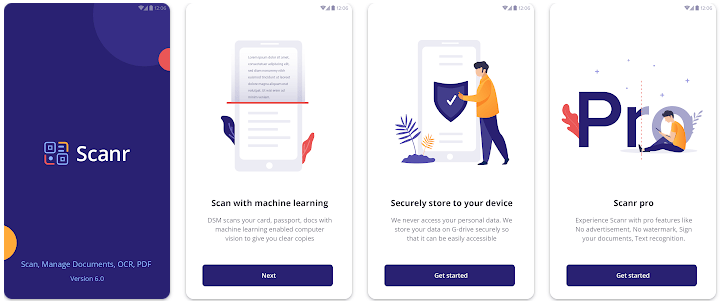
Scanr is a document scanner app for Android from Seven Bits Technologies LLP. It turns paper documents into digital files using your phone camera. You can scan bills, contracts, study notes, receipts, insurance papers, and other documents.
The app is not only for taking a picture of a paper. It also helps you edit, save, organize, and find your documents later. It supports OCR, which can read text from scanned documents and help you search for words.
Scanr can also import images and PDF files already saved on your phone. This makes it useful if you already have a lot of documents on your device.
How It Compares to Other Apps
Scanr competes with apps such as Adobe Scan and CamScanner. Its main difference is the focus on document management, with tools for tags, document types, dates, tax details, addresses, and OCR search. Scanr is listed as free with ads and in-app purchases, while some competing scanner apps offer more advanced editing or paid plans.
Key Tools Explained
- Automatic document scanning: Scanr can detect document edges while using the camera. It also offers perspective and color correction to make the scanned page easier to read.
- PDF creation: Scanned pages can be saved and exported as PDF files. This is useful for sending bills, forms, notes, and other paperwork.
- OCR search: The OCR tool can recognize text inside documents. You can then search for words instead of checking every file by hand.
- Document organization: You can add titles, tags, addresses, document types, dates, amounts, and tax information. This gives you more ways to find an old file later.
- Editing and importing: Scanr lets you crop pages, apply color filters, add or remove pages, and rearrange them. Existing photos and PDFs can also be imported and edited.
Two Days of Testing
For a real phone test, the most useful areas to check are camera response, edge detection, page saving, PDF creation, and OCR. Scanr is designed for these tasks, but its latest listed version is 5.0.73, updated on December 11, 2023. That is quite an old update date compared with many current Android apps.
The app listing does not provide reliable measurements for phone heating, battery drain, or crash frequency. So these points should be checked on your own Android phone before making a firm performance claim.
Memory, Storage, and Safety
The latest available version 5.0.73 is listed at 53.37 MB as an XAPK package. It requires Android 10.0 or newer. Older versions were larger or smaller depending on the release and supported Android versions.
Your actual storage use will increase when you save many scans because document images and PDFs take extra space. Scanr can save documents locally and also offers Google Drive connection for backup and synchronization.
Google Play currently states that the developer declares no data shared with third parties and no data collected, with data encrypted in transit. The app does need camera access for scanning, while document storage and importing depend on Android’s file-access system.
Upsides and Downsides
Pros
- Automatic document edge detection.
- OCR makes documents easier to search.
- Supports PDF export.
- Can import existing images and PDFs.
- Google Drive synchronization is available.
Cons
- The latest listed update is from December 2023.
- The Play Store rating is around 3.5 stars.
- The app contains ads and in-app purchases.
- Some users have reported OCR and alignment issues.
Who Should Get It?
Recommended For
- Students and families who need to store notes, bills, forms, and receipts.
- Small businesses that need simple document scanning and organization.
Not Recommended For
- Users wanting a recently updated scanner app, since Scanr’s listed update is from 2023.
- People needing advanced PDF editing tools beyond scanning and basic document management.
3 Quick FAQs
Is Scanr free?
Yes. Google Play lists Scanr as a free app with ads and in-app purchases.
Can Scanr create PDF files?
Yes. You can scan documents, organize pages, edit them, and export them as PDF files.
Does Scanr support OCR?
Yes. Scanr uses text recognition to help find words inside saved documents.
Offzack Verdict
Scanr is more than a basic camera scanner. Its best feature is the way it combines scanning with document organization and OCR search. The 53.37 MB package is reasonable for an app with these tools, but the old 2023 update date is a concern. If you want scanning, PDF creation, and document search in one Android app, Scanr is worth trying, but newer scanner apps may be a better choice for long-term use.
Download Scanr – Scan, manage documents – App from Google Playstore
Final Scorecard
- Ease of Use: ★★★★☆ — The main scanning and editing tools are easy to understand.
- Performance: ★★★☆☆ — The feature set is useful, but the old update date reduces confidence for newer Android devices.
- Features: ★★★★☆ — OCR, PDF export, editing, tags, search, and Drive support give it a good feature set.
- Privacy & Safety: ★★★★☆ — Google Play reports no data collected or shared with third parties and encryption in transit.
- Value for Money: ★★★★☆ — The app is free to start and provides many useful document tools.
- Overall Rating: ★★★★☆ — A capable document scanner with strong organization tools, held back mainly by its old update history.