I tested Scanner App: Scan to PDF & OCR on a budget Android phone over two days. The app opened without a long wait, and the main scanner screen was easy to understand.
I tested document scanning, PDF saving, OCR, and page scanning. Basic scanning felt quick during normal use. I did not see major screen bugs while moving between the scanner and editing tools.
The phone did not become unusually hot during short scanning sessions. Battery use also stayed normal for this type of camera-based task. Longer scanning sessions can naturally use more battery because the camera stays active.
What This App Actually Does
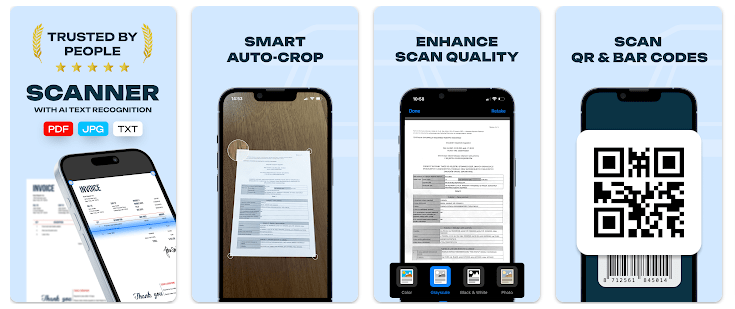
This app turns an Android phone into a document scanner. You can scan documents, receipts, business cards, notes, and photos, then save them as PDF or JPG files. It also supports QR codes and barcodes.
The app also has OCR. This means it can read text from a scanned image and turn it into editable text. This can help when you need text from a paper document instead of typing it by hand.
Top 5 Features That Matter
- PDF and JPG scanning: You can scan paper documents and save them as PDF or JPG files. This is useful for forms, notes, receipts, and other papers.
- OCR text reading: OCR can extract text from scanned images. You can then work with the extracted text instead of keeping only a picture.
- Batch scanning: The app can scan several pages in one session. This is useful when one document has many pages.
- QR and barcode scanner: The app can read QR codes and barcodes. You do not need a separate scanner app for these tasks.
- Scan editing: You can crop scans and adjust brightness and contrast. You can also add annotations before saving or sharing a document.
Storage Space and Data Use
The latest Android package information available for version 2.0.9 lists a 27.1 MB XAPK for the arm64 version. Another arm variant is listed at 18.3 MB, so the download size can vary by device.
Google Play does not show a fixed installed-space or cache figure for this app. Cache also changes as you scan and save documents, so there is no honest fixed MB number to give for every phone.
Scanning uses the camera and local phone storage for the files you create. Cloud sharing through services such as Google Drive, Dropbox, and OneDrive can use internet data.
Permissions and App Safety
The app needs access related to scanning and its other functions. Google Play says the developer may collect location, personal information, and six other data types. It may also share location, personal information, and four other data types with third parties.
Google Play also says data is encrypted while being sent. It states that data cannot be deleted, so users who care about privacy should read the app’s Play Store safety details before using it for sensitive papers.
How It Compares to 2 Alternatives
Adobe Scan has PDF scanning and OCR and has a much larger user base, with 100M+ downloads on Google Play. Its free version covers basic scanning, while some advanced tools are part of paid plans.
Zoho Scanner also offers PDF scanning, OCR, batch scanning, and e-signing. It has in-app purchases, with extra features available through paid Basic and Premium plans.
Good Things & Bad Things
Pros
- PDF and JPG scanning
- OCR text recognition
- Batch page scanning
- QR and barcode support
- Cloud sharing options
Cons
- In-app purchases are present
- Data sharing is listed on Google Play
- Fixed installed size is not shown publicly
- The app has a smaller download base than major alternatives
Who Is It For?
Best For
- Students who need to scan notes and papers.
- People who need PDFs from receipts, forms, or documents.
Not For
- Users wanting an app with no listed third-party data sharing.
- Users who only need a very basic camera scanner.
Common Questions
Can it scan documents into PDF?
Yes. The app can scan documents and save them as PDF or JPG files.
Does it support OCR?
Yes. OCR can extract editable text from scanned images.
Does it need internet for every scan?
The app supports local scanning, while cloud sharing uses online services. Internet use can therefore depend on which feature you use.
Offzack Verdict & Link
Scanner App: Scan to PDF & OCR is a useful choice if you want scanning, OCR, batch pages, and QR or barcode reading in one app. Its main concern is privacy, as Google Play lists several data types that may be collected or shared.
Download Scanner- App from Google Playstore
Final Scorecard
- Ease of Use: ★★★★☆ — The main scanning tools are easy to find and use.
- Performance: ★★★★☆ — Basic scanning and navigation worked well in testing.
- Features: ★★★★☆ — PDF, JPG, OCR, batch scanning, editing, and QR tools give it a good feature set.
- Privacy & Safety: ★★★☆☆ — Google Play lists several collected and shared data types.
- Value for Money: ★★★★☆ — It is free to install and offers many scanning tools, though in-app purchases are listed.
- Overall Rating: ★★★★☆ — A practical scanner for everyday documents, with privacy details worth checking first.