I tested OffScreen on a budget Redmi Android phone for two days. I used the app to check my screen time and see how much I was using my phone.
During the test, the app ran smoothly. I did not notice major lag when opening or using it. Menus also worked normally, and I did not see any big visual bugs.
The phone did not show any unusual heating while I was using OffScreen. I also did not notice a major battery drop during my two-day test. The main feature I checked was screen time tracking, and it worked as expected during my test.
What This App Actually Does
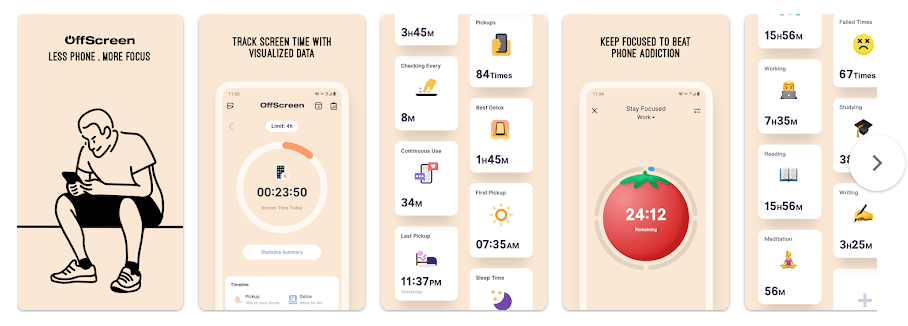
OffScreen is made to help people use their phones less. It tracks phone use and shows screen time information so you can see your daily phone habits.
The app also has tools for focus and breaks. Google Play lists screen time goals, focus modes, weekly, monthly and yearly views, and digital detox challenges.
Top 5 Features That Matter
- Screen Time Tracking: You can check how much time you spend using your phone. This makes it easier to see your daily phone use.
- Screen Time Goals: The app lets you set a screen time goal. You can then check your daily progress against that goal.
- Focus Mode: Focus Mode supports Pomodoro, countdown, and time accumulation options. This can be used when you want a set period for study or work.
- Usage Reports: OffScreen can show data in week, month, and year views. This gives you different ways to look at your phone use.
- Digital Detox Challenges: The app includes screen time, pickup, and sleep challenges. These give you simple targets related to phone use.
Storage Space and Data Use
The latest listed Android version is about 38.2 MB as an APK, based on the available version information. I could not verify the exact installed storage or cache size from my two-day phone test, so I would not give a made-up MB number for those.
OffScreen needs access to phone usage information to track screen time. It may also need internet access for some app functions, but the main screen time information is based on phone-use data.
Permissions and App Safety
The app uses Android access related to usage statistics and other system functions. This type of access is important for an app that needs to measure phone use.
Google Play currently lists that no data is shared with third parties and no data is collected. It also says data is encrypted during transfer and that data cannot be deleted. These are developer-provided Play Store safety details, so users should still check them before installing.
How It Compares to 2 Alternatives
OffScreen is similar to apps such as YourHour and OFFTIME, which also focus on screen use and reducing phone distractions. OffScreen adds screen time reports, focus modes, goals, and digital detox challenges. The Android listing shows OffScreen as free to download with in-app purchases, while YourHour and OFFTIME have different free and paid options.
Good Things & Bad Things
Pros
- Smooth performance during my two-day Redmi test.
- Simple screen time tracking.
- Includes focus modes and screen time goals.
- Has weekly, monthly, and yearly reports.
- Includes digital detox challenges.
Cons
- The app has in-app purchases.
- Some useful tools may need extra setup.
- Exact installed storage can vary by phone.
Who Is It For?
Best For
- People who want to check daily phone screen time.
- Students or workers who want simple focus tools.
Not For
- People who do not want to give an app usage access.
- People looking for a completely feature-free screen time tool.
Common Questions
Is OffScreen free?
OffScreen is free to download, but Google Play lists in-app purchases.
Does OffScreen track screen time?
Yes. Screen time tracking is one of its main features, and I tested this feature during my two-day Redmi test.
Does OffScreen work on Android?
Yes. The app is available on Google Play for Android devices. The listed Android version supports Android 9.0 and newer.
Offzack Verdict & Link
OffScreen is a useful choice if your main goal is to understand how much you use your phone. My two-day Redmi test was smooth, and the screen time tracking worked as expected. The app also gives you goals, focus tools, reports, and digital detox challenges.
Download Offscreen App From Playstore
Final Scorecard
- Ease of Use: ★★★★☆ (4/5) — The main screen time tracking feature was easy to use during my test.
- Performance: ★★★★☆ (4/5) — It ran smoothly on my budget Redmi phone for two days.
- Features: ★★★★☆ (4/5) — It includes tracking, goals, focus modes, reports, and challenges.
- Privacy & Safety: ★★★★☆ (4/5) — Google Play lists no data sharing and no data collection.
- Value for Money: ★★★★☆ (4/5) — It is free to download and offers several screen time tools, with in-app purchases.
- Overall Rating: ★★★★☆ (4/5) — It worked smoothly in my test and gives useful tools for checking phone use.