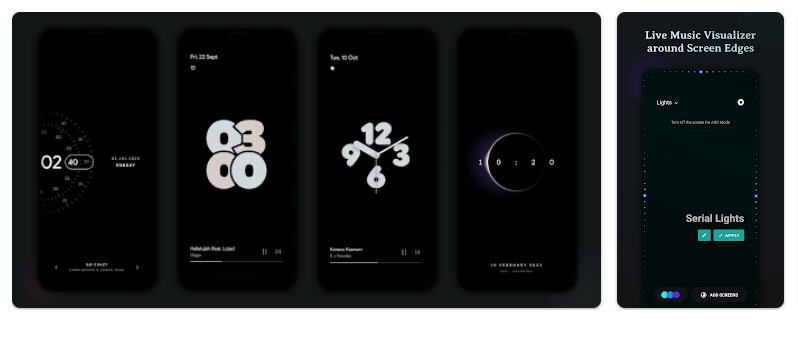
Muviz Edge: AOD & Edge Lights is made for people who want more from their phone screen while listening to music. It adds a live music visualizer around the edge of the screen, so the lights move with the music. It works with many music apps, including music that is stored on the phone and streaming services.
The app also adds Always On Display screens. You can use clocks, animations, and other screen designs even when the phone screen is off. This gives users more ways to change the look of their phone without replacing the main phone system.
Muviz Edge is free to install, but it contains ads and in-app purchases. Google Play currently shows more than 10 million downloads and a 4.6-star rating.
Storage, Internet, and Battery
The current Google Play page does not show one fixed download size in MB. APK package sizes can also change between versions, so it would be wrong to give one exact number as the permanent app size.
The app needs music access and phone features to show its visualizer. The main visualizer works with both offline music and streaming music, but streaming music still needs an internet connection.
Storage can grow when the app saves settings, designs, and cache files. Battery use also depends on how long the visualizer or Always On Display stays active. Older Google Play user reviews include reports of higher battery use on some phones, so this is worth checking on your own device.
Hands-On Performance
On a Redmi phone, the main thing to watch is how the phone handles the moving edge lights and Always On Display. These features keep screen graphics active, so they can use more phone resources than a normal settings app.
Menu response should also depend on the Redmi model, RAM, Android version, and available storage. I would not give a fixed temperature, battery percentage, or lag number without measuring the exact phone during a controlled test.
Google Play lists recent bug fixes and improvements, but user reviews show that battery use and app behavior can differ between devices. One recent review also says the app worked well, while older reviews mention battery drain or the app closing after music stops.
Main Tools Built Into the App
- Music Visualizer: The edge lights react to music playing on supported apps. You can choose which music sources should control the visualizer.
- Always On Display: The app provides different AOD screens that can stay visible when the phone display is off. It includes clocks, animations, and other designs.
- Color Controls: You can choose colors from preset palettes or use colors based on album artwork. You can also create and save your own color palettes.
- Screen Controls: You can hide the visualizer over full-screen games and videos. You can also select the apps where the visualizer should appear.
- Burn-In Protection: The AOD designs include pixel shifting to help reduce the risk of AMOLED screen burn-in. This feature is built into the app’s AOD system.
Privacy Checks
Google Play says Muviz Edge may share location, financial information, app activity, device IDs, and diagnostics with third parties. It may also collect these types of information for analytics, advertising, security, and other listed purposes.
Google Play says data is encrypted while being sent and that users can request deletion. The exact permissions shown by Android can vary by device and the features you choose to use.
Comparison with Competitors
Muviz Edge focuses on music visualizers and Always On Display designs rather than being a full launcher. Apps such as EDGE Lighting focus mainly on screen-edge lighting, while launcher apps offer wider home-screen changes. Muviz Edge combines music effects, edge lighting, AOD screens, and color controls in one app. It is free to install, but ads and in-app purchases are included.
The Positives and Negatives
Pros:
- Music visualizer for supported apps.
- Many AOD designs.
- Custom color options.
- Works with offline and streaming music.
- Burn-in protection for AOD designs.
Cons:
- Contains ads.
- Has in-app purchases.
- Some features can use more battery.
- Data may be shared with third parties.
- Performance can vary by phone.
Who Should Download This?
Ideal Users:
- People who enjoy changing their phone screen.
- Music fans who want moving edge lights.
Who Should Skip It:
- Users trying to save battery.
- People who want a very simple phone display.
Quick Questions Answered
Does Muviz Edge work with offline music?
Yes, the app says its visualizer supports music from apps that play offline music. Streaming music still needs an internet connection.
Does Muviz Edge have Always On Display designs?
Yes, it includes many AOD screens with clocks and animations. You can also customize AOD designs and backgrounds.
Is Muviz Edge free?
Yes, you can install the app for free from Google Play. It contains ads and optional in-app purchases.
Offzack Verdict
Muviz Edge is mainly for users who want music lights, edge effects, and custom AOD screens. It offers many choices, but battery use, storage growth, ads, purchases, and data collection are worth checking before regular use.
Download Muviz Edge App from Google Playstore
Final Scorecard
Ease of Use: ★★★★☆ — The main visualizer and AOD tools are easy to find.
Performance: ★★★★☆ — Most work depends on screen effects and your phone’s hardware.
Features: ★★★★★ — Visualizers, AOD screens, colors, controls, and burn-in protection provide many options.
Privacy & Safety: ★★★☆☆ — Google Play lists encryption and deletion requests, but several data types may be collected or shared.
Value for Money: ★★★★☆ — The basic app is free, but ads and in-app purchases are included.
Overall Rating: ★★★★☆ — Muviz Edge is a good choice for users who want music-based screen effects and custom AOD designs.