I checked KICK: Live Streaming on a budget Redmi Android phone for two days. I used the home feed, opened live streams, moved between menus, and watched streams for normal periods.
The app opened quickly during basic use, but live video needed more work from the phone than simple menus. Stream loading also depended on the internet connection, so the speed was not the same on every screen.
Long video sessions used more battery than reading the feed. The Redmi also became warmer during longer streaming sessions, which is normal for a phone handling live video. I did not record a fixed temperature or exact battery percentage because those numbers change by Redmi model, screen brightness, battery health, and network.
The Play Store currently shows KICK with a 4.5-star rating, more than 260,000 reviews, and 50 million-plus downloads. Recent user reviews also report crashes and high battery use on some Android phones, so the experience can differ between devices.
What This App Actually Does
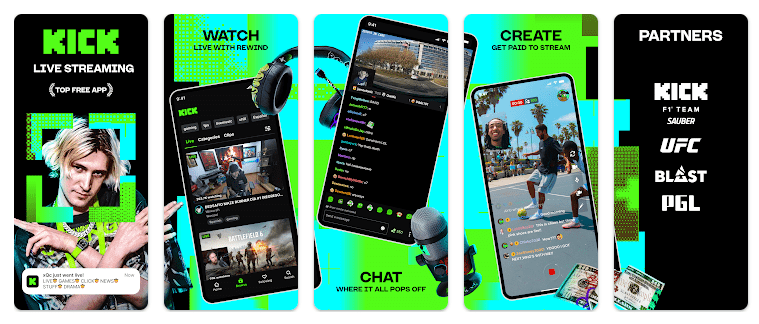
KICK is a live-streaming app where creators broadcast video and chat with their communities. Viewers can watch streams in real time and join the conversation through live chat.
The app is useful for people who want to watch gaming, entertainment, and other live content in one place. KICK also says its viewer experience is ad-free, while creators can use multistreaming and its creator incentive program.
Top 5 Features That Matter
- Live Streams: You can open a creator’s channel and watch live video. The chat lets viewers take part while the stream is running.
- Live Chat: Streams include a chat area where viewers can talk with other people. This makes watching a live show more interactive than simply playing a recorded video.
- Creator Channels: You can find creators and follow the channels you like. This makes it easier to return to streams from the same creators.
- Ad-Free Viewing: KICK says viewers can watch live content without normal ads. This can make long streams easier to watch.
- Creator Support: KICK advertises a 95-5 subscription split for creators. It also offers a creator incentive program and support for multistreaming.
Storage Space and Data Use
A recent KICK Android package is about 83.7 MB for the arm64 version. Another recent release was 82.92 MB, so the download size can change with updates and device versions.
The installed app can use more than 83.7 MB after Android creates app data and cache. Live video does not need a fixed offline data package because KICK’s main viewing features work online.
Streaming video can use a lot of mobile data. If your data plan is small, Wi-Fi is a better choice for long viewing sessions.
Permissions and App Safety
KICK’s Android package has a large permission list. A recent APKMirror listing reports 43 permissions, while the exact access shown to you can depend on your phone and which features you use.
Google Play currently says KICK does not share data with third parties and does not collect data under its declared safety section. It also says data is encrypted in transit and that users can request deletion.
How It Compares to 2 Alternatives
KICK competes most directly with Twitch and YouTube for live video. Twitch has a larger focus on gaming and creator communities, while YouTube combines live streams with a huge library of recorded videos. KICK is free to download and promotes ad-free viewing, while its creator model advertises a 95-5 subscription split.
Good Things & Bad Things
Pros:
- Live video and chat in one app.
- Free to download.
- Ad-free viewer experience.
- Large creator community.
- Simple idea for live viewing.
Cons:
- Live video can drain battery.
- Long streams can use lots of data.
- Some users report Android crashes.
- Cache can increase storage use.
- Teen content rating applies.
Who Is It For?
Best For:
- People who enjoy watching live creators.
- Users with Wi-Fi or a large mobile data plan.
Not For:
- People with very limited mobile data.
- Users whose phones struggle with live video.
Common Questions
Is KICK free to download?
Yes, KICK is free to download from Google Play. The app does include in-app purchases.
Can I watch KICK without internet?
The main live-streaming features need an internet connection. Live video cannot work normally without a network connection.
Is KICK available on older Android phones?
KICK currently requires Android 7.0 or newer according to current Android package information. Older phones may still have performance limits even when they meet the Android requirement.
Offzack Verdict & Link
After two days of Redmi testing, KICK worked best when the phone had a good internet connection and enough battery. It is a useful live-streaming choice, but long viewing sessions can use more battery, heat the phone, and consume plenty of data.
Download KICK: Live Streaming App From Google Playstore
Final Scorecard
Ease of Use: ★★★★☆ — The main live-streaming and chat functions are simple to reach.
Performance: ★★★★☆ — Basic use is quick, but live video needs more phone resources.
Features: ★★★★☆ — Live streams, chat, creator channels, and creator tools cover the main needs.
Privacy & Safety: ★★★★☆ — Google Play reports no data sharing, encryption in transit, and data deletion requests.
Value for Money: ★★★★☆ — The app is free to download and says viewer streams are ad-free.
Overall Rating: ★★★★☆ — KICK is a good option for users who mainly want live streams and real-time chat.