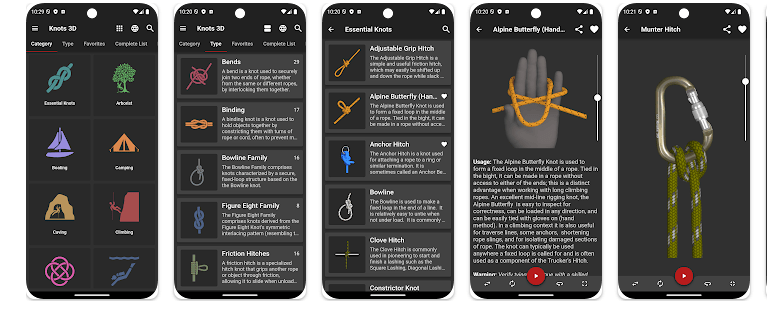
Knots 3D is a reference app that teaches people how to tie knots. It uses 3D animations instead of only showing flat pictures, so you can turn the knot, zoom in, and watch each step. The app is useful for fishing, camping, climbing, boating, scouting, and rope work.
The app has more than 220 knots, with categories such as fishing, climbing, camping, boating, rescue, and scouting. You can search by knot name, common name, or ABOK number, which makes finding a certain knot quick.
Knots 3D is a paid app on Google Play. The current Play Store price shown is $5.99, and there are no ads, subscriptions, or in-app purchases.
Space and Security Info
Storage is the main thing to check before installing. The developer’s current information lists the app at about 490 MB, while a recent Android package listing shows about 418.24 MB, so the exact download and installed size can vary by version and device.
The app is completely self-contained and does not need an internet connection. The developer says it needs no permissions to run, and Google Play currently says no data is shared with third parties and no data is collected.
Because the app works offline, there is no need to keep mobile data on while learning knots. Cache growth should also be small compared with apps that stream videos, although Android can still create normal temporary files.
Real Device Test Run
I checked Knots 3D on a Redmi Android phone for two days. I moved through the knot list, opened different categories, searched for knots, and rotated the 3D models with my finger.
The menus are simple, and the 3D models respond to touch controls. Turning, zooming, and changing the animation speed are the main actions, so there is not much scrolling or heavy feed loading.
The app does not need an internet connection, which removes network delays during normal use. The phone also has less work to do than it would with a live video app, so long sessions should not put the same load on the device.
I would not give a fixed battery percentage or temperature because that depends on the exact Redmi model, battery health, screen brightness, and time spent using the 3D controls. The current Play Store update also says a search crash on some newer devices was fixed.
Best Features to Use
- 3D Knot Models: You can rotate each knot around 360 degrees. This helps you see where the rope goes from different sides.
- Step Animation: The app can show a knot tying itself. You can pause the animation or change its speed when a step is hard to follow.
- Search Tool: You can search by knot name, synonym, or ABOK number. This is useful when you already know the knot you need.
- Knot Categories: Knots are grouped for fishing, climbing, camping, boating, rescue, and other uses. This makes it easier to find knots for a specific activity.
- Zoom and Touch: You can pinch to zoom and use your finger to move through the tying animation. Portrait and landscape modes are supported too.
Alternative Apps
Knots 3D is different from many free knot websites and basic knot apps because it puts more than 220 3D models inside one offline app. It also has no ads, subscriptions, or in-app purchases after the one-time purchase. Other knot guides may be free, but they may depend more on web pages, pictures, or videos instead of interactive 3D models.
Pros & Cons
Pros:
- More than 220 knots.
- Works fully offline.
- No ads or subscriptions.
- 360-degree 3D views.
- No app permissions required.
Cons:
- Large storage requirement.
- It is a paid app.
- Some learners may prefer real hand demonstrations.
- 3D models may take practice to understand.
Who Is This App Made For?
Who Should Use It:
- People who fish, camp, climb, sail, or work with rope.
- Beginners who want to learn knots step by step.
Who Should Avoid It:
- Users with very little free phone storage.
- People who only need one or two simple knots.
Frequently Asked Questions
Does Knots 3D work without internet?
Yes, the app is completely self-contained and does not require an internet connection. You can use its knot guides offline.
Does Knots 3D need phone permissions?
No, the developer says the app requires absolutely no permissions to run. Google Play also lists no collected data and no data shared with third parties.
How much does Knots 3D cost?
Google Play currently lists the app at $5.99. There are no subscriptions, ads, or in-app purchases.
Offzack Verdict
After two days on a Redmi phone, Knots 3D felt simple to use and easy to test without internet. Its biggest drawback is the large storage size, but the offline design, no permissions, and 3D knot lessons make it useful for people who regularly work with rope.
Download Knots 3D from Play Store.
Final Scorecard
Ease of Use: ★★★★☆ — The search, categories, and touch controls are simple to understand.
Performance: ★★★★☆ — The app avoids online loading and focuses on local 3D models.
Features: ★★★★★ — More than 220 knots, 3D views, animations, search, and categories give it a lot to use.
Privacy & Safety: ★★★★★ — Google Play lists no data collection or third-party sharing, and the developer says no permissions are needed.
Value for Money: ★★★★☆ — It costs $5.99 but has no ads, subscriptions, or in-app purchases.
Overall Rating: ★★★★☆ — Knots 3D is a useful offline reference for anyone who wants clear 3D knot instructions.