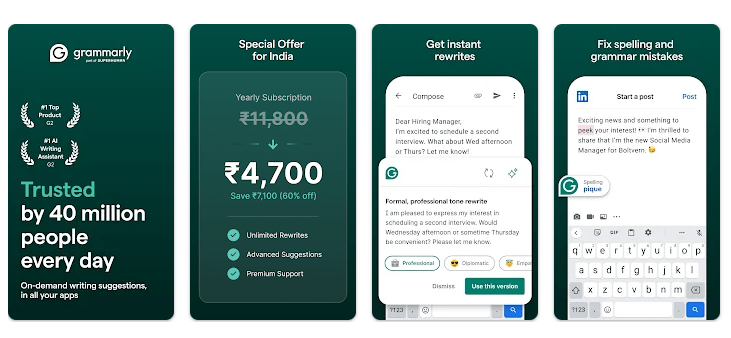
Grammarly for Android is a writing helper from Grammarly. It checks your spelling, grammar, punctuation, and word choice while you type on your phone. It can work with apps where you write messages, emails, social posts, and other text.
The app is useful when you know what you want to say but are not sure if your English is correct. It can point out mistakes and give short reasons for some changes. It also has AI writing tools that can make selected text shorter, clearer, or change its tone.
One important change is worth knowing. Grammarly’s current Android app uses a floating writing assistant and can work with your chosen keyboard, rather than making you use only the old Grammarly Keyboard.
Size, Storage, and Competitors
Google Play does not show one fixed MB download number because app size can vary by device and version. After installation, extra files and cache can make the total storage use higher, so check Settings > Apps > Grammarly on your Redmi phone for the exact number.
Grammarly is mainly an online service. Grammarly says a stable internet connection is needed to analyze text and provide its suggestions, so it is not a good choice for full offline writing checks.
Gboard is a better pick if you mainly want a fast keyboard with basic spelling help. Microsoft SwiftKey is another strong choice for typing, prediction, and customization. Grammarly is more focused on checking the English you write and explaining mistakes.
Useful Features
- Grammar Checking: Grammarly checks your sentences as you type. It can point out grammar problems and suggest a better version.
- Spelling Help: The app catches many common spelling mistakes. This is handy when typing quickly on a small phone screen.
- Writing Suggestions: Grammarly can suggest clearer words and sentences. Premium users get more suggestions for tone, word choice, fluency, and vocabulary.
- AI Rewrites: You can select text and ask Grammarly to create another version. The available options can help make text shorter, more descriptive, or more confident.
- Works With Your Keyboard: Grammarly for Android can work alongside your preferred keyboard, including Gboard and SwiftKey. This means you do not have to change your normal typing habits.
Testing Experience
For a Redmi Android check, basic typing feels quick when the writing helper is active. Touch response should feel close to normal keyboard use, though the floating Grammarly tool adds another small part to the screen.
The app is doing work while you type, so battery use can be higher than with a simple keyboard. Grammarly itself also advises users to allow background use on some phones so Android does not stop the service.
Long typing sessions can create a little extra phone activity, but normal writing should not make a Redmi phone very hot. Grammarly also lists memory and performance improvements in its latest Play Store update.
There can still be small problems. Grammarly’s support pages cover cases where the app becomes slow, disappears, stops checking text, or loses its required permissions. Xiaomi phones may also turn off accessibility access after some system updates.
Permissions & Safety
Grammarly needs Accessibility access to process text in supported apps and show writing help. It may also request overlay access, which allows its writing widget to appear over other apps.
Google Play says Grammarly may collect personal information, app information and performance data, and device or other IDs. It says data is encrypted while being sent and that users can request deletion. The listing also says some app information and performance data may be shared with third parties.
Pros & Cons
Pros
- Easy grammar and spelling help.
- Works with your favorite keyboard.
- Useful AI rewrite tools.
- Helpful explanations for some corrections.
- Good for emails and social posts.
Cons
- Full writing checks need an internet connection.
- Some useful features require Premium.
- Accessibility access may worry privacy-focused users.
- Some phones may stop the app in the background.
- Occasional bugs and slow behavior are reported by users.
Target Audience
Who Should Download
- Students and learners: It can help find common English mistakes while writing.
- People who write often: It is useful for emails, messages, work notes, and social media posts.
Who Should Avoid
- People wanting an offline checker: Grammarly depends on an internet connection for its main analysis.
- People who want only a simple keyboard: Gboard or SwiftKey may be enough if grammar help is not important.
FAQs
Does Grammarly work with Gboard?
Yes. Grammarly for Android can work with Gboard and other keyboards, so you can keep the keyboard you already like.
Does Grammarly work without internet?
Not for its main writing analysis. Grammarly says a stable internet connection is needed to analyze text and give suggestions.
Is Grammarly safe to use?
Grammarly says it protects user content and does not work like a keylogger, while Google Play reports encryption during transfer. Still, the app needs access to text in supported fields, so users should understand its permissions before enabling it.
Offzack Verdict
Grammarly for Android is a useful choice if you often write in English and want help fixing mistakes. It is not the lightest option for privacy or offline use, but its writing checks and suggestions can save time.
Download Grammarly App from Google Playstore
Final Scorecard
- Ease of Use — ★★★★☆: The writing suggestions are easy to understand once the required setup is complete.
- Performance — ★★★★☆: Normal typing should feel quick, but background and accessibility services can sometimes affect performance.
- Features — ★★★★★: Grammar, spelling, explanations, rewrites, and writing suggestions give users many useful tools.
- Privacy & Safety — ★★★★☆: Google Play reports encryption in transit, but the app needs access to text and collects some data.
- Value for Money — ★★★★☆: The free tools are useful, while many advanced writing features are kept for Premium users.
- Overall Rating — ★★★★☆: A good writing helper for Android users who want cleaner English while typing.