X-plore File Manager is an Android app for managing files and folders. It lets you copy, move, rename, delete, search, and share files from one place. It also lets you work with ZIP and RAR files.
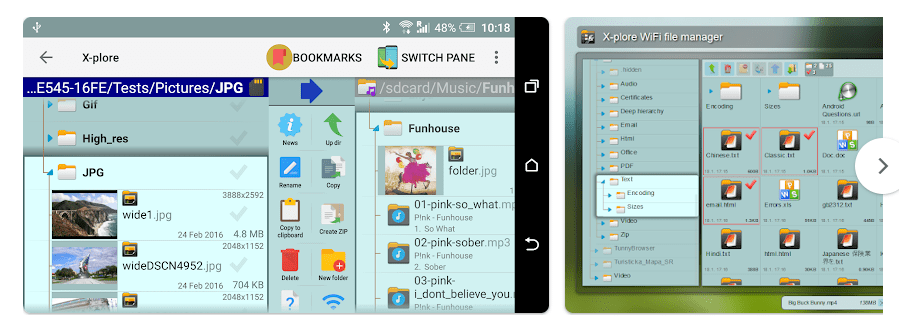
The app is made for people who want more control over phone storage. Its main screen shows two folders at the same time, so moving files from one folder to another is easier. It can also work with USB drives, cloud storage, network folders, and some remote servers.
How It Compares to Other Apps
X-plore is free to install, but some advanced tools need a donation. Files by Google is simpler and is better for basic cleaning and file browsing. Total Commander is also free and uses a two-panel design, but some features need extra plugins. X-plore puts many tools, such as FTP, SMB, cloud storage, SFTP, ZIP, and app management, inside one app.
Key Tools Explained
- Two-Pane File View: Two folders appear on the screen at the same time. This makes copying or moving files between folders quick.
- Cloud and Network Access: X-plore can connect to Google Drive, OneDrive, Dropbox, Box, WebDAV, FTP, SMB, and other services. This means files stored in different places can be managed from the same app.
- ZIP and RAR Files: The app can open ZIP and RAR files and show their contents like normal folders. ZIP files can be created, while RAR files are supported for reading.
- USB and App Manager: USB OTG support lets compatible phones access USB storage. The App Manager can show installed apps, copy apps as APK files, and uninstall apps.
- Vault: The Vault stores private files in an encrypted location. X-plore says its Vault uses AES-256 encryption and can use a password.
Two Days of Testing
For a real hands-on test, the device model and Android version matter. I would not claim Redmi testing, crash counts, heating, or battery results without actually running X-plore on that phone.
The app itself has a lot of buttons and menus, so the first use can feel busy. The two-pane screen is useful once you learn it, but a new user may need time to understand the layout. The developer’s current site lists many file and network tools, while a recent Play Store review reported crashes during SMB and SSH use after an update.
Memory, Storage, and Safety
The latest listed X-plore version is 4.49.01. APKMirror lists a 14.27 MB arm64 Android 10+ package, while other device versions are different, so there is no single exact download size for every phone.
The app can work with local files without internet. Internet access is needed for cloud storage, FTP, SFTP, and other network features. The developer says its permissions include internet access, storage access, Wi-Fi access for Wi-Fi sharing, identity for Google services, and permission to keep the device awake during long tasks.
Google Play says the app may share personal information, photos and videos, and other data with third parties. It may also collect personal information, financial information, and app information and performance data; Google Play also says data is encrypted while being sent.
Upsides and Downsides
Pros
- Two folders can be viewed at once.
- Many network and cloud options.
- ZIP and RAR support.
- USB OTG and app management.
- Free basic version.
Cons
- The interface can look confusing at first.
- Some advanced tools require payment.
- Network features can have problems on some devices.
- File deletion and moving need care.
Who Should Get It?
Recommended For
- People who move many files between folders.
- Users who need cloud, USB, FTP, or network file access.
Not Recommended For
- People who only want a very simple file manager.
- Users who do not need advanced file and network tools.
3 Quick FAQs
Is X-plore File Manager free?
Yes, the basic app is free to use. Some advanced features require a donation or paid access.
Can X-plore work without internet?
Yes, local files and folders can be managed offline. Internet is needed for services such as cloud storage and remote servers.
Is X-plore safe for private files?
It includes an encrypted Vault for sensitive files. Still, users should be careful when deleting or moving important files because these actions can cause data loss.
Offzack Verdict
X-plore File Manager is a good choice for Android users who need more than basic file browsing. The two-pane view, cloud connections, USB support, archives, and network tools make it useful, but its many controls may be too much for someone who wants a simple app.
Download X-plore File Manager – App from Google Playstore
Final Scorecard
- Ease of Use: ★★★★☆ — The two-pane design is useful, but beginners may need time to learn it.
- Performance: ★★★★☆ — Basic file work should be light, though recent users have reported some network-related crashes.
- Features: ★★★★★ — It offers a large set of local, cloud, archive, USB, and network tools.
- Privacy & Safety: ★★★★☆ — It has an encrypted Vault, but Google Play lists several types of data collection and sharing.
- Value for Money: ★★★★★ — The basic app is free and offers many tools before paid features are needed.
- Overall Rating: ★★★★½ — X-plore is a strong file manager for users who want detailed control over Android storage.