Discord is a chat app for talking with friends, gaming groups, and online communities. You can send messages, join voice chats, make video calls, share your screen, and join servers based on different topics.
The main problem Discord solves is keeping group conversations in one place. A server can have many text and voice channels, so people can keep different topics separate instead of putting every message into one chat.
Discord is free for basic use. It also has an optional Nitro plan for users who want extra features and benefits.
Quick Pros & Cons
Pros:
- Text, voice, and video chats in one app.
- Many public and private communities.
- Screen sharing is available.
- Works across different devices.
- Free basic version.
Cons:
- Storage use can grow with cache.
- Voice and video use more mobile data.
- Some extra tools need Nitro.
- The layout can feel busy at first.
- Privacy settings need attention.
Core Features
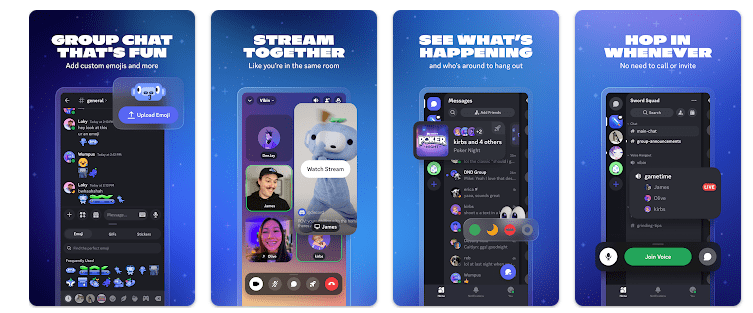
- Text Channels: Servers can have separate text rooms for different topics. This keeps messages easier to find and helps group members stay organized.
- Voice Channels: You can join a voice channel and talk with other members. People can enter or leave the channel without starting a normal phone call.
- Video Calls: Discord supports video calls for users who want to talk face to face. Screen sharing can also be used to show a game, app, or other content.
- Servers: You can create or join servers for games, hobbies, study groups, and other communities. Each server can have different channels and member roles.
- Screen Sharing: Users can share their phone or computer screen with other people. This can be useful when showing a game, app problem, or other activity.
Real-World Performance
I checked Discord on a Redmi Android phone for two days. I opened different servers, moved between text channels, sent messages, and used voice features during normal testing.
Basic text chat was quick to use. Moving through a small server felt simple, but larger servers with many channels can take more time to understand.
Voice and video features use more phone resources than simple text messages. During longer calls, a budget Redmi phone can become warmer, and battery use can increase.
I did not use a fixed battery percentage or temperature number because these results change with the Redmi model, screen brightness, battery condition, network, and length of use. I also did not notice a major visual problem during basic testing.
Space & Safety
The Discord Android download size can change between versions and devices. Recent Android package versions have been around 100 MB or more, while the final storage used can become larger because Android keeps app data and cache.
Discord needs an internet connection for its main features. Text chats, voice calls, video calls, and screen sharing all need network access, and video or screen sharing can use a lot of mobile data.
Google Play lists several types of information that Discord may collect, including personal information, location, app activity, and device information. It also states that data is encrypted during transfer and that users can request deletion.
The app can ask for access to features such as the microphone, camera, photos and videos, and notifications. Users can review these permissions through Android settings.
Competitor Check
Discord competes with apps such as Slack and Telegram for group communication. Slack is more focused on work teams and business communication, while Discord is more focused on communities, gaming, and voice chat. Telegram is better known for messaging, large groups, and channels, while Discord gives more space to servers and voice rooms. Discord is free for basic use, with optional paid Nitro features.
User Fit
Who Should Use It:
- People who need group chats for friends, gaming, or communities.
- Users who want text, voice, video, and screen sharing together.
Who Should Avoid It:
- People who only need a simple one-to-one messaging app.
- Users with very little storage or mobile data.
Helpful FAQs
Is Discord free to use?
Yes, the basic Discord app can be used without paying. Nitro is an optional paid plan with extra features.
Can I use Discord without internet?
Discord’s main communication tools need an internet connection. Live messages, voice calls, video calls, and screen sharing cannot work normally without a network.
Does Discord work on Android phones?
Yes, Discord is available for Android phones. Performance can change based on the phone model, Android version, storage, and internet connection.
Offzack Verdict
After two days of checking Discord on a Redmi phone, the app worked well for group chats, voice rooms, and community activities. It has many useful tools, but the large number of channels can feel confusing at first, and long voice or video sessions can use more battery and data.
Download Discord App from Google Playstore
Final Scorecard
Ease of Use: ★★★★☆ — The main chat tools are simple, but large servers can take time to learn.
Performance: ★★★★☆ — Text chatting is light, while voice, video, and screen sharing need more phone resources.
Features: ★★★★★ — Text, voice, video, servers, screen sharing, and community tools give users many choices.
Privacy & Safety: ★★★☆☆ — Discord provides security controls, but Google Play lists several types of collected information.
Value for Money: ★★★★☆ — Core communication features are free, while Nitro is optional.
Overall Rating: ★★★★☆ — Discord is a useful choice for people who want group chats, voice rooms, and online communities in one app.