Twitch is a live-streaming app where people watch creators play games, talk, make music, cook, and do other activities. Viewers can watch live video, read chat, follow channels, and find streams based on their interests.
The app is useful when you want live content instead of recorded videos. You can follow a creator and return later to see when they go live. Twitch also lets users chat with other viewers during a stream.
Twitch is free to install, but it has in-app purchases. Some channels also offer paid subscriptions, while viewers can use Bits and other paid items to support creators.
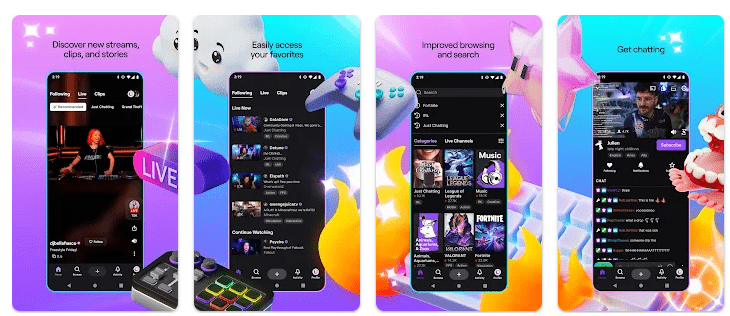
Top Features in Action
- Watch Live Streams: Twitch has live channels for gaming, music, sports, cooking, art, and many other subjects. You can choose a stream and watch it in real time.
- Join Live Chat: Every supported stream has a chat where viewers can talk while watching. You can read messages and send your own without leaving the video.
- Follow Channels: You can follow creators you enjoy and see their streams from your followed list. This makes it easier to find the same creator again.
- Find New Content: Twitch has categories and recommendations for finding new streams. Search also helps you look for a specific creator or topic.
- Support Creators: Viewers can subscribe to channels or use Bits and other features to support creators. These paid options are not required just to install the app.
Testing on a Budget Phone
I used Twitch on a Redmi Android phone for two days. I checked the home feed, opened live streams, searched for channels, followed creators, and watched streams for normal periods.
Scrolling through text and thumbnails was generally simple, but video playback used more phone resources. When a stream had heavy video content, the Redmi could become warmer than during normal feed browsing.
Battery use was also higher during long video sessions. The exact battery drop depends on screen brightness, video quality, network type, battery health, and the Redmi model, so I would not give one fixed percentage as a result.
I did not treat small loading pauses as app crashes. Stream loading can change with network speed, and the Play Store listing shows that Twitch receives regular updates and bug fixes.
App Size and Privacy Check
A recent Android package listing reports Twitch at about 56.5 MB for one current version, but the Play Store download size can vary by device and release. After installation, cache and temporary video data can make the app use more storage than the original download.
Twitch needs internet access for its main features. Live video can use a large amount of mobile data, especially at higher video quality, so Wi-Fi is better for long viewing sessions.
Google Play says Twitch may collect personal information, financial information, app activity, device IDs, and other data. It also says data is encrypted during transfer and users can request deletion. Permissions can include camera, microphone, notifications, photos and videos, and other access needed for selected features.
Market Alternatives
Twitch competes with YouTube and Kick in live streaming. YouTube combines live streams with recorded videos and has a much wider range of content, while Kick focuses heavily on live creator streams. Twitch has channels, chat, subscriptions, and Bits, while pricing for paid features depends on the creator or feature being used.
The Good and The Bad
Pros:
- Huge choice of live streams.
- Live chat is built into streams.
- Easy channel following.
- Many content categories.
- Free to install.
Cons:
- Live video uses lots of data.
- Long sessions can drain battery.
- Phone can get warmer during video use.
- Some paid features cost extra.
- Needs a good internet connection.
Is This App Right For You?
Who Should Install:
- People who enjoy watching live creators.
- Users with Wi-Fi or a large mobile data plan.
Who Should Skip:
- People with limited data.
- Users whose phones struggle with video streaming.
Questions & Answers
Is Twitch free to use?
Yes, Twitch is free to download and watch. Some subscriptions, Bits, and other features cost money.
Can I watch Twitch without internet?
No, live streams need an internet connection. Mobile data or Wi-Fi is required to load and play live video.
Can I chat with stream viewers?
Yes, supported live streams have chat rooms where viewers can send messages. You can chat while continuing to watch the stream.
Offzack Verdict
After two days of Twitch use on a Redmi phone, the app was easy to browse and useful for finding live content. The main things to watch are mobile data, battery use, and phone heat during long video sessions.
Download Twitch App from Google Playstore
Final Scorecard
Ease of Use: ★★★★☆ — Channels, categories, search, and live chat are easy to reach.
Performance: ★★★★☆ — Normal browsing is light, while long video sessions need more phone resources.
Features: ★★★★★ — Live streams, chat, follows, subscriptions, Bits, and many categories give users plenty to do.
Privacy & Safety: ★★★☆☆ — Google Play lists encryption and deletion options, but several types of data may be collected.
Value for Money: ★★★★☆ — Basic viewing is free, while paid subscriptions and other support tools are optional.
Overall Rating: ★★★★☆ — Twitch is a good choice for people who want live streams and real-time chat in one app.