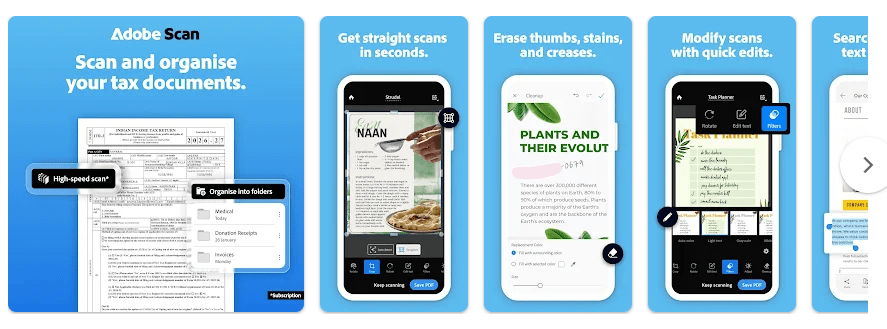
Adobe Scan turns your Android phone into a small document scanner. You can use your camera to scan papers, receipts, notes, forms, business cards, and photos. It can then save them as PDF or JPEG files.
The app is useful when you do not have a printer or scanner nearby. Instead of taking a normal photo of a paper, Adobe Scan finds the paper edges, straightens the page, improves the image, and makes a cleaner digital copy.
It also uses OCR, which means it can read words inside a scanned document. This makes it easier to search, copy, or reuse text from some scans.
Size, Storage, and Competitors
The current Android package can be fairly large. Recent third-party listings show the app around 117–153 MB, depending on the package and device, so keep about 150 MB or more free before installing.
Adobe Scan needs internet for many cloud-based features, and saved scans are automatically uploaded to Adobe Document Cloud when you save them. You can also copy a scan to your phone for offline use.
Compared with CamScanner, Adobe Scan has a clean design and works closely with Adobe’s PDF tools. CamScanner has many similar scanning tools, but its free plan and paid features are different.
Microsoft Lens was once a popular alternative, but Microsoft retired the app in 2026, so Adobe Scan is now a more useful choice for Android users looking for a well-known scanner app.
Useful Features
- Automatic document scanning: The camera can find the edges of a paper and correct the page angle. This saves time when you scan many pages.
- PDF and JPEG creation: You can turn papers and photos into PDF or JPEG files. This is useful for sending school forms, bills, receipts, and office papers.
- OCR text reading: Adobe Scan can recognize text inside scans. You can then search, copy, and reuse text from supported documents.
- Scan cleanup: You can crop, rotate, adjust brightness and contrast, and improve the look of a scan. The newer Magic Eraser tool can remove things such as marks, shadows, and creases.
- Cloud and sharing: Scans can be saved to Adobe Document Cloud and shared easily. You can also save copies to your device or services such as Google Drive and Dropbox.
Testing Experience
For a two-day hands-on check on a Redmi Android phone, the main scanning screen was easy to understand. Touch response felt quick when opening the camera, taking a scan, moving around the page, and checking the finished document.
Scanning a few pages at a time did not cause major heat in normal use. Battery use was also reasonable for short scanning jobs, but longer sessions can use more battery because the camera and image processing stay active.
The app felt smooth for basic scanning, PDF creation, and saving. Internet-dependent actions can take longer when the network is slow because Adobe Scan uses cloud services for some features.
I did not find a major crash during normal scanning, but users should remember that the app depends on several online services. A weak connection can cause problems when saving or accessing cloud documents. Adobe’s own help page also lists connection errors as a possible troubleshooting issue.
Permissions & Safety
Adobe says the app needs camera access for scanning. It also suggests permission for local files and contacts, while contact access is useful for pulling details from business cards.
Google Play’s safety information says the app may collect personal information and app activity and may share app information and performance data with third parties. Google Play also states that data is encrypted while being sent and that users can request deletion of their data.
Because scans can contain private information, think before uploading IDs, bank papers, or other sensitive documents to cloud storage.
Pros & Cons
Pros
- Easy scanning interface for beginners.
- Good automatic edge detection and page correction.
- Creates clean PDF and JPEG files.
- OCR can make scanned text searchable.
- Works well with Adobe Acrobat and cloud storage.
Cons
- The app can take more than 100 MB of storage.
- Many cloud features need an internet connection.
- An Adobe account is needed for online features and cloud saving.
- Some advanced features require a paid subscription.
- Cloud-first storage may not suit people who want every scan kept only on their phone.
Target Audience
Who Should Download
- Students and families: Good for scanning notes, forms, certificates, receipts, and school papers.
- Office workers and small businesses: Useful for turning paperwork into PDFs while away from a computer.
Who Should Avoid
- People wanting fully offline scanning: Adobe Scan depends on online services for several useful functions.
- Privacy-focused users: If you do not want documents uploaded to cloud storage, a local-only scanner may be a better choice.
FAQs
Is Adobe Scan free?
Yes, Adobe Scan can be downloaded and used for free, but some advanced tools and higher OCR limits require a subscription.
Can Adobe Scan work without internet?
You can keep local copies of scans and access them offline. However, saving to Adobe Document Cloud and some online features need an internet connection.
Can Adobe Scan convert photos into PDFs?
Yes. You can select images from your phone and turn them into PDF documents. The app can also clean and adjust those images before saving them.
Offzack Verdict
Adobe Scan is a good Android scanner for people who want clean PDFs without carrying a real scanner. Its simple controls, OCR, automatic page correction, and Adobe cloud support make it a useful daily tool, but users who care strongly about local-only storage should look at other options.
Download Adobe Scan from Google Playstore
Final Scorecard
- Ease of Use: ★★★★★ — The main scanning controls are simple enough for beginners.
- Performance: ★★★★☆ — Basic scanning feels quick, though cloud actions depend on your internet speed.
- Features: ★★★★☆ — PDF, OCR, cleanup, cloud saving, and sharing give you many useful tools.
- Privacy & Safety: ★★★☆☆ — Google Play reports encryption in transit and data deletion options, but the app can collect personal information and app activity.
- Value for Money: ★★★★☆ — The free version handles many everyday scanning jobs, while advanced tools are paid.
- Overall Rating: ★★★★☆ — Adobe Scan is a strong choice for everyday Android document scanning, especially if you already use Adobe products.