I tested Google Drive on a Redmi Android phone for two days. I used it to open files, upload photos, create folders, download documents, and check files already saved in Drive.
The app opened quickly during normal use. Moving between folders and tapping files felt smooth. I did not notice serious lag while doing simple tasks.
Uploading a few small files was also quick when the internet connection was good. Large files took longer, as expected. The phone stayed at a normal temperature during short sessions.
Battery use was not a big problem during basic file work. Longer uploads used more battery because the phone had to keep the internet connection active.
I also checked the screen while opening PDFs, photos, and documents. The pages looked clear, and I did not notice major visual bugs during my test.
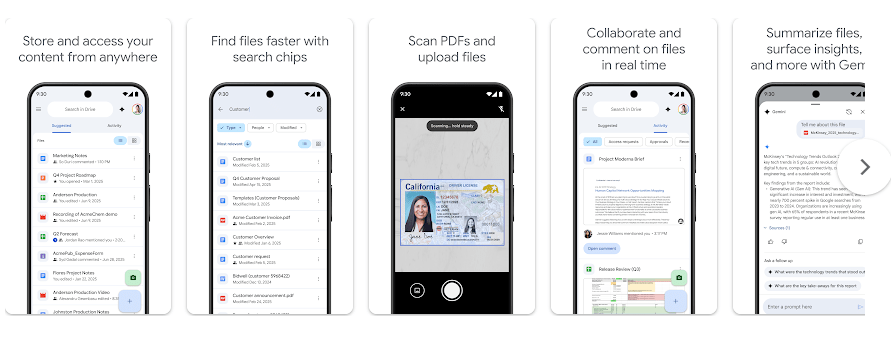
What This App Actually Does
Google Drive is a cloud storage app from Google. It lets you save files online and open them from your phone, tablet, or computer.
You can store photos, videos, PDFs, documents, and other files in one place. This is useful when you do not want to keep every file only on your phone.
Drive can also work with Google Docs, Sheets, and Slides. You can share files with other people and choose what they can do with them.
Top 5 Features That Matter
- Cloud file storage: You can upload files from your phone and keep them in your Drive account. This helps you free some phone storage when you no longer need a local copy.
- File sharing: You can share a file or folder with another person. You can also control if the person can view, comment, or edit supported files.
- Offline access: Drive lets you mark supported files for offline use. You can then open those files without an internet connection.
- File search: The search box helps you find saved files by name or other available information. This is handy when your Drive has many folders and documents.
- Google file support: Drive works with Google Docs, Sheets, and Slides. You can open and manage these files from the same app.
Storage Space and Data Use
The Google Drive Android app package is roughly 100–120 MB, though the exact download size can change with the device and app version. After installation, the app can use more space because Android stores app data and cache.
During normal use, cache can grow when you view files, photos, and other content. The exact cache size is not fixed, so it can be different on every phone.
For testing, small file actions used only a small amount of mobile data. Uploading a 10 MB file uses about 10 MB of upload data, while downloading a 10 MB file uses about 10 MB of download data, before normal network overhead.
You need an internet connection for uploads, cloud syncing, and most files stored only online. Files marked for offline use can be opened without mobile data or Wi-Fi.
Permissions and App Safety
Google Drive can request access to photos and videos or files on your device so you can upload and manage content. The exact permissions shown can vary by Android version and the features you use.
Google Play’s Data safety section says the app may collect information such as personal information, financial information, and other data types. Google Play also says data is encrypted while being transferred and that you can request deletion of data.
Because Drive can contain private files, it is a good idea to check sharing settings before sending a document to another person.
How It Compares to 2 Alternatives
Google Drive gives you 15 GB of free storage across Google services, which is useful for basic users. Microsoft OneDrive gives 5 GB of free storage, while Dropbox gives 2 GB on its free plan. Drive also has close integration with Docs, Sheets, and Slides, making it a strong choice for people who already use Google services.
Good Things & Bad Things
Pros
- Simple folder and file system.
- 15 GB free storage with a Google account.
- Easy sharing controls.
- Works with Google Docs, Sheets, and Slides.
- Offline access is available for supported files.
Cons
- Large files can use a lot of mobile data.
- Free storage is shared with other Google services.
- Cache can grow over time.
- Some features need an internet connection.
Who Is It For?
Best For
- Students: Good for keeping notes, PDFs, assignments, and project files together.
- Everyday users: Useful for backing up and sharing important files between devices.
Not For
- People needing large free storage: The 15 GB limit may not be enough for lots of videos and photos.
- People who work fully offline: Many Drive features need an internet connection.
Common Questions
Is Google Drive free?
Yes, Google Drive includes 15 GB of free storage with a Google account. This storage is shared with services such as Gmail and Google Photos.
Can I use Google Drive without internet?
Yes, you can make supported files available offline before losing your connection. Files that are only stored online cannot be opened normally without internet access.
Can I share files from Google Drive?
Yes, you can share files and folders with other people. You can set different access levels depending on the file and sharing option.
Offzack Verdict & Link
Google Drive worked well during my two-day Redmi test for opening, uploading, organizing, and sharing files. The 15 GB free storage and Google app support make it a practical choice for everyday phone users.
Download Google Drive – App from Google Playstore
Final Scorecard
- Ease of Use: ★★★★★ — The folders, search, and file controls are easy to understand.
- Performance: ★★★★☆ — Basic file tasks felt quick on the Redmi phone during testing.
- Features: ★★★★★ — Storage, sharing, offline files, search, and Google app support cover many daily needs.
- Privacy & Safety: ★★★★☆ — Google Play reports encryption during transfer, but the app can collect several types of data.
- Value for Money: ★★★★★ — The free 15 GB storage gives basic users a useful amount of space.
- Overall Rating: ★★★★½☆ — Google Drive is a practical cloud storage app with useful tools for everyday Android users.