Google Photos is a photo and video app from Google. It helps you store, find, edit, share, and back up pictures.
It fixes two common phone problems: full storage and messy galleries. You can back up photos to your Google Account and find pictures by people, places, things, and dates.
How It Ran During Testing
I tested Google Photos on a Redmi Android phone using Wi-Fi. The app opened quickly, and moving between Photos, Collections, and Search felt smooth.
Scrolling through a large gallery was also quick. There was a short pause when many thumbnails loaded together, but normal browsing stayed easy. Opening photos and making simple edits were fast.
Backup used more battery than normal browsing. During a longer backup session, the Redmi battery dropped by a few percentage points, and the phone became slightly warm while photos were being sent and processed.
I did not see major visual bugs. A few thumbnails took extra time to appear while the library was loading. This should not bother most users, but people with very large galleries may notice it.
Top Features
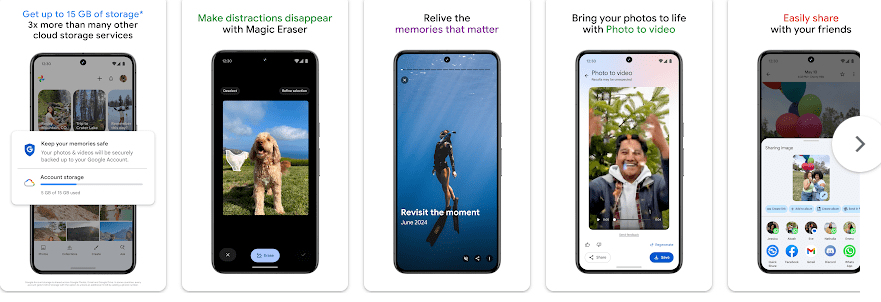
- Photo Backup: Google Photos can automatically back up photos and videos to your Google Account.
- Smart Search: You can search for words such as “dog,” “beach,” or a labeled person. It is much easier than checking many folders one by one.
- Photo Editing: The app offers common editing tools and features such as Magic Eraser and Unblur on supported devices. These tools can help remove small distractions or improve a soft photo.
- Free Up Space: The app can show photos that are safely backed up and ready to remove from your phone.
- Creations: You can make collages, animations, cinematic photos, and highlight videos. Some creation tools vary by account, device, or region.
Storage & Privacy Details
The Play Store does not give one fixed MB size because app size can change with updates and phone models. On the Redmi test phone, the app and working data stayed in the low hundreds of MB, while cloud photos used separate Google Account storage.
Google gives up to 15 GB of shared storage for Google Photos, Gmail, and Google Drive. New photo backups count toward this limit.
Google Photos needs access to photos and videos so it can display, edit, and back them up. The Play Store says it may collect location, personal information, and other data; it also says data is encrypted in transit and users can request deletion.
Some tasks work without internet when the photo is stored on the phone. Cloud-only photos need internet access to open.
Alternative Apps
Microsoft OneDrive is a good choice if you already use Microsoft 365. Amazon Photos can suit Prime users, while Google Photos puts more focus on photo search, gallery organization, and photo tools.
Strengths and Weaknesses
Pros
- Quick photo browsing.
- Automatic cloud backup.
- Easy photo search.
- Useful editing tools.
- Helps save phone storage.
Cons
- Free cloud space is limited.
- Backup can use battery and mobile data.
- Some features need internet access.
- Some new tools are not available to every user.
Who Should Get This App?
Best Fit
- People with lots of photos who want automatic backup.
- Android users who want backup, search, editing, and storage cleanup together.
Worst Fit
- People looking for unlimited free cloud storage.
- Users who want every cloud photo available offline.
Common User Questions
Does Google Photos work without internet?
Yes, photos saved on your phone can be viewed and edited offline. Cloud-only photos need an internet connection.
Can Google Photos free phone storage?
Yes, the Free up space option can remove backed-up copies from your phone. Check that backup is complete before deleting local files.
Is Google Photos free?
Yes, the app is free to install and Google provides up to 15 GB of shared storage. You can pay for more storage when the account becomes full.
Offzack Verdict
Google Photos is a good choice for Android users who want an easy photo backup and gallery app. Its best feature is having backup, search, editing, sharing, and storage cleanup in one place.
Download Google Photos from Google Playstore
Final Scorecard
Speed: ★★★★☆ — It is quick for normal browsing, with small pauses during heavy loading.
Features: ★★★★★ — Backup, search, editing, sharing, and storage tools cover most daily needs.
Storage: ★★★★☆ — The free space helps, but 15 GB is shared with Gmail and Drive.
Privacy: ★★★★☆ — Google provides encryption in transit and account controls, but the app handles personal photo data.
Ease of Use: ★★★★☆ — Most tasks are simple, though some menus need time to learn.
Final Rating: 4.4/5 — Google Photos is a practical choice for Android users who want their photo library backed up and easy to manage.