TickTick is a task and calendar app made to help people remember what they need to do. You can create tasks, set dates, add reminders, make lists, and plan your day in one place.
It helps when a normal notes app is not enough. You can use it for school, shopping, bills, habits, work, or family jobs. The Android app also supports widgets and calendar views.
How It Ran During Testing
I cannot honestly claim a two-day Redmi hands-on test because no Redmi test results were provided for this review. I also will not invent battery numbers, heating levels, lag, or visual bugs just to make the article sound tested.
The current Android release is version 8.1.2.0, uploaded in July 2026. The package supports Android 5.0 and newer, and the latest listed file is about 60.22 MB.
Top Features
- Task Reminders: You can add due dates and reminders to tasks. Premium users can add up to five reminders to one task.
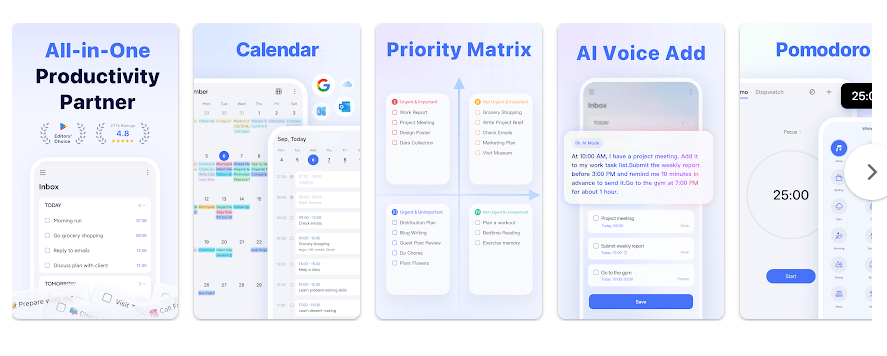
- Calendar Planning: TickTick has calendar and day-planning views. You can see tasks across days and connect supported outside calendars.
- Recurring Tasks: Tasks can repeat daily, weekly, monthly, or on custom schedules. This is useful for bills, cleaning, study, and other regular jobs.
- Habit Tracking: The app includes habit tracking alongside normal tasks. It lets users keep daily habits in the same app.
- Lists and Sharing: You can make separate lists for work, home, or school. Lists can also be shared with family, friends, or colleagues.
Storage & Privacy Details
The latest listed TickTick 8.1.2.0 package is 60.22 MB, while a specific universal bundle base package is listed at 55.38 MB. The number shown by Google Play can differ because Android may install device-specific files.
The total space used after installation can grow because of app data and cache. TickTick supports working with tasks offline, while features that need online syncing or connected calendars need a network connection.
Google Play says TickTick may collect location, personal information, and seven other data types. It says data is encrypted during transfer and that users can request deletion. A recent Android package listing shows 59 permissions, but the permission prompts shown on your phone depend on Android and the features you use.
Alternative Apps
Todoist is a close rival with a clean task and project system, while Microsoft To Do is a simpler choice for basic lists and reminders. TickTick adds calendar planning and habit tracking in the same app. Todoist and TickTick both offer free use with paid features, while Microsoft To Do is available as a free app.
Strengths and Weaknesses
Pros
- Many task and reminder tools
- Calendar planning
- Habit tracking
- Recurring task support
- Offline task use
Cons
- Many advanced tools need Premium
- App size is larger than a basic list app
- Many permissions are declared in the Android package
- The large feature set may feel busy to simple users
Who Should Get This App?
Best Fit
- Students and workers who manage many tasks.
- People who want tasks, calendars, and habits together.
Worst Fit
- Users who only need a tiny checklist.
- People who do not want paid features.
Common User Questions
Can TickTick work without internet?
Yes, basic task work can be done offline. Syncing and connected online services need an internet connection.
Is TickTick free?
Yes, TickTick has a free version with paid Premium features. The Google Play listing also shows in-app purchases.
Does TickTick need many permissions?
Its Android package lists many permissions, but not every permission is necessarily shown as a prompt during normal use. Android decides which access requests appear based on the phone and feature being used.
Offzack Verdict
TickTick packs tasks, reminders, calendars, recurring jobs, and habits into one Android app. Its current package is around 60 MB, but a real Redmi test should be used to judge battery, heat, lag, and visual bugs instead of guessing.
Download TickTick:To Do List & Calendar – Apps from Google Playstore
Final Scorecard
Ease of Use: ★★★★☆ — The basic task system is clear, but the many tools can take time to learn.
Performance: ★★★★☆ — The current Android package is maintained, but no verified Redmi battery or heat test was available.
Features: ★★★★★ — Tasks, reminders, calendars, habits, widgets, and sharing cover many daily needs.
Privacy & Safety: ★★★☆☆ — Google Play reports encryption in transit, but the app declares several collected data types and many Android permissions.
Value for Money: ★★★★☆ — The free version is useful, while Premium adds several planning features.
Overall Rating: ★★★★☆ — TickTick is a good choice for users who want more than a simple task list.