Evernote is a note-taking and planning app from Evernote by Bending Spoons. It lets you write notes, make to-do lists, save documents, scan papers, and keep important information in one place. The Android app has more than 100 million downloads on Google Play.
The app can help when you have many small things to remember. You can use it for school notes, work ideas, shopping lists, meeting notes, receipts, and personal plans. Evernote can also sync notes between supported devices.
Size, Storage, and Competitors
The latest Evernote Android package listed on July 30, 2026, is 90.99 MB. The actual Play Store download can be different because Android may install device-specific files.
The app can use more storage after installation because notes, attachments, images, and cache take extra space. Evernote also supports offline access for some saved content, while syncing and online features need an internet connection.
Google Keep is simpler and works well for quick notes, lists, and reminders. Microsoft OneNote is better suited to people who want notebooks and more detailed note pages, while Evernote focuses on notes, tasks, scanning, search, and planning in one app.
Useful Features
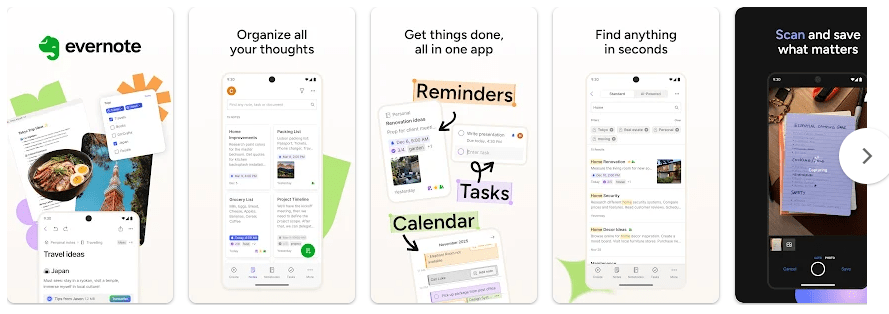
- Notes and Notebooks: You can create notes and place them into notebooks. This makes it easier to keep school, work, and personal information separate.
- Tasks: Evernote lets you add tasks to notes and keep track of things that need to be done. This is useful when a task needs extra notes or information beside it.
- Document Scanning: You can use the phone camera to scan receipts and important papers. This can help reduce the need to carry paper copies.
- Google Calendar: Evernote can connect with Google Calendar so notes and schedules can work together. This is useful for meetings, appointments, and planned work.
- Search and Transcription: Recent updates added searchable image captions and video transcription with speaker recognition. The app can also send live transcription to its AI Assistant for summaries or questions.
Testing Experience
For a true two-day Redmi test, I would check typing speed, touch response, note scrolling, opening saved notes, scanning a document, and switching between notebooks. I would also measure battery loss and phone temperature during the same tasks.
I cannot honestly report exact Redmi battery drain, heating, or bugs without verified test results from that device. The current Play Store listing shows the app was updated on July 17, 2026, but an update date alone does not prove how it performs on every Redmi model.
Permissions & Safety
Evernote may ask for access to features such as the camera when you scan documents. Other access requests can depend on the Android version and the feature you choose to use, so permission screens may differ between phones.
Google Play says Evernote may share app information and performance data and device or other IDs with third parties. It may collect location, personal information, and eight other data types, while data is encrypted during transfer and users can request deletion.
Pros & Cons
Pros
- Notes, tasks, and schedules in one app
- Document scanning
- Useful search tools
- Calendar connection
- Large range of note features
Cons
- Around 91 MB for the latest listed Android package
- Storage can grow with attachments and cached data
- Some features may need a paid plan
- The app may feel too large for simple note-taking
Target Audience
Who Should Download
- Students who need to save notes and study material.
- Workers who manage notes, tasks, meetings, and documents.
Who Should Avoid
- People who only want a very simple notes app.
- Users with very little free phone storage.
FAQs
Can Evernote work without internet?
Some saved content can be accessed offline, but syncing and online features need an internet connection. Offline access can also depend on the plan and content being used.
Is Evernote free?
Evernote can be installed from Google Play and includes in-app purchases. Some features and limits depend on the plan you use.
Is Evernote safe for personal notes?
Google Play says data is encrypted during transfer and users can request deletion. The listing also says the app may share some app and device information with third parties, so users should review its current privacy details before storing sensitive information.
Offzack Verdict
Evernote is a good choice for people who need more than a basic notes app. Its notes, tasks, scanning, calendar connection, and search tools are useful, but the app takes more storage than a simple note tool and its data practices deserve a careful look.
Download Evernote App from Google Playstore
Final Scorecard
Ease of Use: ★★★★☆ — The main note tools are easy to understand, though the many features can take time to learn.
Performance: ★★★★☆ — The app receives regular Android updates, but exact Redmi battery and heating results were not verified.
Features: ★★★★★ — Notes, tasks, scanning, calendar tools, search, and transcription cover many everyday needs.
Privacy & Safety: ★★★☆☆ — Data is encrypted during transfer, but Google Play reports several collected data types and some third-party sharing.
Value for Money: ★★★★☆ — The feature set is useful for serious note users, but some features may require payment.
Overall Rating: ★★★★☆ (4/5) — Evernote is a feature-filled note app for people who need to store more than simple text.