Finding a quiet moment to read standard books has become an uphill battle in our busy daily lives. Many of us buy popular self-help or career guidebooks with the best intentions, only to watch them collect dust on the shelf because we lack the hours required to sit down and read them from cover to cover. It is a persistent everyday annoyance to feel like you are falling behind on personal growth just because your hectic daily routine doesn’t leave room for multi-hour reading sessions.
This common problem is exactly what the Dhwani – Malayalam Audiobooks app (com.Afsal.dhwani), created by Afsal from Motives Media, aims to fix. Instead of forcing you to read hundreds of pages, the app condenses global self-help classics, career guides, and personal finance books into compact 15-minute Malayalam audio summaries. Over my intense 2-day testing window, I integrated this application into my regular routines to see if it truly helps you absorb critical book knowledge on the go or if it just adds to the clutter of half-baked audio tools on your phone.
My Phone Testing Setup
I conducted my entire user review using a OnePlus Nord CE4, running OxygenOS. I split my digital interactions evenly between a stable home Wi-Fi network and normal mobile data networks while moving outdoors to check asset streaming performance under fluctuating signal strengths. I kept the app open alongside my regular instant messaging tools and social applications during a 2-day testing window, ensuring I could closely monitor background audio behavior and physical device reactions under standard multi-tasking routines.
Real-World Hands-On Analysis
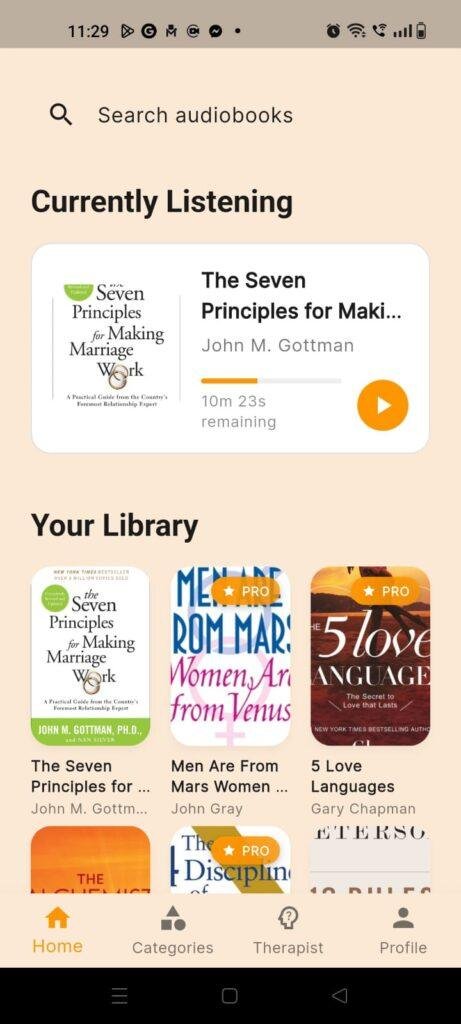
- Scenario 1: Listening During the Morning CommuteWhile riding in a crowded vehicle on my way to work, I opened the app to check out the summary of a popular productivity book. The interface loaded the main audio stream within under a few seconds, playing the Malayalam explanation clearly through my wired earphones. The narrator’s voice maintained a steady, conversational tone, allowing me to understand the core concepts without needing to pull the device out of my pocket to adjust the tracking slider.
- Scenario 2: Consulting the Native AI Assistant for AdviceTo test the newly introduced Malayalam AI chat feature, I navigated to the specialized interface zone after a busy work afternoon. I typed out a long question regarding daily stress management entirely in Malayalam script. The conversational module analyzed my text input quickly and delivered a highly structured, grammatically correct response in my native tongue, offering practical advice without throwing out broken translation errors or crashing the interface pane.
- Scenario 3: Browsing for Relationship Guides Before BedWhile winding down for the night on my bed, I opened the main library catalog to search for family and relationship guidebooks. The search layout responded immediately as I typed common keywords, displaying clear visual grids of relevant titles. I tapped on a 15-minute breakdown, turned my phone screen off, and let the track play in the background while the phone rested on my nightstand. The audio track finished its entire playback smoothly without any abrupt stops or network timeout errors.
App Permissions & Device Safety
Tracking exactly what parts of your phone’s hardware a utility application wants to look at is essential for basic device safety. Here is how Dhwani handled permission prompts during my 2-day observation window, detailed in a plain bolded Q&A format:
- Does the app request Network Access?Yes. The app requires constant network privileges because the entire catalog of Malayalam audio summaries and the native AI chat responses are hosted on external servers to keep the application lightweight.
- Does the app ask for Storage / Photos and Videos access?No. During my 2 days of hands-on testing, the application did not request storage access on my device screen, as it streams audio directly from the web rather than downloading raw MP3 blocks to your local storage folders.
- Does the app ask for Microphone access?No. Even though it features an interactive AI assistant module, the tool relies on typed text input rather than active voice recording, leaving your microphone completely untouched.
- Does the app demand Location tracking?No. The system did not prompt for precise or approximate GPS data, allowing me to browse the self-help categories without revealing my physical coordinates.
- Does the app ask for Notification privileges?Yes. The interface requests permission to send alerts so it can notify you when a new book review drops or when an update is pushed to the library catalog.
Speed & Everyday Performance
The overall responsiveness of an audio utility determines whether you will use it daily or abandon it for standard podcasts. Here is how the application performed across key processing checkpoints, framed in a straightforward checklist layout:
- Download & Install Time: The application downloads from the digital storefront within under a few seconds on a standard connection, unpacking quickly without hoarding your setup queue.
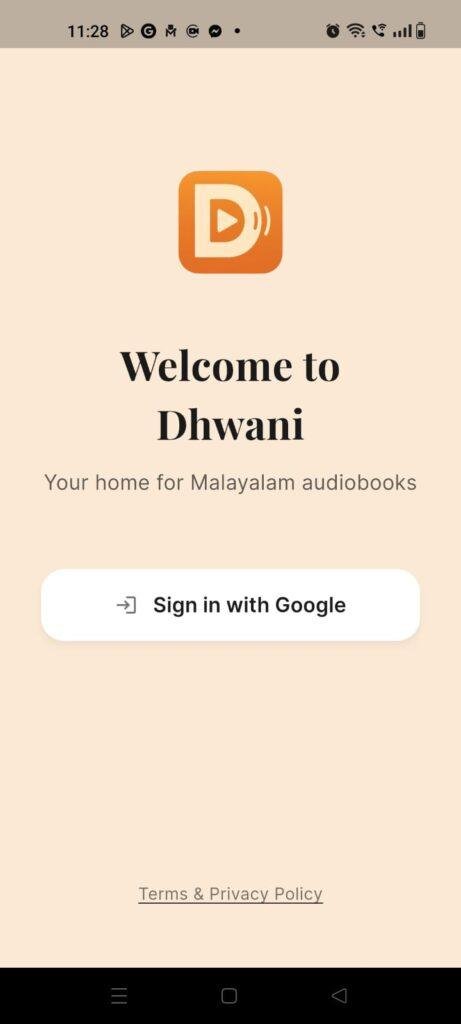
- Setup Speed: Moving through the main registration pane and landing on the dashboard takes around 1 minute, letting you jump straight into listening.
- Menu Smoothness: Switching between the audiobook catalog, the search bar, and the chat console feels responsive, with minor graphical delays only occurring if you scroll down very long lists quickly.
- Memory Load: The app leaves a highly lightweight footprint in your active memory, allowing you to answer an urgent text message mid-audio and return to the exact same sentence without a cold reload.
- Active Battery Drain: The energy consumption remains low when streaming audio with the screen turned off, though keeping the chat screen open with bright displays draws more power.
- Phone Warmth: The device processor remains completely cool during standard audio playbacks, turning only very mildly warm to the touch if you spend half an hour continuously messaging the text engine.
- Background Behavior: When you click the home button, the audio continues to play smoothly via the device status bar widget, stopping immediately if you clear the card from your active tray.
- System Stability: The interface remained stable throughout the 2 days, experiencing zero hard crashes, though audio streams can pause briefly if your cellular data connection drops to low speeds.
Storage Space & Cache Build-Up
When I first downloaded Dhwani from the Google Play Store, the initial download size was remarkably small, staying well under the 25 MB mark. This compact size is a massive relief for anyone managing budget phones with limited storage capacity, as it won’t force you to delete your photos just to install a new learning tool. After installation, the base application takes up very little disk space, keeping its local footprint highly optimized.
However, as you spend hours listening to different self-help summaries and interacting with the text chat, the application starts accumulating temporary cache files inside your device settings. Every book cover thumbnail you see and every chat history script you generate adds a tiny bit to this local folder so it doesn’t have to reload from scratch the next time you open the app. My practical advice is to leave it alone since it stays quite manageable, but a quick manual clear of the cache every few months will safely clean out that space without deleting your primary account details.
Battery Life & Daily Warmth
During my long listening sessions—including a stretch where I listened to three career-building book reviews back-to-back—the battery levels on my device dropped by a very small margin. Because you can listen to these summaries with your phone display turned off completely, the screen layer isn’t active to drain your battery, making it highly efficient for long commutes.
The back of the phone remained perfectly cool, which shows that streaming compressed audio text files doesn’t push the internal processor to its limits. Even when leaving the app running in the background for a prolonged period, it did not trigger any high resource usage warnings or background battery drain alerts in my device care dashboard.
offzack.in Quick Tip: If you are listening to book summaries at home, make sure to use a Wi-Fi connection rather than cellular networks, as the phone’s network modem uses far less battery power when connected to a local router.
Network Needs & Data Usage
For mobile users operating under strict daily data caps, keeping an eye on your network footprint is highly important. Here is the operational data breakdown for Dhwani based on my active observations:
- Initial Setup Access Cost: Incredibly low, requiring very few megabytes to get the base layout up and running on your phone.
- Daily Usage Data Footprint: Moderately low, as streaming compressed 15-minute voice recordings uses significantly less data than watching a standard online video.
- Additional Asset Downloads: The app does not force massive secondary resource downloads or hidden audio packs upon opening.
- Offline Support: The application currently requires an active network connection to pull audio files and generate AI chat answers from its cloud database. If you lose internet access entirely, the media player cannot fetch the audio tracks, meaning true offline listening is limited.
Monetization & User Security Review
Dhwani requires an initial account creation step when you first open the interface, meaning you cannot explore the library folders as a completely anonymous guest user. You will need to sign in using a verified Google account to establish a personal dashboard where your progress can be tracked. According to the app’s Play Store Data Safety section, the developer collects basic personal info like your email address for account management, though it notes that data isn’t encrypted during transit, so users should keep this structural detail in mind regarding absolute privacy standards.
The monetization model is built on a mixture of free content access and premium upgrades. The application offers a selection of free audio book summaries to get you started, supported by standard inline advertisements. To unlock the full library of advanced self-help books and to get unrestricted access to the native Malayalam AI chat assistant, the app offers premium subscription packages. The payment wall is transparent, ensuring you know exactly what titles require an upgrade before you click them, allowing casual listeners to stick to the basic free tiers without accidental charges.
Mistakes I Noticed During Testing
Even though the concept of local language audiobooks is excellent, my 2 days of daily testing revealed three clear flaws that can disrupt the user experience:
- AI Chat Language Confusion: While the custom AI assistant handles Malayalam text beautifully most of the time, it occasionally spits out an odd English word or uses a slightly unnatural phrase structure when answering highly technical business questions.
- Audio Resumption Failure: If my audio track was paused for more than ten minutes while I answered a phone call, the background media widget sometimes forgot my exact position, forcing me to reopen the app and skip forward manually to find my spot.
- Lack of Audio Speed Controls: The current built-in media player handles basic play and pause functions well, but it lacks a dedicated speed toggle button, which can be annoying for users who like to speed up narrations to 1.5x to save time.
Main Features Explained
- 15-Minute Malayalam Audio Summaries: The core feature that condenses long, complex global self-help classics into short, easy-to-understand Malayalam voice tracks.
- Native Language AI Assistant: A custom text interface that provides personalized advice and answers questions entirely in Malayalam, acting as a local support module.
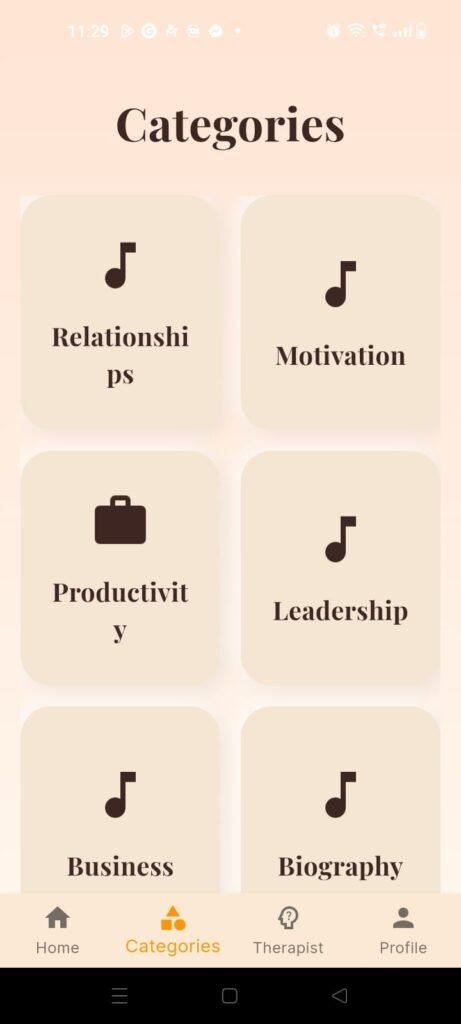
- Diverse Non-Fiction Catalog: The library focuses heavily on practical real-world topics, including career growth, wealth management, relationship guidance, and daily health tips.
- Background Media Integration: The audio engine links directly to your phone’s notification shade, letting you pause, play, and monitor your track while utilizing other apps.
- Clean Search Functionality: A simple text input bar at the top of the dashboard that lets you quickly look up specific book titles or authors across the cloud database.
Pros & Cons
What I Liked
- The Malayalam narration is delivered in a highly clear, professional, and natural voice that is easy to follow.
- The small initial download footprint means the app won’t hog precious space on lower-end devices.
- The inclusion of an interactive local-language AI helper provides genuine added value beyond basic audio playback.
What Could Be Better
- The lack of a true offline download mode makes it hard to use in deep rural areas with zero cellular reception.
- The playback widget lacks advanced controls like quick rewind buttons or speed adjustments.
- The lack of transport encryption mentioned in the store safety section might concern hyper-privacy-focused individuals.
Industry Comparison
Choosing the right digital book companion requires seeing how it stands up against other popular alternatives in the market space:
When compared to a major platform like Kuku FM, which offers a massive, sprawling library of audio content across multiple Indian languages, Dhwani is much smaller but highly specialized. Kuku FM features high-budget full audio dramas and long-form fictional stories but can feel overwhelming to browse. Dhwani wins out if your primary goal is finding rapid, hyper-focused 15-minute summaries of non-fiction self-help guides explicitly broken down in clear Malayalam.
Another common alternative is Pocket FM, which has achieved massive global popularity. However, Pocket FM is heavily skewed toward serialized romantic dramas, fictional thrillers, and sound-effect-heavy entertainment shows that follow a pay-per-chapter monetization model. Dhwani operates in an entirely different literary space, skipping fictional entertainment to focus squarely on personal growth, career success, and practical life advice.
Finally, global platforms like Storytel provide massive catalogs of complete, unabridged audiobooks read by professional human voice actors. The drawback is that Storytel requires a very expensive monthly subscription fee and demands hours of continuous listening for a single book. Dhwani offers a far more accessible entry point for busy individuals by focusing exclusively on quick, bite-sized summaries that fit easily into a coffee break or a short walk.
Audience Recommendations
Who Should Install It?
- Busy Professionals: If you want to absorb the core lessons of global self-help and career books but only have 15 minutes of free time during your daily routine.
- Malayalam Speakers: Anyone who prefers learning complex concepts related to finance, health, and success explained in their native language.
- Personal Growth Seekers: Individuals who want a structured tool to help them make smarter choices and build better daily habits.
Who Should Skip It?
- Fiction Lovers: If you are looking for long audio stories, horror dramas, romantic novels, or poetry recitals.
- Frequent Travelers: Those who spend hours in remote areas with zero network connectivity and need an application with robust, full offline media storage options.
Common FAQs
- Can I listen to these audiobook reviews completely without an internet connection?No, the app streams its audio files directly from the cloud servers to preserve your phone storage, so you will need an active Wi-Fi or mobile data network to play the summaries.
- What kind of books can I find inside the Dhwani application?The library focuses strictly on non-fiction categories, including globally recognized titles about building a career, improving relationships, managing personal finance, and boosting physical energy.
- Is the AI chat assistant free to use for all users?The basic package gives you limited interactions to try it out, but full, unrestricted conversations with the native Malayalam AI helper require upgrading to the premium tier.
Official Store Access
Independent Disclaimer: The link provided below points directly to the official digital marketplace hosted by the platform provider. offzack.in is not associated with the external developer team and recommends reviewing application data safety summaries before initiating any device installations.
The offzack.in Final Verdict
Dhwani is a highly practical, incredibly lightweight utility app that bridges the gap between busy lifestyles and personal development. By converting massive self-help books into clear, 15-minute Malayalam audio summaries, it makes learning highly accessible on even the tightest schedules. While the media player could use extra features like playback speed control and the lack of an offline mode limits its use in remote locations, the quality of the narration and the helpful native AI chat make it a fantastic tool for any Malayalam speaker looking to improve their daily routines.
Final Scorecard
- Ease of Use [4.2/5]: The dashboard layout is incredibly simple to navigate, making it very easy to jump straight into an audio track without clicking through messy sub-menus.
- Speed & Performance [4.0/5]: Audio streams load under a few seconds on regular data networks, and the app runs flawlessly in the background with the screen turned off.
- Features [4.3/5]: The integration of a personalized Malayalam AI chat assistant adds great modern utility alongside the core audio summaries.
- Privacy & Safety [3.6/5]: The guest access is restricted by a mandatory Google login, and the data data safety sheet notes a lack of transmission encryption.
- Value for Money [4.4/5]: The free tier offers genuine, highly practical knowledge to casual listeners without forcing immediate purchases.
- Overall offzack.in Score: 4.1 / 5