Character AI: Chat, Talk, Text is an AI chat app where you can talk with computer-made characters. You can type messages, have voice conversations, create your own characters, and make stories with them. The app has millions of user-made AI characters, so there are many types of chats to try.
I found it useful when I wanted something more fun than a normal question-and-answer AI app. You can talk to characters made for stories, roleplay, learning, jokes, or simple chatting. The AI can also remember parts of past chats and reply based on the conversation.
Size, Storage, and Competitors
The Android APK size reported for a recent 2026 version is about 114.53 MB, though the space used after installation and updates can be higher. Character AI needs an internet connection for its main AI chats, so it is not a good choice when you want a fully offline AI app.
Compared with ChatGPT and Replika, Character AI puts more attention on chatting with different characters and roleplay. ChatGPT is better for general questions, writing, and useful tasks, while Replika focuses more on personal AI companionship. Character AI is the better pick if you mainly want creative conversations with many different personalities.
Useful Features
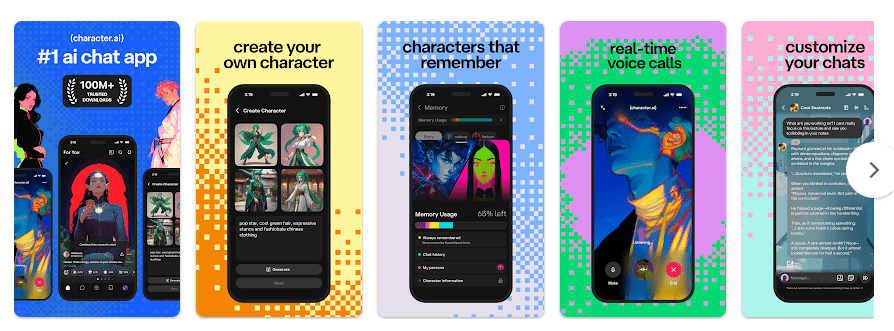
- AI Character Chats: You can choose from millions of characters made by users. Each character has its own style, name, and personality.
- Create Your Own Character: You can make an AI character with your own name, personality, and story. This is fun if you want to build a character for a game or story.
- Voice Calls: The app supports live voice conversations with AI characters. You can speak instead of typing when you want a more natural chat.
- Story and Roleplay: I liked the story feature because the AI can continue a made-up situation with you. It can be used for simple stories, adventures, and roleplay.
- AI Community: You can find characters made by other users and follow creators you like. This gives you many new chats to try without making everything yourself.
Testing Experience
I tested Character AI for two days on a Redmi Android phone. Touch response was quick when opening characters, typing messages, moving through menus, and starting chats.
Normal text chatting worked well during my test. The main delay came from waiting for the AI to create a reply, which is expected because the response needs an internet connection.
Battery use was noticeable during longer chat sessions, but it did not feel extreme for normal use. The phone became slightly warm after using the app for a longer time, especially while using voice features.
I did not face a major crash during my two-day test. However, recent Android users have reported lag and interface bugs after some updates, so performance may not be the same on every phone.
Permissions & Safety
Character AI may request access related to network use, microphone, camera, storage, notifications, and advertising services. A third-party Android app listing reports around 40 permissions for the app, including permissions connected with camera, microphone, storage, notifications, and network access.
Google Play lists the app as Teen and says it contains diverse content, user interaction, and in-app purchases. Google Play also says the developer does not share data with third parties, while the app may collect personal information, app activity, and other data. Data is encrypted while being sent, and users can request deletion of their data.
Pros & Cons
Pros
- Millions of AI characters to choose from.
- Easy character creation tools.
- Text and voice chat are available.
- Good for stories and roleplay.
- Free to download.
Cons
- Needs the internet for AI chats.
- Free users see ads.
- Some users report recent bugs and lag.
- The large app can take a fair amount of storage.
- In-app purchases are available.
Target Audience
Who Should Download
- People who enjoy AI chatting, stories, and roleplay.
- Users who want to create and talk with their own AI characters.
Who Should Avoid
- People who want an AI app that works fully offline.
- Users who dislike ads or want a very simple question-answer app.
FAQs
Is Character AI free to use?
Yes, the app is free to download and offers free AI chats and voice calls. It also contains ads and in-app purchases.
Does Character AI work without internet?
No, its main AI chat features need an internet connection. You should use Wi-Fi or mobile data for regular chatting.
Is Character AI safe for children?
Google Play currently gives the app a Teen rating and warns about diverse content. Parents should check the app before allowing younger children to use it.
Offzack Verdict
Character AI is a fun choice if you enjoy talking to different AI characters and making stories. Its many characters and voice options make it more interesting than a basic chatbot, but ads, internet use, and some recent Android complaints are worth considering.
. Download Character AI From Google Playstore
Final Scorecard
- Ease of Use: ★★★★☆ — The main chat and character controls are simple to understand.
- Performance: ★★★★☆ — It worked well during my two-day Redmi test, with some warmth during longer use.
- Features: ★★★★★ — Character chats, voice calls, character creation, and roleplay give you plenty to try.
- Privacy & Safety: ★★★★☆ — Google Play provides data safety information, encryption in transit, and data deletion options.
- Value for Money: ★★★★☆ — The free version gives you plenty to use, though ads and paid options can be annoying.
- Overall Rating: ★★★★☆ — A fun AI character app with many choices, best suited to users who enjoy creative chatting and roleplay.