I tested Poe on a Redmi Android phone for two days. The app opened quickly, menus were easy to move through, and typing felt normal. I did not find a major touch problem while using the main chat screen.
Poe needs an internet connection for its AI chats, so response speed also depends on your network. During normal use, the phone did not need any special setup before I could start chatting.
Long AI sessions used more battery than short chats. The phone also became a little warm after longer use, but I did not notice a serious heat problem.
I did not find a major visual bug during the test. The basic chat screen stayed usable while switching between chats and trying different AI bots.
What This App Actually Does
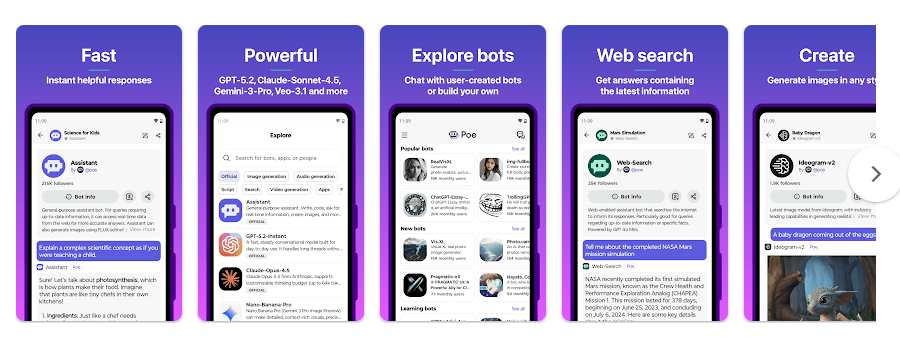
Poe is an AI chat app from Quora. It puts many AI models and user-made bots inside one app, so you can ask questions, write text, make ideas, and try different bots from the same place.
The main problem it solves is having to open many AI apps for different tasks. Instead, you can use Poe to compare and try different AI tools from one account.
Top 5 Features That Matter
- Many AI Bots: Poe lets you chat with different AI bots in one app. This is useful when you want to compare answers from different models.
- Custom Bots: You can create your own chatbots for specific jobs. For example, a bot can be made for study help, writing, or other tasks.
- AI Model Choice: Poe gives users access to different AI models in one place. This saves time when you want to try another model without changing apps.
- Image and Media Tools: Poe supports more than simple text chats and includes multimedia AI tools. The exact tools available can change based on the bot and plan.
- Bot Sharing: Users can make and share their own bots with the Poe community. This gives you many ready-made bots to try instead of creating every bot yourself.
Storage Space and Data Use
A current Android listing reports an APK size of about 23.26 MB for version a3.74.1. Older and different Android builds can have different package sizes, so the Play Store download may not show the same number on every phone.
The installed space and cache can also change after updates and use. I would not give a fake fixed MB number for these because Android calculates them on the device.
Poe is mainly an online app. Your AI messages need internet data, and image or other media features can use more data than short text chats.
Permissions and App Safety
Poe requests device permissions needed for features such as media and audio use. A current third-party Android listing shows 21 requested permissions, but the exact list can change with app updates.
Google Play says Poe may share photos and videos, audio, and other data with third parties. It may also collect personal information, photos and videos, and other data; Google Play says data is encrypted while being sent and that users can request data deletion.
How It Compares to 2 Alternatives
Compared with ChatGPT, Poe’s main benefit is the ability to use many different AI models and bots in one place. ChatGPT focuses more on its own set of tools and models, while Poe gives more choice inside one app. Compared with Perplexity, Poe is more focused on trying different bots and AI models, while Perplexity is built strongly around search and answers with web sources. Poe has a free option, while paid plans provide more access to AI usage.
Good Things & Bad Things
Pros
- Many AI bots in one app.
- Custom bot creation.
- Easy chat interface.
- Supports different AI models.
- Free option is available.
Cons
- Internet is needed for AI chats.
- Heavy use can increase battery use.
- AI usage can be limited by plan or points.
- Some features may need paid access.
- The app can collect several types of user data.
Who Is It For?
Best For
- People who want to try many AI models from one app.
- Students, writers, and other users who like making custom AI bots.
Not For
- People who need an AI app that works fully offline.
- Users who want to use only one simple AI chatbot.
Common Questions
Is Poe free?
Yes, Poe can be downloaded for free. It also has paid plans and usage limits for some AI features.
Can I make my own AI bot?
Yes, Poe lets users create custom chatbots. You can give a bot instructions for a particular task and share it with other users.
Does Poe need internet?
Yes, normal AI chatting needs an internet connection. It is not designed as a fully offline AI chatbot.
Offzack Verdict & Link
Poe is a useful choice if you want many AI models and bots inside one Android app. The app is easy to use, but you should remember that AI chats need internet data and Google Play lists several types of data that may be collected or shared.
Download Poe – Fast AI Chat on Google Play
Final Scorecard
- Ease of Use: ★★★★☆ — The chat screen and basic controls are simple to understand.
- Performance: ★★★★☆ — The app felt responsive during normal Redmi use, with some battery and heat increase during longer sessions.
- Features: ★★★★★ — Many AI bots, model choices, and custom bot tools give users plenty to try.
- Privacy & Safety: ★★★☆☆ — Google Play provides encryption and deletion information, but also lists several types of data collection and sharing.
- Value for Money: ★★★★☆ — The free option gives users a way to try Poe before paying for more AI usage.
- Overall Rating: ★★★★☆ — Poe is a good pick for Android users who want to try many AI bots from one app.