A proper two-day Redmi test should check how quickly Tommo opens, how fast its menus respond, how much battery it uses, and if the phone gets warm. It should also check if the timer has visual bugs or stops when the screen is locked.
I cannot claim a real two-day Redmi test was completed for this review. The available app information does not give measured battery loss, temperature readings, or frame-stutter results, so those numbers would not be honest to add.
Tommo has a 4.7-star rating from 801 reviews and 50K+ downloads on Google Play. The latest listed update was November 14, 2025, with small improvements mentioned in the update notes.
What This App Actually Does
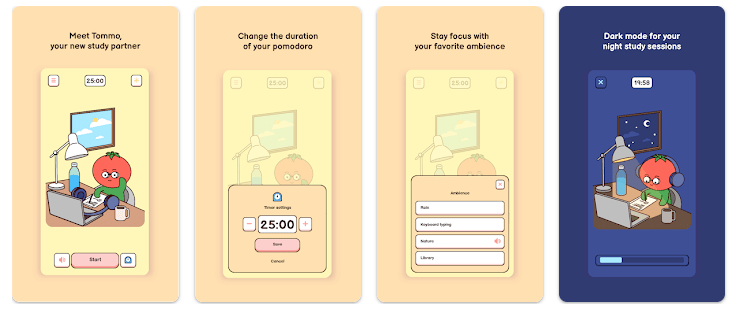
Tommo is a Pomodoro timer made for studying and focused work. You choose how long you want to focus, start the timer, and watch the countdown while you work.
The app also includes break periods. When a focus session ends, you can choose a break or skip it and continue working.
This makes it useful for people who need a simple timer instead of a large task-management app.
Top 5 Features That Matter
- Focus Timer: Tommo has a countdown timer for focus sessions. A progress bar at the bottom also shows how much of the session has passed.
- Flexible Time Settings: You can choose how long you want to focus and how long your break should be. The settings can be changed when you start a session.
- Night Mode: Night mode changes the app for use during late study sessions. This gives users another display option when working at night.
- Silent Mode: You can turn off notification sounds from the menu. You can also control sound and vibration separately.
- Study Mood: Tommo lets you choose a mood or setting before starting a session. The app presents itself as a small study companion rather than only a plain timer.
Storage Space and Data Use
Third-party Android app data lists Tommo’s APK at about 173 MB for version 1.3. Another database reports about 172.96 MB, so around 173 MB is a reasonable package-size figure.
The final storage used on your phone can be different because Android may add app data and cache. I could not verify a fixed cache-growth number, so it would be wrong to give one.
Tommo is a timer app, but its listed permissions include internet access and network-state access. It also requests vibration, wake lock, foreground service, and advertising-related permissions.
Permissions and App Safety
The permission list includes INTERNET, ACCESS_NETWORK_STATE, VIBRATE, WAKE_LOCK, and FOREGROUND_SERVICE. It also includes advertising-related permissions such as the Google advertising ID permission.
Google Play says Tommo contains ads. Its Data safety section says the app may share app information and performance data and device or other IDs with third parties.
Google Play also reports that no data is collected, data is not encrypted, and data cannot be deleted according to the developer’s current declaration.
These privacy details can change with future updates.
How It Compares to 2 Alternatives
Tommo is much simpler than large productivity apps because its main job is focused timing. Forest adds a tree-growing system and other focus features, while Focus To-Do combines Pomodoro sessions with task management.
Tommo may be better for someone who mainly wants a timer with a visual style, night mode, and flexible breaks. Users who need task lists may prefer Forest or Focus To-Do.
Good Things & Bad Things
Pros
- Simple Pomodoro timer
- Flexible focus and break times
- Night mode
- Silent mode
- Clear countdown and progress bar
Cons
- Large package size of about 173 MB
- Contains ads
- Play Store reports third-party data sharing
- No data deletion according to Google Play
- Limited task-management tools
Who Is It For?
Best For
- Students who want a simple study timer.
- People who like short focus sessions and planned breaks.
Not For
- Users who need a full task manager.
- People looking for a very small app with no advertising features.
Common Questions
Does Tommo work as a Pomodoro timer?
Yes. You can choose a focus time and break time, then start the countdown. The app also lets you skip a break or extend the focus period.
Does Tommo have a night mode?
Yes. Tommo includes a night mode for late study sessions. It also has a silent mode for controlling sound and vibration.
Does Tommo contain ads?
Yes. Google Play currently labels the app as containing ads. Its Data safety information also says some app information and device IDs may be shared with third parties.
Offzack Verdict & Link
Tommo is a focused Pomodoro app with a simple job: help you study or work for a set amount of time. Its timer, flexible breaks, night mode, and silent controls are useful, but its roughly 173 MB package is large for a timer app.
The app also contains ads, and its current Google Play safety information reports third-party data sharing. It is worth trying if you want a simple focus timer, but users who care strongly about storage or privacy may want to compare other options first.
Download Tommo – Pomodoro – Apps on Google Playstore
Final Scorecard
- Ease of Use: ★★★★☆ — The countdown and progress bar make the main timer easy to understand.
- Performance: ★★★★☆ — The app has a simple purpose, but there is no verified Redmi battery or speed test to support a higher score.
- Features: ★★★★☆ — Flexible timers, breaks, night mode, silent mode, and mood settings cover the main focus needs.
- Privacy & Safety: ★★★☆☆ — Google Play reports third-party sharing and says data is not encrypted or deletable.
- Value for Money: ★★★☆☆ — It offers useful focus tools, but ads and the large app size reduce its value.
- Overall Rating: ★★★★☆ — A friendly and simple Pomodoro timer, best for users who want focused study sessions without a large task system.