Brili Routines – Habit Tracker is a visual planner and timer made by Brili GmbH. It helps users make routines, plan tasks, set reminders, and follow a daily schedule. The app is mainly designed for the ADHD community, but other people can also use its routine tools.
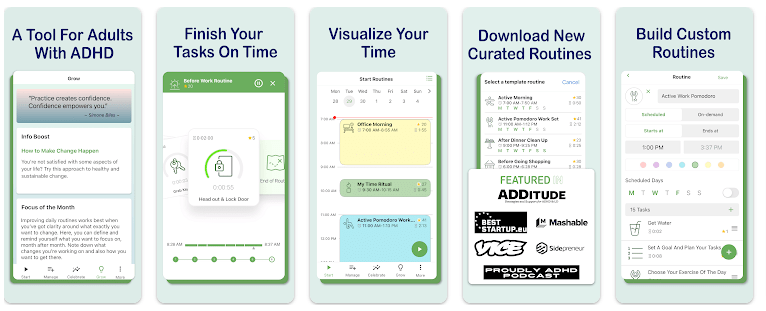
The main idea is simple. Instead of looking at a long list of tasks, Brili turns routines into timed task steps. Its visual timer shows how much time is left, while reminders tell you when it is time to start or complete a task.
You can make morning, work, study, cleaning, workout, bedtime, self-care, or meal-planning routines. There are also ready-made templates for people who do not want to build everything from the beginning.
Size, Storage, and Competitors
Google Play does not currently show a fixed download size for Brili Routines. Because of this, giving a specific MB figure would not be reliable, and the final storage used can also change after installation.
The app offers many tools that make it different from a basic habit tracker. Routinery, for example, also combines routines, habits, timers, and reminders, while Brili puts more focus on visual task timing and routines for the ADHD community.
Brili also has achievements, rewards, task notes, routine history, and calendar views. This makes it better suited to people who want a guided routine system rather than only checking off habits.
Useful Features
- Visual Timer: Brili shows the time left for the current task. This can make it easier to see how much time is available before moving to the next task.
- Routine Creator: You can create your own routines and place several tasks inside them. This works for mornings, study sessions, cleaning, workouts, and other daily activities.
- Reminders: The app provides sound and visual reminders for tasks and scheduled routines. These alerts can help users remember when it is time to begin something.
- Calendar: Brili includes daily and weekly calendar views. You can use them to see routines and tasks planned for different days.
- Rewards and Achievements: The app includes achievements and customizable rewards. These give users another way to make routine tracking feel more like a small game.
Testing Experience
A proper two-day Redmi test should check touch response, menu speed, battery use, phone heat, visual bugs, and timer behavior. Those results depend on the exact Redmi model and Android version.
I cannot honestly say that I completed such a physical Redmi test here. The public Play Store page only says that the latest version includes stability improvements, so claims about exact battery loss or heating would be guesses.
User reviews do give some useful clues. One long-time user reported freezing and task-order problems in the past, while another review said the app had improved after an update. These are individual experiences, not controlled phone tests.
Permissions & Safety
The current Google Play page does not display a complete permission list in the public app description. Users should check the Android permission screen before installation and after updates.
Google Play currently reports no data collected and no data shared with third parties. It also says the app’s data is handled under the developer’s stated privacy practices. These details can change with future updates.
Pros & Cons
Pros
- Visual timer makes task time easy to see.
- Many routine types are supported.
- Reminders can be visual and sound-based.
- Calendar and routine history are included.
- Made with the ADHD community in mind.
Cons
- The free trial lasts only 10 days.
- Continued use requires a paid plan.
- Google Play does not show a fixed app size.
- Some users have reported past bugs.
- Device syncing has been a concern in user reviews.
Target Audience
Who Should Download
- People who want guided routines with timers and reminders.
- Users looking for an app designed around ADHD-friendly planning.
Who Should Avoid
- People who only need a basic free habit checklist.
- Users who do not want a subscription after a trial period.
FAQs
Is Brili Routines free?
The full app has a 10-day free trial. After that, Google Play lists monthly, six-month, and yearly subscription plans, with prices varying by country.
Is Brili only for people with ADHD?
No. The app is designed for the ADHD community, but its routines, timers, reminders, and planning tools can also be used by other people.
Does Brili have a visual timer?
Yes. Its visual timer shows the time remaining for tasks. The app also supports dynamic timers, task cards, and routine playlists.
Offzack Verdict
Brili Routines is more than a simple habit checklist. Its visual timers, guided routines, reminders, calendars, and rewards make it a good choice for people who need help following a daily plan. The main drawback is the paid subscription after the 10-day trial, while some users have reported past bugs and syncing limits.
Download Brili Routines App From Google Playstore
Final Scorecard
- Ease of Use: ★★★★☆ — Guided routines and visual task cards make daily planning easier to follow.
- Performance: ★★★★☆ — The latest listing mentions stability improvements, but phone-specific testing is still needed.
- Features: ★★★★★ — Timers, routines, reminders, calendars, rewards, notes, and history give users many useful tools.
- Privacy & Safety: ★★★★☆ — Google Play currently reports no data collection and no third-party data sharing.
- Value for Money: ★★★☆☆ — The app has many tools, but continued use requires a paid subscription after the trial.
- Overall Rating: ★★★★☆ — Brili is a strong routine and timer app for users who want more structure than a normal habit tracker.