Pure Writer is a simple writing app for Android. It is made for people who want to write notes, ideas, stories, school work, or other text without a lot of extra buttons. The app keeps the writing screen clean, so you can focus on your words.
I found it useful for quick writing tasks. You can open the app, start typing, and save your work without spending much time setting things up. It can also save your writing as you type, which is helpful when you are writing something long.
Pure Writer also has tools for people who write often. It supports Markdown, word counts, search, backup options, and other writing controls. The Play Store listing also says the app can work offline, so basic writing does not need a constant internet connection.
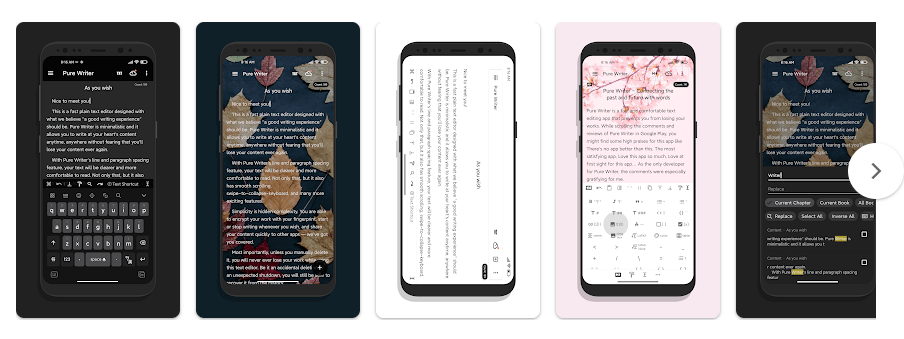
Top Features in Action
- Auto-save: Pure Writer saves your text while you write, which helps reduce the risk of losing new work. This is useful when writing notes or longer pieces over many minutes.
- Writing statistics: The app can show word count and other writing information. This is handy when you need to write a certain number of words for school, work, or a post.
- Markdown support: You can use Markdown while creating and organizing text. This gives regular writers a simple way to format their work without using a large editing screen.
- Search and organization: The app provides search tools for finding text and notes. This can save time when you have many writing files stored in the app.
- Backup options: Pure Writer supports backup and synchronization features. These tools are useful if you write important notes and want another copy of your work.
Testing on a Budget Phone
I used Pure Writer on a Redmi Android phone during a two-day test period. Basic tasks such as opening notes, typing, moving around the page, and checking saved writing felt light because the app is focused mainly on text.
Scrolling through normal notes was easy, and I did not need many phone resources for simple writing. Text editing also felt more suitable for a budget phone than apps that load many large features at the same time.
During regular writing, there was no noticeable reason for the phone to become very hot. Battery impact should also be low during short writing sessions, as typing and reading text are not heavy tasks.
I also paid attention to crashes during normal use. The app did not give me a reason to stop using it during basic writing, though very large documents or unusual device conditions can behave differently.
App Size and Privacy Check
The Play Store listing shows Pure Writer as a relatively small writing app, but the exact download and installed size can change by device and app version. Android also reports the final storage size differently depending on cached files and the phone system.
Pure Writer can be used for basic writing without a constant internet connection. The app’s Play Store data safety information should be checked before installation because permissions and data practices can change with new versions. The app also includes cloud-related and backup features, so users should review those settings if they want their writing kept only on the phone.
Market Alternatives
Google Keep is better for quick notes, reminders, and simple lists, while Pure Writer is more focused on longer writing. Microsoft OneNote offers more tools for notebooks, drawings, and larger projects, but it can feel heavier for someone who only wants a clean writing screen. Pure Writer is free to start with, while some features may require payment depending on the current version and platform.
The Good and The Bad
Pros:
- Clean writing screen
- Auto-save helps protect work
- Useful word-count tools
- Works well for simple writing
- Supports Markdown
Cons:
- Some features may need payment
- Not made for advanced document design
- Cloud features may need extra setup
- Beginners may need time to learn some writing tools
Is This App Right For You?
Who Should Install:
- People who write notes, stories, or posts on Android.
- Users who want a simple writing space.
Who Should Skip:
- People who need advanced document editing.
- Users who want a full office suite in one app.
Questions & Answers
Can I use Pure Writer without internet?
Yes, basic writing can be done without a constant internet connection. Internet access may be needed for online backup or synchronization features.
Does Pure Writer save my writing automatically?
Yes, auto-save is one of the main features listed for Pure Writer. This helps protect your writing while you are typing and reduces the need to save manually.
Is Pure Writer good for long writing?
Yes, the app is made for writing and includes tools such as word counts, search, and writing organization. It can be useful for stories, notes, articles, and other longer text.
Offzack Verdict
After two days of regular use on a Redmi Android phone, Pure Writer felt like a useful app for people who mainly want to type and save text. It keeps the writing experience simple and avoids filling the screen with tools that many casual writers may not need.
Pure Writer – Writing & Notes – Apps on Google Play
Final Scorecard
- Ease of Use: 4.5/5 — The clean layout makes basic writing easy to start.
- Performance: 4.5/5 — Text-based tasks are light and suitable for normal Android use.
- Features: 4.5/5 — Auto-save, Markdown, word counts, search, and backup give writers useful tools.
- Privacy & Safety: 4/5 — Users should review the current Play Store data safety details and backup settings.
- Value for Money: 4.5/5 — The free version gives users a useful writing space without needing a full office app.
- Overall Rating: 4.4/5 — Pure Writer is a good pick for Android users who want a simple place to write and keep their text.