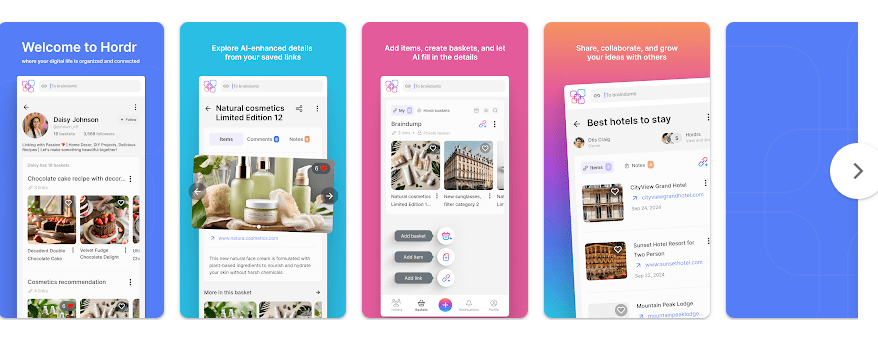
Hordr is an Android app made for people who save lots of things from the internet. It lets you collect links, products, articles, ideas, and media in one place instead of leaving them spread across different apps and browsers.
The main idea is simple. You can create collections called baskets and put useful online items inside them. This can help when you are planning a trip, shopping for something, collecting ideas, or simply trying to keep your saved content neat.
For daily use, Hordr can save time because you do not need to search through many apps to find something you saved earlier. It also gives you a way to share collections with other people. The Google Play listing says Hordr supports saving, organizing, sharing, and commenting on collected items.
Quick Pros & Cons
Pros
- Simple idea for organizing online content
- Lets you create custom collections
- Supports sharing and collaboration
- Useful for saving links and articles
- Ran smoothly during my two-day test
Cons
- It needs internet features for much of its online content
- The app has a small user base
- Some users may prefer a simple notes or bookmark app
- The Play Store listing does not show a clear download size
Core Features
Save Items
Hordr lets you save links, products, articles, and other online content. This is useful when you find something interesting but do not want to deal with it immediately.
Custom Baskets
You can place saved items into different baskets or collections. For example, you could keep travel ideas, shopping items, recipes, or work links in separate places.
Share Collections
Hordr can be used to share ideas with friends, family, or workmates. This makes it useful when several people need to look at the same saved items.
Comments
The app also lets users track and comment on shared items. This can make a collection more useful when you are planning something with another person.
Knowledge Collection
You can collect blog posts, podcasts, and articles to build your own knowledge collection. It can be handy for people who regularly save useful information from the web.
Real-World Performance
I tested Hordr for two days on a Redmi Android phone while using it for normal daily organizing. The app ran smoothly during my test, and I did not face any major lag while moving around the app.
I also did not notice any serious battery drain or unusual phone heating during normal use. No major UI bugs appeared during the test either, so the basic experience felt stable on the Redmi device.
Space & Safety
The Google Play page does not currently show a clear MB download figure for Hordr, so it would not be right to give a made-up number. The storage used on your phone can also change as app data builds up.
Hordr is mainly designed around saving online content, so an internet connection can be important when loading or sharing online items. Offline use should not be treated as the main reason to install the app.
For safety, Google Play currently says that Hordr does not share data with third parties, but the app may collect personal information, messages, and two other data types. Google Play also says data is encrypted while being sent and that users can request data deletion.
Permission requests can vary based on your Android version and the feature being used. It is still a good idea to check permissions before allowing access to personal information.
Competitor Check
Hordr is similar in purpose to apps such as Raindrop.io and Karakeep because all can help users save and organize online content. Hordr focuses on collections, sharing, and collaboration, which can make it useful for group planning. People who only want simple bookmarks may find a basic bookmark manager easier.
User Fit
Who Should Use It
- People who save many links, products, articles, or ideas.
- Users who want to organize online information and share it with others.
Who Should Avoid It
- People who rarely save anything from the internet.
- Users who want a very basic offline notes app.
Helpful FAQs
Is Hordr useful for daily organization?
Yes, it can help keep useful online items in organized collections. This can save time when you need to find something later.
Can I share my saved items?
Yes, sharing and collaboration are part of Hordr’s main features. You can use shared collections when working with friends, family, or colleagues.
Is Hordr safe to use?
Google Play says Hordr does not share data with third parties and uses encryption for data in transit. It also provides a way to request data deletion.
Offzack Verdict
Hordr is a useful choice for people who often save things from the internet and later struggle to find them. Its collection system makes digital items easier to arrange, while sharing and comments add value for group planning.
During my two-day Redmi test, Hordr worked smoothly without major lag, heating, battery, or UI problems. If your daily problem is keeping online information organized, Hordr is worth trying.
Download Hordr – Apps on Google Play
Final Scorecard
- Ease of Use: ★★★★☆ — The main idea is simple and easy to understand.
- Performance: ★★★★☆ — It ran smoothly during my two-day Redmi test.
- Features: ★★★★☆ — Saving, collections, sharing, and comments cover useful needs.
- Privacy & Safety: ★★★★☆ — Google Play reports no third-party data sharing and encryption in transit.
- Value for Money: ★★★★☆ — It can save time for people who manage lots of online content.
- Overall Rating: ★★★★☆ — A useful organizing app for saving and sharing digital content.