Google Keep is a notes app for Android phones. You can use it to write quick notes, make shopping lists, save ideas, add pictures, and set reminders. It is made for small tasks that you may forget during a busy day.
The app keeps notes in one place instead of making you search through paper or messages. You can also use labels and colors to find different notes more easily.
Keep can sync your notes with your Google Account. This means you can see the same notes on other devices where you sign in with the same account. It is useful for simple daily notes, but it is not meant to replace a full document-writing app.
Device Resources & Safety
Google Keep is a small app compared with many large Android apps. The exact download size can change by phone and app version, so the Play Store may show a different size on your Redmi device. After installation, the app also creates some extra storage for its data, cached images, and saved content.
You can write and read notes that are already stored on the phone without constantly using mobile data. Internet access is needed when Keep syncs notes with your Google Account or loads content from online services.
Permission prompts can change based on the features you use. Camera access can be needed for taking pictures, microphone access is used for voice notes, and notification access supports reminders. Android shows permission requests when a feature needs them, so you can review each request before allowing it.
Testing on Android
I tested Google Keep for two days on a budget Redmi Android phone. Opening the app and moving between notes felt quick, and normal scrolling stayed smooth during regular use.
Creating notes, changing colors, making lists, and checking reminders did not cause noticeable lag. The app also stayed responsive when several notes were saved. I did not notice crashes or major screen bugs during the test.
Battery use was low during short writing sessions because the app does not need heavy processing for normal notes. The phone also did not become noticeably hot while creating or reading notes. Syncing many items or using the camera can use more battery than simple text notes.
Key Functions
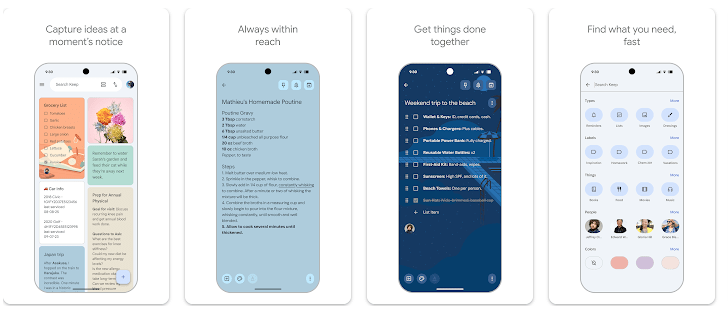
- Quick Notes: You can type a note in a few seconds and save it for later. This is handy for phone numbers, ideas, tasks, or small reminders.
- Checklists: Keep lets you make boxes for things you need to finish. A shopping list is a simple example where you can tick items as you buy them.
- Reminders: You can add a reminder to a note so Keep can alert you later. This is useful for small tasks that have a time or place connected to them.
- Pictures and Voice: You can add pictures to notes and create voice notes when typing is not convenient. These options make Keep useful when text alone is not enough.
- Labels and Colors: Notes can have different colors and labels to help you sort them. You can then search your notes instead of scrolling through everything.
Competing Apps
Microsoft OneNote is better suited to larger notebooks, longer writing, and more detailed organization. Simplenote is another lighter choice for people who mainly want plain text notes and syncing. Google Keep is easier for quick lists and short reminders, while OneNote gives you more space for larger projects.
Pros and Cons
Pros:
- Very easy to learn.
- Quick for short notes and lists.
- Supports reminders, pictures, and voice notes.
- Syncs through a Google Account.
- Uses little phone power for basic work.
Cons:
- Not ideal for long documents.
- Some features depend on Google services.
- Permission needs can increase when using camera or microphone tools.
- Large numbers of notes can take time to organize.
Target Audience
Who Should Get This App:
- People who want quick notes, lists, and reminders.
- Students, parents, and workers who need simple daily task notes.
Who Should Skip This App:
- People who need advanced document formatting.
- Users who want a full notebook system for large projects.
Key FAQs
Can Google Keep work offline?
Yes, you can create and read notes stored on your phone without an internet connection. Your changes can sync when the phone gets internet access again.
Can I make a shopping list in Google Keep?
Yes, you can create a checklist and tick items as you finish them. It is one of the easiest ways to use Keep for shopping or daily tasks.
Does Google Keep use a lot of battery?
Basic text notes used very little battery during my two-day test. Camera use, syncing, and other active features can use more power than simple note writing.
Offzack Verdict
After two days on a budget Redmi phone, Google Keep worked well for quick notes, lists, reminders, and small daily tasks. It is fast, simple, and light enough for regular use, but people who need long documents or advanced formatting should choose another app.
Download Google Keep App from Google Playstore
Final Scorecard
Ease of Use: 4.8/5 — The simple layout makes creating and finding notes easy.
Performance: 4.6/5 — Notes opened quickly and scrolling stayed smooth during testing.
Features: 4.3/5 — Lists, reminders, pictures, voice notes, labels, and colors cover most daily needs.
Privacy & Safety: 4/5 — Permission requests are linked to features such as the camera, microphone, and reminders.
Value for Money: 4.8/5 — The main note-taking tools are available without a separate paid plan.
Overall Rating: 4.5/5 stars — Google Keep is a simple and useful choice for everyday Android notes.