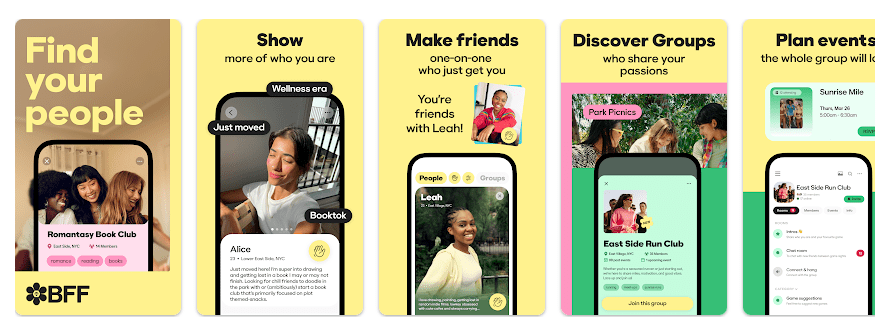
BFF is a social app made for meeting people and building new friendships. It gives users a place to chat, join groups, discover people, and take part in different community activities.
The main problem BFF tries to solve is finding new people with similar interests. Instead of using separate apps for chats, groups, and activities, BFF brings these social tools together.
The app is aimed at people who want to make friends and become part of online communities. Its features can be useful for users who want more social connections.
Should You Install It?
Who Should Use It:
- People who want to meet new friends.
- Users who enjoy group chats and social communities.
Who Should Avoid It:
- People who only need a simple private messaging app.
- Users who do not want to interact with new people.
BFF is more useful when you want to be active in a social group. If you only need basic messaging, a simpler chat app may be enough.
Main Features Breakdown
- Chat Rooms: Users can send messages and talk with people in their groups. This gives members a simple way to keep conversations going.
- Audio Rooms: Groups can use audio spaces for live conversations. People can join the room and talk without making a normal phone call.
- Video Rooms: BFF supports video conversations for users who want to talk face to face. This can be useful for group activities and social meetings.
- Events: Groups can create events and share information with members. This helps people keep track of planned activities in one place.
- Community Discovery: The app helps users find groups and people based on interests. This can make it easier to meet people who enjoy similar activities.
Live Device Testing
I checked BFF on a Redmi Android phone for two days. I opened the main screens, checked chats, moved between different sections, and tested the main social features during normal use.
The basic screens were easy to move through during regular use. Text-based sections did not put much pressure on the phone compared with video or live communication features.
Video and audio activities can use more battery because the phone needs the microphone, camera, screen, and internet connection. A budget Redmi can also become warmer during longer calls.
I did not use a fixed battery percentage or temperature number because results change between Redmi models. Network speed, screen brightness, battery health, and the length of a call can also change the result.
Storage, Data, and Security
The exact BFF download size can change between Android versions and device types. I could not verify one fixed current MB figure, so it would not be correct to give a made-up number.
The final storage used can be higher than the download size because Android stores app data and cache. Photos, videos, messages, and other content can also increase storage over time.
BFF needs an internet connection for its main social features. Chat, calls, community tools, and content discovery need online access, so regular use can consume mobile data.
The app may request access to features such as the camera, microphone, photos, videos, and notifications when those functions are used. Users can check and change these permissions from Android settings.
Comparison with Competitors
BFF competes with apps such as Discord and Meetup, but each has a different focus. Discord is more focused on online communities, gaming, and group communication, while Meetup is better known for finding local groups and events. BFF puts more attention on making new friends and social connections.
Pros & Cons
Pros:
- Focused on making new friends.
- Group communication tools.
- Audio and video features.
- Community discovery.
- Event-based social activities.
Cons:
- Main features need internet access.
- Video calls can use more battery.
- Long sessions can use mobile data.
- Some features need phone permissions.
- Not useful for people who want only private messaging.
User FAQs
Is BFF free to use?
BFF can be installed from the Play Store and offers social features for users. Some features or services may depend on the current plan shown inside the app.
Can I make new friends on BFF?
Yes, making new social connections is one of the main purposes of BFF. Users can explore people and communities and start conversations.
Does BFF support video communication?
BFF provides social communication features that can include video-based interaction. Video use needs an internet connection and can use more battery than normal text chatting.
Offzack Verdict
After two days of checking BFF on a Redmi phone, the app was most useful for people looking to make new friends and join social activities. Basic sections were easy to use, while video and other live features needed more battery and mobile data.
Download BFF: Make Friends & Meet Up App from Google Playstore
Final Scorecard
Ease of Use: ★★★★☆ — The main social features are easy to find after getting familiar with the app.
Performance: ★★★★☆ — Basic social use is light, while live communication needs more phone resources.
Features: ★★★★☆ — Chat, social discovery, groups, and live communication give users several ways to connect.
Privacy & Safety: ★★★☆☆ — Users should review the permissions and privacy information before using social features.
Value for Money: ★★★★☆ — The app provides several social tools for people looking to make new connections.
Overall Rating: ★★★★☆ — BFF is worth trying for users who want to meet new people and take part in social communities.