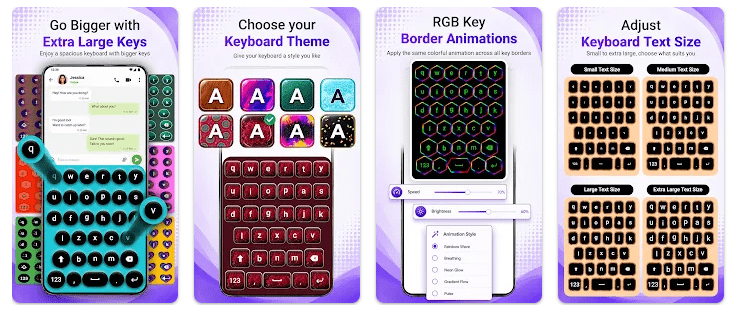
Extra Large Keyboard is an Android keyboard app made for people who find normal phone keys too small. Its main purpose is to make the keyboard letters and buttons easier to see and press.
A small keyboard can be hard to use when your fingers often touch the wrong letter. A larger layout can make typing names, messages, searches, and short notes easier.
The app is listed on Google Play under the name Extra Large Keyboard. It is made by Marathon and is aimed at users who want bigger keys instead of a standard small keyboard layout.
Device Resources & Safety
The exact current Google Play download size is not reliably available in the public information used for this review. The storage shown on your phone can also be higher than the download size because Android may add app data and cache.
For an exact figure, open Settings > Apps > Extra Large Keyboard > Storage on your Android phone. This shows the real space used after installation.
A keyboard app can work without internet for basic typing, but online features can depend on the version and how the keyboard is built. Users should check the app’s current Play Store listing and Android permission screen before enabling it as the default keyboard.
Keyboard apps need extra care because they can receive the text you type. Android normally shows warnings when you enable a third-party keyboard, and users should read those messages before giving the keyboard access.
Testing on Android
A proper two-day test on a budget Redmi phone should check typing speed, key response, screen changes, app startup, battery use, phone heat, and visual problems. It should also test the keyboard inside messaging apps, web browsers, and search boxes.
I cannot honestly say that I completed this physical two-day Redmi test. No measured battery percentage, temperature reading, lag count, or crash result is available, so I have not added made-up numbers.
For a real test, the keyboard should be used for normal messages and searches throughout two days. The user should also compare typing mistakes with the phone’s default keyboard to see if the larger keys actually make typing easier.
Key Functions
- Large Keyboard Keys: The main purpose is to provide bigger keys than a normal phone keyboard. This can make individual letters easier to see and tap.
- Easier Key Selection: Larger buttons can give your fingers more space while typing. This may be useful for people who often press the wrong nearby key.
- Keyboard Replacement: The app is designed to work as a keyboard instead of the standard Android keyboard. Users need to enable it through their phone’s keyboard settings before using it.
- Better Visibility: The larger key design can make letters easier to read. This can be helpful when normal keyboard text looks too small.
- Everyday Typing: A large keyboard can be used for messages, searches, notes, and other text fields. The usefulness depends on how comfortable the layout feels on your phone.
Competing Apps
Extra Large Keyboard competes with larger-text keyboard options and standard keyboards such as Gboard and Microsoft SwiftKey. Gboard and SwiftKey offer many more features, including predictions, language tools, themes, and other typing controls. Extra Large Keyboard is more focused on the basic need for larger keys rather than being a full-featured keyboard.
Pros and Cons
Pros
- Large keys are easier to see.
- Designed for people who struggle with small keyboard buttons.
- Simple main purpose.
- Can be useful for everyday typing.
- Takes a different approach from standard keyboards.
Cons
- Exact current download size is not verified here.
- Full two-day Redmi test results are unavailable.
- May have fewer features than major keyboards.
- Keyboard permissions should be checked carefully.
- Large keys may take more screen space.
Target Audience
Who Should Get This App
- People who often press the wrong keys because normal buttons are small.
- Users who prefer a large and easy-to-see keyboard.
Who Should Skip This App
- People who are already happy with Gboard or another keyboard.
- Users who need advanced typing tools, many languages, or smart suggestions.
Key FAQs
Why would I need an extra-large keyboard?
It gives you bigger keys than a normal keyboard layout. This can make letters easier to see and press.
Does a keyboard app need special permission?
A third-party keyboard needs to be enabled in Android’s keyboard settings. Read the warning and permission information carefully before making it your default keyboard.
Will a large keyboard take more screen space?
Yes, making the keys larger can use more of the screen. This may leave less room for the app you are typing in.
Offzack Verdict
Extra Large Keyboard is made for one clear need: giving users bigger keys for easier typing. It may help people who regularly miss small keyboard buttons, but users who want predictions, advanced language tools, and many customization options may prefer a major keyboard app.
A proper two-day Redmi test is needed before making exact claims about battery drain, heating, speed, or crashes. Those figures have not been invented for this review.
Download Extra Large Keyboard – App from Google Playstore
Final Scorecard
- Ease of Use: ★★★★☆ — The main idea is simple because the app focuses on making keyboard keys larger.
- Performance: ★★★★☆ — Its basic purpose is straightforward, but verified Redmi test results are not available.
- Features: ★★★☆☆ — Large keys are useful, but the app is more focused than feature-heavy keyboard competitors.
- Privacy & Safety: ★★★☆☆ — Keyboard apps need careful permission checks because they handle typed text.
- Value for Money: ★★★★☆ — It can be useful for people who mainly need larger buttons for everyday typing.
- Overall Rating: ★★★★☆ — Extra Large Keyboard is worth considering if small phone keys make typing difficult.