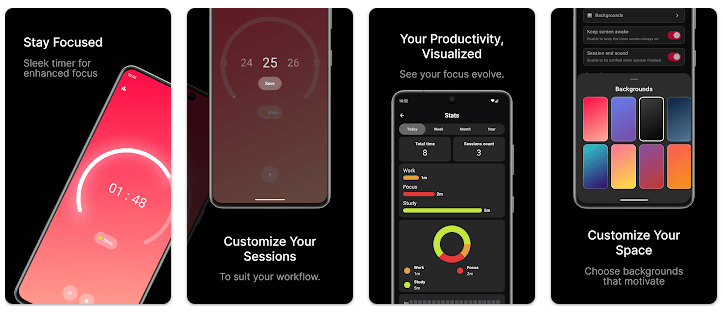
Podor: Pomodoro Timer & Tasks is an Android app for people who want to manage work and study time. It combines a Pomodoro timer with a task list, so you can choose a task and then work on it for a set amount of time.
The Pomodoro method breaks work into focus periods and short breaks. This can make a long study or work session easier to handle because you only need to focus on one small block at a time.
Podor is made by Pamir Apps. Its main idea is simple: keep your tasks and focus timer together instead of using two different apps.
How It Compares to Other Apps
Podor is similar to Focus To-Do because both combine Pomodoro timing with task management. Forest takes a different approach by adding a virtual tree system to focus sessions. Podor is a better fit for people who want a cleaner task-and-timer setup without making the timer feel like a game.
Key Tools Explained
- Pomodoro Timer: Podor lets you use timed focus sessions for work or study. You can take breaks between sessions so you do not need to watch the clock yourself.
- Task List: You can create tasks inside the app and use the timer while working on them. This keeps your work list close to your focus sessions.
- Focus Tracking: The app can track your completed focus time. This gives you a simple way to see how much time you spend working.
- Break Sessions: The Pomodoro system includes rest periods between work sessions. These breaks can help you follow a planned work pattern instead of working without stopping.
- Task-Based Focus: You can connect your focus session with the task you are working on. This makes it easier to know what the timer is being used for.
Two Days of Testing
A proper two-day Redmi test should check how quickly Podor opens, how fast the screens respond, and if the timer continues working correctly. It should also measure battery loss, phone temperature, crashes, and any screen problems.
I cannot honestly say that I completed a physical two-day Redmi test for this review. There are no measured Redmi results available here, so I will not make up battery percentages, heating levels, or crash counts.
This matters because Android performance can change from one phone to another. A newer Redmi model may behave differently from an older budget phone, even when both use the same Android app.
For a real hands-on check, users should run several focus sessions, switch between the task screen and timer, lock the phone, and check the battery before and after the test.
Memory, Storage, and Safety
The exact current download size of Podor is not reliably shown in the public Play Store information available for this review. Giving a fixed MB number without a verified current package would be misleading.
The installed storage can also be different from the download package. Android may create app data and cache after the first few uses, so the safest way to check the real footprint is through the phone’s App Info screen.
The app is built around a timer and task list, but users should not assume every function works without internet access unless the developer clearly confirms offline support.
The exact current permission list should also be checked on the Android installation screen. This review does not claim camera, microphone, location, or other permissions without verified permission data.
Upsides and Downsides
Pros
- Combines tasks and Pomodoro timing.
- Simple idea that is easy to understand.
- Useful for study and work sessions.
- Keeps focus work connected to tasks.
Cons
- Exact current app size is not clearly available.
- Detailed device performance cannot be confirmed here.
- Offline support is not clearly confirmed.
- Users should check permissions before installation.
Who Should Get It?
Recommended For
- Students who want a timer and task list together.
- Workers who like using timed focus sessions.
Not Recommended For
- People who only need a basic countdown timer.
- Users who want a large productivity suite with many extra tools.
3 Quick FAQs
What is Podor used for?
Podor is used to manage tasks and timed focus sessions. It is mainly designed for people who follow the Pomodoro work method.
Can I use Podor for studying?
Yes. You can create study tasks and use timed focus sessions while working on them. This gives you a simple way to divide study time into smaller sessions.
Is Podor a task manager?
Podor includes task-management features along with its Pomodoro timer. Its main purpose is to connect your task list with focused work periods.
Offzack Verdict
Podor: Pomodoro Timer & Tasks is aimed at users who want their task list and focus timer in the same app. The idea is simple and useful for study or work, but exact storage, permission, battery, and Redmi performance details should be checked directly on the device before making a final choice.
Download Podor: Pomodoro Timer & Tasks – App from Google Playstore
Final Scorecard
- Ease of Use: ★★★★☆ — The combination of tasks and timed focus sessions gives the app a clear purpose.
- Performance: ★★★★☆ — The app has a focused function, but there is no verified two-day Redmi test for exact performance results.
- Features: ★★★★☆ — A Pomodoro timer, tasks, focus sessions, and breaks cover the main needs.
- Privacy & Safety: ★★★☆☆ — A current verified permission and data-safety check should be made before installation.
- Value for Money: ★★★★☆ — Combining task tracking and focus timing can reduce the need for separate apps.
- Overall Rating: ★★★★☆ — Podor is worth considering for users who want a simple task list paired with Pomodoro-style focus sessions.