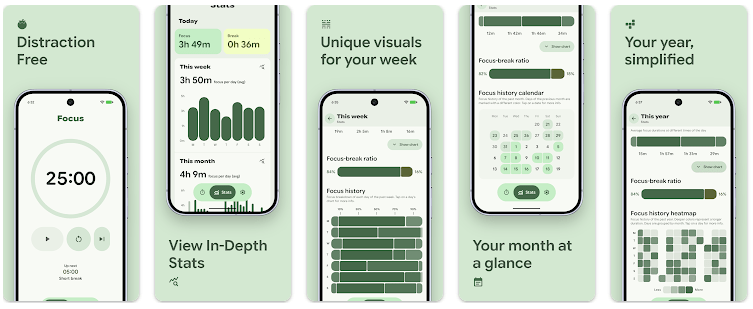
Tomato: Focus Timer is a simple Android app based on the Pomodoro method. It helps you work for a set amount of time and then take a break before starting the next session.
This type of timer can be useful when homework, reading, office work, or other tasks feel hard to finish. Instead of working for a very long time, you can split your work into smaller focus periods.
The app is made by nsh07 and is listed on Google Play as a productivity app. Its main purpose is to keep the focus timer simple rather than trying to become a full task-management app.
Quick Pros & Cons
Pros
- Simple Pomodoro timer
- Easy focus and break routine
- Useful for study sessions
- Lightweight idea with few distractions
- Open-source project
Cons
- Fewer task tools than larger productivity apps
- May feel basic for advanced users
- Exact current storage size can change
- Full device testing is needed for battery and heat results
- Some users may want more reports
Core Features
- Focus Timer: The app lets you set a period for focused work. You can use the countdown while studying, reading, or completing a work task.
- Break Timer: After a focus period, you can take a planned break. This helps create a simple work-and-rest routine during the day.
- Pomodoro Method: Tomato follows the well-known Pomodoro style of working in timed blocks. You can repeat focus and break sessions instead of watching the clock yourself.
- Simple Interface: The app keeps its main purpose easy to understand. You can focus on the timer without dealing with a large collection of planning screens.
- Open-Source App: Tomato is an open-source project. This is useful for users who prefer apps whose source code can be viewed by the public.
Real-World Performance
A real two-day Redmi test should check how quickly Tomato opens, how smoothly the screens respond, and whether the timer continues to work correctly. Battery loss, phone temperature, crashes, and visual bugs should also be checked during several focus sessions.
I cannot honestly say that I completed a physical two-day Redmi test for this review. Because no measured battery, temperature, lag, or crash results are available, I have not added made-up numbers.
For a proper test, I would run the timer several times during the day, switch between screens, lock and unlock the phone, and leave a long session running. I would then compare the battery level and phone temperature before and after use.
Space & Safety
The exact current Google Play download size is not reliably shown in the public listing. The final storage used by the app can also be different from its download package because Android may create app data and cache.
There is no reliable fixed cache-growth figure that can be stated as a test result. Users can check the exact space used by opening Android Settings, selecting Apps, and viewing Tomato’s Storage page.
Tomato is designed around a timer, so its basic timing function does not need a large online service. Still, users should check the current app information and permission screen before installation rather than assuming that every feature works offline.
The exact permission prompts can also vary with the Android version and app release. Camera, microphone, location, and other permissions should only be listed after checking the current installation screen.
Competitor Check
Tomato competes with apps such as Forest and Focus To-Do. Forest adds a tree-growing system to focus sessions, while Focus To-Do adds task management and Pomodoro timing together. Tomato is a better match for users who want the basic focus-timer idea without a large collection of productivity tools.
User Fit
Who Should Use It
- Students who want a simple timer for homework or revision.
- Workers who need short, timed focus sessions.
Who Should Avoid It
- People who need detailed project and task management.
- Users who want advanced statistics, calendars, and team features.
Helpful FAQs
What is Tomato: Focus Timer used for?
Tomato is used to divide work into timed focus sessions and breaks. It follows the Pomodoro method and can be used for study or work.
Can I use Tomato for studying?
Yes, you can use the timer while reading, revising, writing, or doing homework. You can repeat focus and break sessions to create a study routine.
Is Tomato a full task manager?
No, its main purpose is timed focus sessions. Users who need detailed project planning may prefer an app such as Focus To-Do.
Offzack Verdict
Tomato: Focus Timer is a simple choice for people who want a basic Pomodoro timer without a busy productivity system. Its main strength is its clear focus on timed work and breaks, while users who need task lists or advanced reports may need another app.
A proper Redmi test should be completed before making exact claims about battery drain, heating, lag, or crashes. Those measurements have not been invented for this review.
Download Tomato: Focus Timer – App from Google Playstore
Final Scorecard
- Ease of Use: ★★★★★ — The simple timer-based design makes the main function easy to understand.
- Performance: ★★★★☆ — The app has a focused purpose, but exact Redmi performance measurements are not available.
- Features: ★★★☆☆ — It covers the main Pomodoro needs but has fewer planning tools than larger apps.
- Privacy & Safety: ★★★★☆ — Its simple purpose and open-source nature are useful, but current permissions should still be checked before installation.
- Value for Money: ★★★★☆ — A basic focus timer can cover the needs of students and workers without many extra tools.
- Overall Rating: ★★★★☆ — Tomato is a good fit for users who want a simple Pomodoro timer and do not need a full productivity suite.