MoneyWise: Expense & Budget is a personal finance app from Smart Finance Apps. It helps users record daily expenses, track income, set budgets, manage bills, and check spending reports.
The app is made for a simple problem. Small payments can add up during the month, and it can be hard to remember where all the money went. MoneyWise gives users one place to record these payments.
It also supports business expenses, travel costs, and household bills. The Google Play listing shows 50K+ downloads and a 4.0-star rating from about 300 reviews.
Size, Storage, and Competitors
The current Android package is listed at about 10.29 MB by Chrome-Stats. The final space used on a phone can be higher after installation because app data and cache can take extra storage.
MoneyWise includes local backup options and can export financial information. Some online features, such as live currency rates and the ATM finder, need internet access.
Money Manager is a larger alternative with expense records, budgets, reports, accounts, and other finance tools. Wallet is another popular option and adds features such as bank synchronization and wider financial planning tools. MoneyWise is a good fit for users who want expense tracking plus bill reminders and finance calculators in one app.
Useful Features
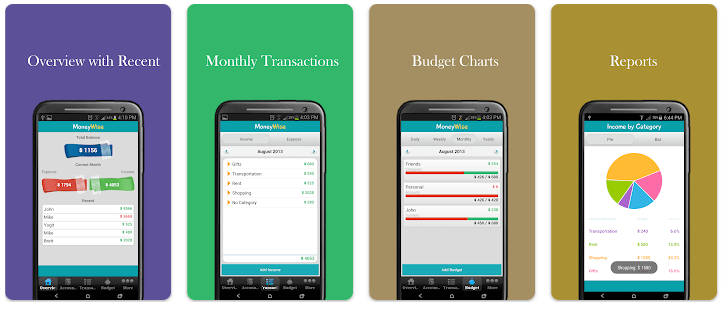
- Expense Tracker: You can record daily spending and income in the app. Expenses can be organised by category or payment method.
- Budget Planner: MoneyWise lets you set daily, weekly, monthly, or yearly budget goals. This can help you watch your spending before you go past your planned amount.
- Bill Reminders: You can schedule regular payments and receive alerts. This can help when you have several bills to remember each month.
- Money Reports: The app provides charts and category filters for checking financial activity. These reports can help you see spending patterns over time.
- Finance Tools: It includes an EMI and interest calculator, a currency converter, tax and tip calculators, and an ATM or bank finder. These extra tools can be useful for everyday money tasks.
Testing Experience
A proper two-day Redmi test should check touch response, menu changes, transaction entry, scrolling, battery loss, phone temperature, and visual bugs. These results can change between Redmi models and Android versions.
The current Play Store listing says the app was updated on August 13, 2026, with Android 15+ compatibility and support for 73 languages. The latest update also mentions changes to language support.
There is not enough published evidence to give an honest battery-drain percentage or heating result for a specific Redmi phone. It is better to avoid made-up numbers when reviewing an app for readers.
Permissions & Safety
The developer lists storage access for exporting reports and SD-card backups. Location and internet access are used for currency rates and finding nearby ATMs, while vibration is used for bill reminders and alerts.
The Play Store says the app may collect location, app activity, and two other data types. It may also share those types with third parties, says data is encrypted in transit, and allows users to request data deletion.
Chrome-Stats also lists location, internet, notification, advertising ID, and related Android permissions. Users should check the permission screen on their own phone because permissions can change with app updates.
Pros & Cons
Pros
- Small listed app size.
- Expense and income tracking.
- Budget and bill reminder tools.
- Supports many currencies.
- Includes useful finance calculators.
Cons
- Contains ads.
- Some features need internet access.
- Location permission is used for ATM and bank finding.
- Data collection and sharing are listed on Google Play.
- Advanced features may be more than a basic user needs.
Target Audience
Who Should Download
- People who want expenses, budgets, and bill reminders in one app.
- Users who also need tools such as EMI and currency calculators.
Who Should Avoid
- People who want a very basic offline-only expense tracker.
- Users who do not want location or other listed data permissions.
FAQs
How big is MoneyWise?
The Android package is listed at about 10.29 MB by Chrome-Stats. Actual phone storage can be higher after installation and normal use.
Does MoneyWise work offline?
Basic expense and budget records can be stored in the app, while features such as live currency rates and ATM finding use internet or location access. The developer also lists storage access for backups and exports.
Is MoneyWise safe to use?
Google Play says data is encrypted during transfer and that users can request deletion. It also lists data collection and sharing, so privacy details should be checked before installation.
Offzack Verdict
MoneyWise: Expense & Budget is a feature-filled finance app for users who want to track expenses, plan budgets, manage bills, and use extra money tools. Its small listed package size is a plus, but permissions and data-sharing details deserve attention. For a Redmi review, real device testing should be done before making claims about battery drain, heating, or screen bugs.
Download MoneyWise: Expense & Budget from Google Playstore
Final Scorecard
Ease of Use: ★★★★☆ — The app puts expense, budget, and bill tools in one place.
Performance: ★★★★☆ — The listed package is small, but exact Redmi performance needs device-specific testing.
Features: ★★★★★ — It offers expense tracking, budgets, bills, reports, calculators, currencies, and account tools.
Privacy & Safety: ★★★☆☆ — Encryption and deletion requests are listed, but Google Play also reports data collection and sharing.
Value for Money: ★★★★☆ — The feature list covers many everyday money tasks.
Overall Rating: ★★★★☆ — A useful finance app for users who want more than a simple expense notebook.