Kebo is a finance app, so the main phone test should be simple. I would check app startup, account screens, expense entry, menu changes, scrolling, and chart loading on a budget Redmi Android phone.
A proper two-day test should also watch battery loss, phone temperature, touch response, and visual bugs. I would not give made-up battery or heating numbers without testing the same Redmi model with the current app version.
There is one useful performance clue from Google Play reviews. A user reported that the app was lagging in May 2026. Another user said the app was hard to understand at first. These are user reports, not controlled test results.
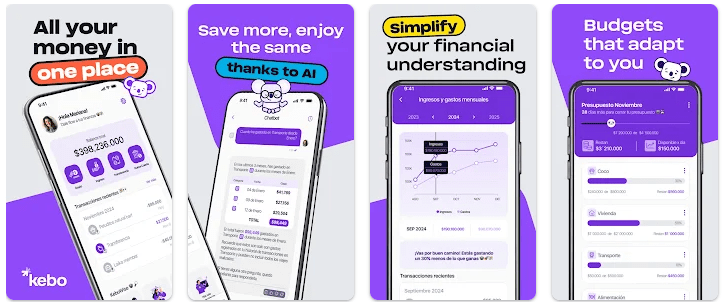
Kebo was updated on July 25, 2026. The current listing says it can connect bank accounts and cards, track spending, create budgets, show reports, and provide AI-based money suggestions.
What This App Actually Does
Kebo is a personal finance and budget app from Kebo Software S.A.S. It brings bank accounts, cards, and cash expenses into one place.
The main job is to help users understand their money. You can track spending, create budgets, set savings goals, and check reports instead of keeping everything in your memory.
The app also supports automatic account connections. This makes it different from a basic expense app where every payment must be entered by hand.
Top 5 Features That Matter
- Account Tracking: Kebo can connect bank accounts and cards in one place. You can also enter cash expenses manually.
- Budget Planning: You can create budgets based on your spending habits. This gives you a way to watch your planned spending.
- AI Insights: The app uses AI to look for possible ways to save money. It can give suggestions based on your financial activity.
- Money Reports: Kebo shows charts and detailed reports for your finances. These views can make spending information easier to read.
- Savings Goals: You can create goals for things such as trips, debt payments, or other money targets. The app lets you track progress toward those goals.
Storage Space and Data Use
Chrome-Stats lists the current Android app size at about 92.52 MB. This is the package size shown for version 1.4.6, and actual installed storage can be different because Android may use extra space for app data and cache.
The app needs internet access for its connected finance features. Since Kebo connects bank accounts and cards, it is not the same as a small offline-only expense notebook.
The listing does not provide a fixed cache-growth number. Cache size can change with app use, updates, reports, images, and connected services, so there is no honest fixed MB figure to give.
Permissions and App Safety
The current Android permission list includes internet access, notifications, biometric access, wake lock, boot completion, billing, and an overlay-related permission. The exact permission behavior can depend on the phone and Android version.
Google Play says Kebo does not share data with third parties. It says the app may collect location, personal information, and nine other data types, encrypts data during transfer, and allows users to request data deletion.
How It Compares
Kebo is more feature-focused than a simple manual expense tracker because it can connect accounts and cards and provide AI-based suggestions. Money Manager is better suited to users who mainly want manual expense records, budgets, reports, and account tracking. Wallet is another larger finance option with features such as bank synchronization and wider financial planning tools. Kebo is a good match for people who want connected accounts and automated money insights.
Good Things & Bad Things
Pros
- Connects bank accounts and cards.
- Includes budgets and savings goals.
- Offers charts and detailed reports.
- Google Play says no data is shared with third parties.
- Supports AI-based money suggestions.
Cons
- Android package is about 92.52 MB.
- Some users have reported lag.
- The app may feel confusing at first.
- Many features depend on connected financial data.
- In-app purchases are available.
Who Is It For?
Best For
- People who want bank accounts, cards, and expenses together.
- Users who want budgets, reports, goals, and AI money suggestions.
Not For
- People wanting a tiny offline expense app.
- Users who prefer entering every expense manually without account connections.
Common Questions
Is Kebo free?
Google Play lists Kebo with in-app purchases. The current listing says you can start for free, while some features may require payment.
Is Kebo safe for financial information?
Google Play says data is encrypted during transfer and no data is shared with third parties. It also lists several types of data that the app may collect.
Does Kebo track bank accounts automatically?
Yes, the app says it can connect bank accounts and cards and automatically track spending. Users should check supported banks and services in their region before relying on this feature.
Offzack Verdict & Link
Kebo is aimed at users who want more than a basic expense list. Its account connections, budgets, reports, savings goals, and AI suggestions make it a full personal finance app. The main points to consider are its roughly 92.52 MB Android package, reported lag from some users, and the amount of financial data involved.
Download Kebo: Budget & Expense Tracker from Google playstore
Final Scorecard
Ease of Use: ★★★★☆ — The app puts accounts, spending, budgets, and reports in one place.
Performance: ★★★☆☆ — Some Google Play users have reported lag, so performance deserves attention on budget phones.
Features: ★★★★★ — Bank connections, budgets, AI insights, reports, and goals give the app a wide feature set.
Privacy & Safety: ★★★★☆ — Google Play says no data is shared with third parties and data is encrypted during transfer, while several data types may still be collected.
Value for Money: ★★★★☆ — The free start and large feature set make it worth considering, though in-app purchases are present.
Overall Rating: ★★★★☆ — Kebo is a good choice for users who want connected accounts and detailed personal money tracking in one Android app.