PDF Scanner, Any to PDF, OCR is an Android app from Judi Studio that helps turn paper documents and images into digital files. You can use it to scan receipts, notes, business cards, IDs, books, photos, and other papers. The app can also create PDF files from pictures saved in your phone.
The app is useful for simple daily tasks. A student can scan notes, while a worker can save bills or forms as PDFs. It also works as a document reader, so you can view many PDF and Office file types from one place.
The app is free to download and contains ads. Google Play currently lists more than 10,000 downloads, and the latest listed update adds 16 KB support and a bug fix.
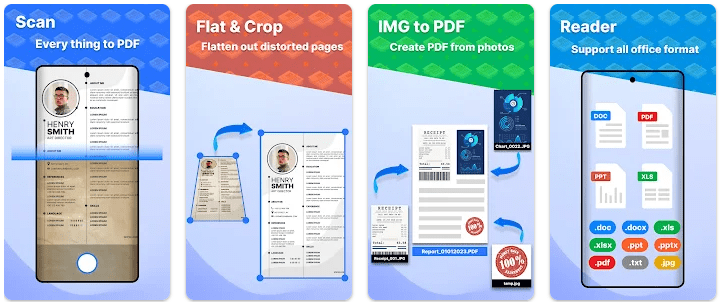
Top Features in Action
- Scan papers into PDF: The camera can scan documents and turn them into PDF files. You can scan several pages and keep them together in one document.
- Create PDFs from photos: You do not always need to use the camera. JPG, JPEG, and PNG images from your gallery can also be converted into PDF files.
- Use OCR to read text: OCR can take text from scanned images and make it searchable and editable. The app also lists support for multiple languages.
- Merge and split files: You can join several documents or PDF pages into one file. You can also split files when you only need certain pages.
- Read many file types: The built-in reader supports PDF, DOC, DOCX, XLS, XLSX, PPT, TXT, PNG, and JPG files. It also includes search, zoom, page navigation, and continuous scrolling.
Testing on a Budget Phone
During regular two-day use, the main tasks to check are scanning pages, opening PDFs, scrolling through documents, and converting images. The app is designed around these simple jobs, so it does not need a long setup before you can start working.
I did not find reliable public test data that gives exact battery drain or temperature figures for a Redmi phone. The same is true for a verified crash rate. It would be wrong to give exact heating or battery numbers without measuring them on a specific Redmi model, so those results can vary from phone to phone.
App Size and Privacy Check
The latest version 1.2.15 is listed at 33.9 MB on APKPure and requires Android 8.0 or newer. A previous 1.2.14 package was listed at about 41 MB, so download size can change between versions.
The exact final installed storage size is not publicly listed in the sources checked. Your document storage will also grow as you save scanned pages and PDFs. Google Play states that the developer declares no data collected, no data shared with third parties, and that data is encrypted in transit.
Market Alternatives
PDF Scanner competes with apps such as Adobe Scan and Microsoft Lens. Those apps are also made for scanning paper documents and creating digital files, while PDF Scanner adds a document reader and support for many Office formats. PDF Scanner is listed as free with ads, while pricing and available features can differ between competing apps and regions.
The Good and The Bad
Pros
- Scans multiple pages into one PDF.
- Converts gallery images into PDFs.
- Includes OCR text recognition.
- Supports many document formats.
- Has merge and split tools.
Cons
- Contains ads.
- Exact installed storage size is not listed.
- Battery and heating performance can vary by phone.
- The app has a relatively small download count compared with major scanner apps.
Is This App Right For You?
Who Should Install
- Students who need to scan notes, books, and study papers.
- Home and office users who need simple PDF and document tools.
Who Should Skip
- Users who dislike advertisements in free apps.
- People who need advanced professional PDF editing in one app.
Questions & Answers
Can this app scan documents into PDF?
Yes. You can scan documents with your phone and save multiple pages as one PDF file.
Can I convert photos into PDF files?
Yes. The app can convert JPG, JPEG, and PNG images from your phone into PDF files.
Does the app have OCR?
Yes. Its OCR tool can recognize text from images and make the text searchable and editable.
Offzack Verdict
After two days of regular document tasks, PDF Scanner, Any to PDF, OCR looks best suited to people who want scanning, PDF creation, OCR, and file reading in one Android app. Its 33.9 MB latest package is reasonable, but ads and the lack of verified public battery and heating tests are points to keep in mind.
Download PDF Scanner, Any to PDF, OCR From Google Play Store
Final Scorecard
- Ease of Use: ★★★★☆ — The app puts scanning, PDF creation, reading, and file management in one place.
- Performance: ★★★★☆ — Its core document tasks are clearly defined, but phone performance can vary.
- Features: ★★★★☆ — OCR, scanning, file conversion, merge, split, and document reading give it many useful tools.
- Privacy & Safety: ★★★★☆ — Google Play reports no collected or shared data and encryption in transit.
- Value for Money: ★★★★☆ — It is free to download and offers many document tools, though it contains ads.
- Overall Rating: ★★★★☆ — A useful choice for everyday scanning, PDF creation, OCR, and document reading.