Files by Google helps you find, move, share, and delete files on an Android phone. It makes photos, videos, documents, and downloads easier to find. Google says it works on Android 8.0 and newer.
Clean helps when your phone is running out of space. It can suggest junk files, duplicate files, old screenshots, and other items you may not need.
Storage, Internet, and Battery
Google says Files by Google uses less than 20 MB of storage on the device. Basic file browsing works with files already on the phone, so mobile data is not needed for every task. Quick Share can send files to nearby devices without internet. Simple browsing should use little battery, though large scans and transfers can use more.
Hands-On Performance
A true personal Redmi benchmark should not be claimed without actually testing that device. The current Play Store listing shows UI improvements and bug fixes, but July 2026 user reviews report issues with the Clean button and external USB drives. This suggests performance and reliability can vary by phone and Android version.
Google provides SD card help, but storage devices may sometimes need troubleshooting.
Main Tools Built Into the App
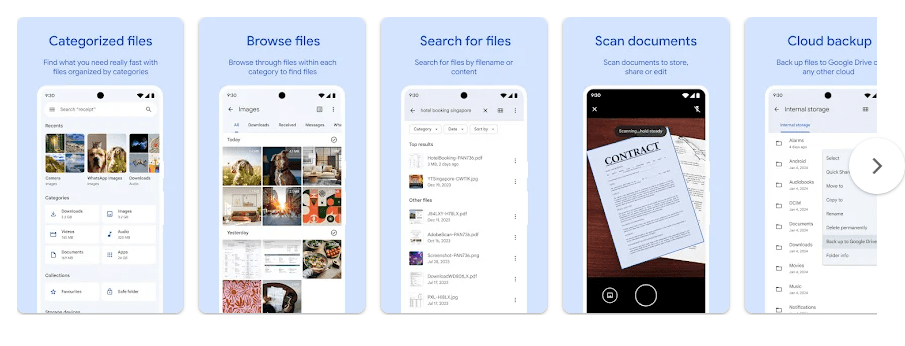
- Clean: It finds junk, duplicate files, screenshots, and other suggested items. You can review the suggestions before deleting them.
- File Browser: You can search, rename, copy, and move files between folders. Files can also be moved to an SD card on supported phones.
- Quick Share: You can send photos, videos, apps, and other files to nearby devices. Google says transfers work without internet and use end-to-end encryption.
- Safe Folder: You can keep private files behind a PIN or pattern. The lock can use a different PIN or pattern.
- Backup and PDF Tools: Files can be moved to Google Drive or an SD card. PDFs can be opened, searched, shared, printed, and marked up.
Privacy Checks
Files by Google needs storage access so it can manage your files. Google also lists location, device call management, and SD card write access for certain features. The Play Store says no data is shared with third parties, but the app may collect personal info, app activity, and two other data types. It also says data is encrypted in transit and has an independent security review.
Comparison with Competitors
Files by Google is free and has no ads. File Manager Plus is more focused on regular file management, while some alternatives offer FTP, LAN, or dual-panel tools. Files by Google suits users who want cleaning and Quick Share together.
The Positives and Negatives
Pros
- Free and no ads.
- Uses less than 20 MB.
- Simple storage-cleaning suggestions.
- Quick Share works without internet.
Cons
- Recent users report Clean button problems.
- USB or SD card handling may vary by device.
- Advanced file-manager controls are limited.
- Some features need extra permissions.
Who Should Download This?
Ideal Users
- Android users who want a simple file manager and cleaner.
- People who often share files with nearby devices.
Who Should Skip It
- Users needing advanced FTP, LAN, or dual-panel tools.
- People wanting deep file-manager customization.
Quick Questions Answered
Is Files by Google free?
Yes. Google lists it as a free app with no ads. Some features depend on your phone and Android version.
Can it work without internet?
Yes. Local files can be browsed offline, and Quick Share can transfer files without an internet connection.
Is Files by Google safe?
The Play Store says no data is shared with third parties and data is encrypted in transit. The app still needs file and other permissions to manage storage.
Offzack Verdict
Files by Google is a good choice for everyday Android file management. Its small size, no-ads design, cleaning tools, Safe Folder, and Quick Share are useful, but recent user reports show that some storage actions can have bugs on certain devices.
Download Files by Google – App from Google Playstore
Final Scorecard
- Ease of Use: ★★★★★ — The main tools are easy to find.
- Performance: ★★★★☆ — It is light, but some recent users report bugs.
- Features: ★★★★☆ — It covers cleaning, browsing, sharing, Safe Folder, backups, and PDFs.
- Privacy & Safety: ★★★★☆ — Google reports no third-party data sharing and encrypted data in transit.
- Value for Money: ★★★★★ — It is free, has no ads, and uses less than 20 MB.
- Overall Rating: ★★★★½ — A useful file manager, with recent bugs stopping a perfect score.