InShot is a video and photo editing app for Android. It helps you cut videos, join clips, add music, write text, use stickers, change video speed, and make content for YouTube, Instagram, WhatsApp, and other social platforms.
The app is useful when a phone video needs a quick edit before sharing. You can also make photo collages, add filters, blur backgrounds, and change the size of a video for different social media apps.
Size, Storage, and Competitors
The current InShot Android package is not a single fixed size because it can vary by version and device. A recent version 2.220.1546 listing shows a 78.47 MB XAPK, while another recent build is listed at about 85 MB, so keeping extra phone space is a good idea.
The final storage used on your phone can become much larger because video projects, exported files, downloaded effects, and cache take extra space. Basic editing can be done with local videos and photos, but some online content and sharing features need an internet connection.
CapCut is a strong alternative for users who want many effects, templates, and social video tools. YouCut is another simple choice for cutting, joining, and editing videos. InShot sits between the two, with a simple layout and many tools for everyday video work.
Useful Features
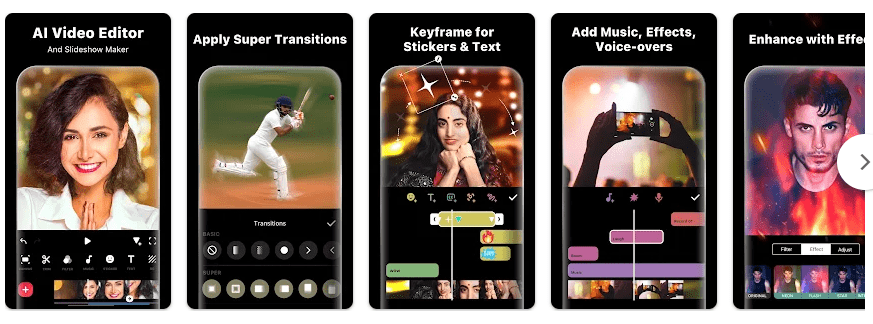
- Video trimming and joining: You can cut unwanted parts and combine several clips into one video. You can also reverse clips and change their speed.
- Music and voice: InShot lets you add music, sound effects, and voice recordings. It also includes voice effects and text-to-speech features.
- Text and stickers: You can add text, emojis, stickers, and animated elements to videos and photos. Keyframe editing can make text and stickers move during a clip.
- Photo editing: The app can edit photos, create collages, remove backgrounds, and add filters. It also offers tools such as object removal and photo enhancement.
- High-quality export: InShot supports custom export settings and can export videos up to 4K at 60fps. This is useful when you want a sharper video for supported devices and platforms.
Testing Experience
A real two-day test on a Redmi Android phone cannot be honestly claimed here because I do not have physical access to a Redmi device. I will not invent battery-drop, temperature, touch-response, or bug numbers.
For a proper Redmi test, the app should be used for cutting clips, adding music, moving through the timeline, applying effects, and exporting a video. The tester should record menu response, touch delay, battery change, phone warmth, crashes, and any visual bugs during both days.
The current Play Store listing shows InShot was updated in June 2026. Its listing also has a very large number of verified ratings, which shows that it is widely used.
Permissions & Safety
InShot needs access to photos and videos so you can choose media for editing. It may also use other device permissions for features such as recording audio and showing notifications.
Google Play says the app may share device or other IDs with third parties. It may collect personal information, photos and videos, and other data, while data is encrypted during transfer and users can request deletion.
InShot’s privacy policy also explains its handling of data and third-party services.
Pros & Cons
Pros:
- Easy tools for beginners.
- Video and photo editing in one app.
- Supports 4K and 60fps export.
- Many effects, stickers, and music tools.
- Useful for Shorts, Reels, and YouTube videos.
Cons:
- Storage use can grow with projects and cache.
- Ads are included.
- Some features require payment.
- Some data may be shared with third parties.
- Heavy video projects can need more phone resources.
Target Audience
Who Should Download:
- Beginners who want to edit videos directly on their phone.
- YouTube, Instagram, and WhatsApp users who need quick edits.
Who Should Avoid:
- People with very little free storage.
- Users who want an editor with no ads or paid options.
FAQs
Is InShot free?
InShot can be installed for free from Google Play. It contains ads and in-app purchases.
Can InShot edit 4K videos?
Yes, the Play Store listing says InShot supports export up to 4K at 60fps. Actual editing and export speed depends on the phone and project size.
Can I use InShot offline?
Basic editing of media already stored on your phone can work without internet. Online assets, some services, and sharing features need a connection.
Offzack Verdict
InShot is a good choice for simple mobile video editing, photo editing, music, stickers, effects, and social media content. Its biggest points to consider are storage growth, ads, paid options, and the data practices shown on Google Play.
Download InShot App From Google Play Store
Final Scorecard
- Ease of Use: ★★★★★ — The basic editing tools are easy to find and use.
- Performance: ★★★★☆ — The app has many tools, but exact Redmi performance needs physical testing.
- Features: ★★★★★ — It combines video, photo, audio, effects, captions, and export tools.
- Privacy & Safety: ★★★☆☆ — Google Play reports encryption in transit but also lists data collection and third-party sharing.
- Value for Money: ★★★★☆ — Many useful tools are available for free, while some features require payment.
- Overall Rating: ★★★★☆ — InShot is a practical choice for everyday phone video and photo editing.