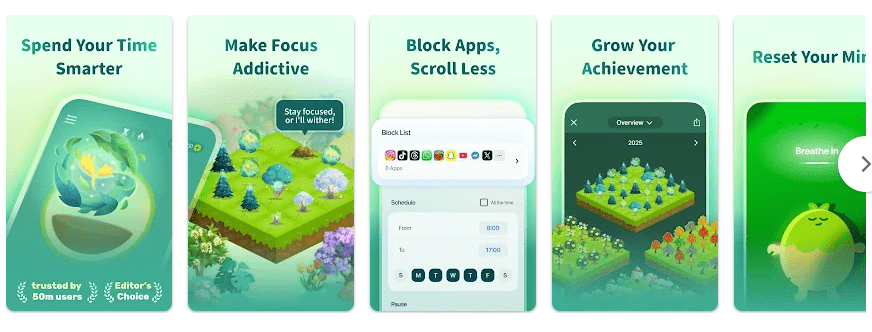
Do you often pick up your phone when you should be studying, working, or reading? Forest: Stay focused is made to help with this problem. You start a focus session by planting a virtual tree. The tree grows while you stay focused. If you leave the session early, the tree can wither. This simple idea gives you a reason to keep your phone away.
Forest also works as a time tracker. You can set a focus period and build a forest from your completed sessions. The app can help students, office workers, writers, and anyone who wants to spend less time checking their phone. It also has tools for blocking distracting apps.
Storage, Internet, and Battery
The current Android package is fairly large. Recent versions listed by third-party Android download services range from about 224 MB to more than 350 MB, depending on the version and package, so users should keep several hundred MB free before installing. Forest needs internet for some account, sync, store, and online features, but the main focus timer does not need a constant connection. Battery use should be modest during a normal timer session, although features that monitor other apps can use more system resources.
Hands-On Performance
On an Android phone such as a Redmi, Forest’s main screens are easy to understand. The timer is the main part of the app, so starting a session does not require going through many menus. The tree animation and focus screen also make it clear when a session is running.
The app has grown into a larger productivity tool, so it is not as lightweight as a basic timer. The latest Android version requires Android 10 or newer according to current version information. Users should also remember that Time Guard uses Android’s AccessibilityService to check which app is active when it needs to block selected apps.
Main Tools Built Into the App
- Focus Timer: Start a session and choose how long you want to focus. A virtual tree grows as you stay with the task.
- Deep Focus: Forest can block distracting apps during a focus session. This is useful if social media or video apps make it hard to stay on task.
- Time Guard: You can schedule blocks for distracting apps at set times. It uses Android’s AccessibilityService to detect the app currently being used.
- Focus Records: Your completed sessions become part of your forest. The app lets you look at your focus activity and see how your time is being used.
- Plant Together: Friends can join the same focus room and grow a shared tree during a session. The feature works across Android and iOS.
Privacy Checks
Google Play says Forest may share personal information with third parties. Its data-safety listing also says it may collect location, personal information, photos, device or other IDs, app activity, and app performance information, depending on use. Google Play states that data is encrypted in transit and that users can request deletion of their data.
Comparison with Competitors
Forest is more game-like than Focus To-Do, which combines a Pomodoro timer with task and planning tools. A basic Pomodoro timer can be simpler if you only need a countdown. Forest’s main difference is the tree-growing system, app blocking, focus records, and shared focus rooms.
The Positives and Negatives
Pros
- Simple focus timer
- Tree-growing system makes sessions more engaging
- App-blocking tools are available
- Focus records help track progress
- Plant Together supports group focus
Cons
- The Android app can take a lot of storage
- Some features need special Android access
- Google Play lists several types of data collection
- Extra features can make it feel less simple than a basic timer
Who Should Download This?
Ideal Users
- Students and workers who get distracted by their phones.
- People who enjoy visual rewards and want to build a focus habit.
Who Should Skip It
- Users who only need a small, basic timer.
- People who do not want to give an app access needed for app-blocking features.
Quick Questions Answered
Is Forest free?
Forest can be downloaded for free, but it also has paid features and in-app purchases. The current service also has Plus features.
Can Forest block distracting apps?
Yes. Deep Focus and Time Guard can block selected apps during focus periods. Time Guard uses Android’s AccessibilityService for this function.
Does Forest need the internet all the time?
No. The basic timer can be used without keeping an internet connection active, but some online features and account functions need internet access.
Offzack Verdict
Forest is worth trying if your main problem is phone distraction. Its growing-tree idea makes a normal timer feel more meaningful, while app blocking and focus tracking give it more useful tools than a simple countdown timer. Its large Android size and wider data collection are worth considering before installing.
Download Forest: Stay focused App From Google Playstore
Final Scorecard
- Ease of Use: ★★★★☆ — The main timer and tree system are easy to understand.
- Performance: ★★★★☆ — The app offers a smooth focus experience, but its large size may matter on phones with limited storage.
- Features: ★★★★★ — Timers, app blocking, focus tracking, and group sessions give users many useful options.
- Privacy & Safety: ★★★☆☆ — Google Play lists several collected data types and some shared personal information.
- Value for Money: ★★★★☆ — The basic idea is useful without needing a complicated productivity system.
- Overall Rating: ★★★★☆ — Forest is a good choice for people who want help staying away from phone distractions.