Every single day, I pick up my smartphone to check a quick work email, only to find myself an hour later completely lost in a sea of short-form videos. The infinite scroll problem is a modern epidemic, driven largely by the bright, flashing colors, custom app icons, and constant notification badges designed to grab our attention. It is a massive everyday annoyance to feel like your own device controls your time rather than acting as a simple, helpful daily tool.
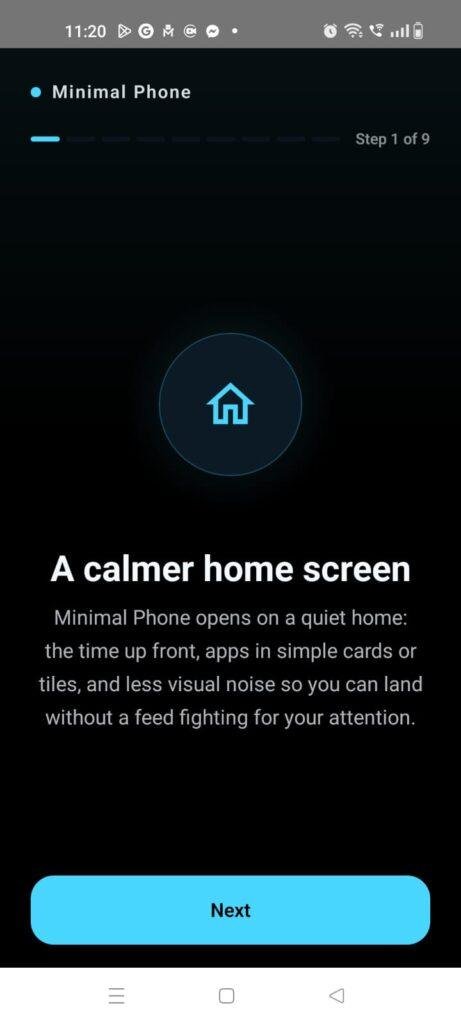
This digital habit problem is exactly what the Minimal Phone: Focus Launcher app (com.minimalphone.launcher) by the Minimal Phone team intends to address. Instead of overwhelming you with flashing graphic configurations, this utility completely strips away your phone’s default visual noise. It replaces your complex, colorful app grids with a beautifully clean, text-based homepage. Over my dense 2-day testing window, I set out to determine whether this text-focused approach genuinely breaks the smartphone addiction loop or if it just creates an unusable, boring mobile environment.
My Phone Testing Setup
I spent 2 full days testing this productivity utility on a Redmi Note 13, running the HyperOS software layer. My daily routines were split evenly between my high-speed home Wi-Fi network and standard mobile data networks while handling commutes outdoors. I intentionally left the tool configured as my primary, default launcher layout alongside my heavy instant messaging channels, streaming utilities, and daily email clients, monitoring its visual stability and device reactions under normal multitasking routines.
Real-World Hands-On Analysis
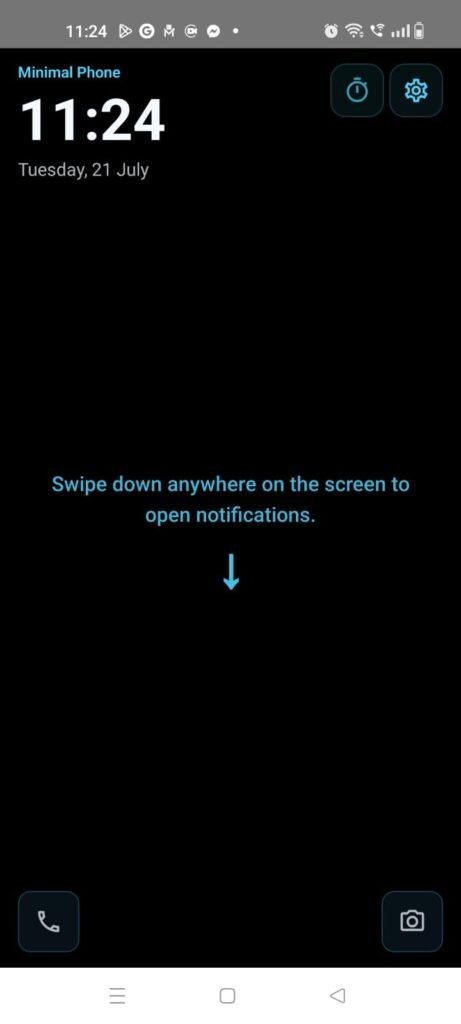
- Scenario 1: Navigating a Distraction-Free Work MorningDuring a busy Monday morning where I needed to finish an article draft, I replaced my regular colorful home screen with the app’s clean text list. Because the flashing social media badges were hidden out of sight, my impulsive urge to tap open my feeds dropped significantly. I was able to locate my primary calendar tool via the simple text layout within under a few seconds, keeping my focus locked on my actual tasks rather than a casual scroll loop.
- Scenario 2: Utilizing the Focus Delay Mode for Impulsive TapsTo test the app’s intentional wellbeing features, I activated the custom mindful delay tool before opening my most distracting video apps. When my thumb habitually moved to the app location out of pure muscle memory, the launcher introduced a brief countdown screen with a small, calm cat animation. This extra pause gave me just enough time to realize I was opening the app out of pure boredom, allowing me to close the window before getting sucked into a scroll trap.
- Scenario 3: Searching the Categorized App List During a CommuteWhile riding on a bumpy public bus late in the afternoon, I needed to quickly find a local navigation tool that I rarely use. I swiped up to access the master text database list and typed the first two characters into the rapid search bar. The interface filtered my local system directory immediately on the screen, letting me launch the navigation map before the vehicle reached the next terminal stop.
App Permissions & Device Safety
When installing custom launcher environments that wrap around your entire phone operating layout, verifying exactly what hardware elements the software tracks is crucial for device safety. Here is how Minimal Phone handled permission queries on my screen during my 2-day observation window, presented in a standard bolded Q&A format:
- Does the launcher require broad Storage permissions?The app did not request storage permission during my testing window, as it reads the text names of your pre-installed applications directly from your phone’s system index rather than scanning your private photo galleries or media folders.
- Does the app ask for Network / Internet access?Yes. Standard network access is utilized to manage basic developer logs and check licensing, though according to the app’s Play Store Data Safety section, settings are stored locally on your device with no unnecessary data harvesting.
- Why does the system ask for Accessibility API permissions?The app requests this access for one specific, optional gesture: the double-tap-to-sleep shortcut. According to the official accessibility permission notice, it does not read, record, or monitor any screen content or personal text entries.
- Does the app track your Location coordinates?No. The system never triggered an approximate or precise GPS location prompt during my 2 days of text customization, ensuring your movements remain completely private.
- Does it request Notification access?Yes. Toggling this on allows the launcher to intercept your standard incoming alerts, filtering out the unnecessary visual badges so you can review your text updates in a calmer home environment.
Speed & Everyday Performance
The overall quickness of a launcher dictates whether your phone feels responsive or clunky during rapid daily operations. Below is a breakdown of how the software behaved across my performance checkpoints, detailed using clear bulleted checklists:
- Download & Installation Time: The base installation package downloads from the market within under a few seconds on a standard connection, expanding onto the phone storage rapidly.
- Setup Speed: Configuring the tool as your default home environment takes around 1 minute, letting you choose your primary favorite text shortcuts without complex onboarding forms.
- Menu Smoothness: Swiping through the vertical app list feels incredibly lightweight, completely free from the frame drops often caused by loading hundreds of individual graphic icon packs.
- Memory Load: The app leaves a tiny processing footprint in your phone’s active RAM, ensuring that jumping between heavy web browsers and data-heavy messaging sheets remains quick.
- Active Battery Drain: The power consumption is exceptionally low, as the simple text presentation uses very little battery compared to typical stock launchers with active wallpaper systems.
- Device Warmth: My phone remained completely cool to the touch even during prolonged periods of menu layout adjustments, showing zero signs of processor strain.
- Background Behavior: Upon exiting an application, the home screen renders instantly without the common “redrawing icons” lag that plagues heavy customized launcher alternatives.
- System Stability: The interface maintained rock-solid stability during my 2-day trial, experiencing zero sudden freezes or display layout resets.
Storage Space & Cache Build-Up
When I first fetched this focus tool from the store, the download file size was impressively small, sitting comfortably in the low double-digit megabyte range. This lightweight package is a massive blessing for individuals using budget smartphones or older hardware that are constantly running out of internal space. It unpacks and sets up without demanding that you clear out your existing camera rolls or personal utilities.
Over my 2 days of regular usage, the data folder inside my phone settings showed virtually zero cache build-up. Because the interface rejects colorful graphic icon formats, massive asset packs, and daily wallpaper downloads, it doesn’t leave heavy temporary garbage files behind in your internal storage system. You can easily leave the app running for months at a time without needing to perform manual cache purges to keep your storage neat.
Battery Life & Daily Warmth
During my long reading sessions and daily communication routines, the overall energy efficiency of this minimalist launcher was highly apparent. Because the home layout presents a dark, text-focused canvas on your display, it prevents your screen pixels from firing at maximum brightness unnecessarily, extending your active battery duration by a noticeable margin.
The upper portion of the phone chassis stayed completely cool during my extended organization runs. Standby performance was equally immaculate; the launcher rests quietly in a deep sleep mode when the phone is sitting on a desk, causing zero unexpected battery spikes or rogue wake-locks over the course of the night.
offzack.in Quick Tip: For the absolute best battery savings on phones with AMOLED displays, make sure to set the launcher’s background theme to a true pitch-black setting, which allows the screen pixels to turn off entirely when looking at your favorite apps list.
Network Needs & Data Usage
For mobile users operating under strict daily data limitations, Minimal Phone is an incredibly optimized choice. Here are the core network parameters I observed during my evaluation:
- Initial Setup Access Cost: Microscopic, using almost no cellular data to pull the base utility blocks down to your device.
- Daily Usage Data Footprint: Virtually zero, as the application runs entirely on your local system definitions rather than streaming cloud templates.
- Additional Asset Downloads: The system does not prompt for mandatory background resource updates or theme packages after the initial download.
- Offline Support: The entire user interface, app drawer, text filters, and search functionalities run completely offline without needing a single byte of network data, as all launcher adjustments are kept local to the device memory.
Monetization & User Security Review
Minimal Phone provides a highly refreshing approach to user data boundaries right out of the box. When you launch the application for the first time, it allows clean guest access without forcing you through a profile account registration portal or demanding a linked Google sign-in. This local-first structure ensures your private usage habits and setup metrics stay strictly on your personal device hardware, rather than being synced to external developer clouds.
In terms of monetization, the launcher keeps its core features accessible, though it operates on an upfront model where advanced deep personalization settings or comprehensive screen tracking metrics are unlocked via a clean, optional premium payment path. You will not encounter flashing programmatic banner ads or full-screen promotional pop-up videos interrupting your home screen interactions, which perfectly honors the distraction-free philosophy of the launcher.
Mistakes I Noticed During Testing
Even though the software is exceptionally well-optimized for productivity, my 2 days of hands-on daily testing revealed three clear design limitations that can affect the user experience:
- Strict Name Space Search Bug: When searching for an app via the text drawer, the filtering system can occasionally fail to show the correct app if you accidentally type an extra blank space behind the app name when using gesture swipe typing, requiring precise text inputs.
- Complete Widget Stripping: Because the launcher targets total visual minimalism, it completely strips away support for standard third-party home screen widgets, meaning you cannot display your standard quick weather forecasts or stock tracking bars on the main interface pane.
- App Clones Redirection Error: While jumping between work profiles and standard applications, the launcher layout occasionally dropped the dual-app clone indicator, pushing both text links to the primary main account profile unless manually adjusted via the settings pane.
Main Features Explained
- Text-Based Home Screen: Replaces standard colorful app icons with a crisp, beautifully aligned text list, removing the primary visual dopamine triggers that lead to mindless tapping.
- Mindful Open Delays: Introduces an optional short countdown screen accompanied by a calm cat graphic before a distracting app opens, breaking your impulsive scrolling habits.
- Instant Search & Launch: Features a lightning-fast vertical search drawer that auto-filters your entire app directory as you type the first few letters on your keyboard.
- Custom Hidden Folders: Gives you the ability to hide highly addictive social apps or games completely from your main view, removing the visual reminder to check them constantly.
- Double-Tap Display Sleep: Integrates an optional accessibility shortcut that lets you turn off your display screen by simply double-tapping any empty area on the home screen layout.
Pros & Cons
What I Liked
- The text-centered home screen dramatically decreases overall screen time and impulsive app checking.
- The application file size and operational RAM footprint are incredibly lightweight, keeping the entire phone snappy.
- Zero commercial banner ads are present on the home interface, ensuring a completely peaceful user environment.
What Could Be Better
- The complete lack of standard system widget options might frustrate users who rely on quick glance weather updates.
- The search engine can feel overly sensitive to trailing spaces when typing out app names in the search drawer.
- The lack of graphical app icons can make identifying similar-looking utility titles slightly slower during the first few hours of transition.
Industry Comparison
Choosing the ideal productivity launcher requires seeing how it stacks up against the other major options dominating the digital minimalism space:
Matrix Table
| App Alternative | Layout Style | Primary Advantage | Pricing & Ads Structure |
| Minimal Phone: Focus Launcher | Ultra-Minimal Text Lists | Custom mindful opening delay features | Free base layer; optional premium upgrades |
| Olauncher | Clean Text Short-lists | Completely open-source and free | 100% Free; entirely ad-free environment |
| Niagara Launcher | Ergonomic Vertical Alphabet Wave | Supports small home widgets and icon packs | Free tier with annual or lifetime paid pass |
| Before Launcher | Grouped Clean Notification Feeds | Focuses heavily on filtering alert clutter | Free version; includes premium unlock packs |
Audience Recommendations
Who Should Install It?
- Digital Detox Seekers: Anyone struggling with severe phone addiction, doomscrolling loops, or constant workplace distractions.
- Students and Professionals: Individuals who need a clean, zero-noise interface to support deep study sessions or focused professional work hours.
- Minimalist Design Lovers: Users who appreciate a sleek, elegant, monochrome style that makes their advanced smartphone look clean and intentional.
Who Should Skip It?
- Mobile Gamers & Power Users: If you need instant access to heavy performance tracking widgets, game centers, and custom macro hotkeys on your home view.
- Visual Glance Information Users: Those who frequently check active calendar timelines, stock charts, or weather animations right from their home screen wallpaper.
Common FAQs
- Will using this minimalist launcher delete my existing Android applications?No, it never deletes your files or apps; it simply changes the outer visual skin of your home layout, and you can access your complete original directory at any moment by swiping into the search list.
- How do I return to my original colorful phone launcher if I want to switch back?You can easily return to your original layout by navigating to your phone’s default apps menu inside the system settings and switching the primary launcher back to your stock theme.
- Does the mindful delay feature collect data on what apps I try to open?No, the countdown tracking happens entirely on your local device hardware memory, ensuring your individual habit logs remain completely private and secure.
Official Store Access
Independent Disclaimer: The link provided below points directly to the official digital marketplace hosted by the platform provider. offzack.in is not associated with the external developer team and recommends reviewing application data safety summaries before initiating any device installations.
The offzack.in Final Verdict
Minimal Phone: Focus Launcher is an exceptionally effective, beautifully designed tool that successfully turns your distracting smartphone into a focused, intentional piece of hardware. While the lack of widget support might feel restrictive for some and the text drawer search requires precise input, its incredibly light memory usage, battery friendliness, and clever focus delay countdowns offer massive everyday utility. If you want to conquer doomscrolling and reclaim your focus today, this launcher is an absolute must-install.
Final Scorecard
- Ease of Use [4.2/5]: The text layout is immediately clean and highly legible, though adjusting to the complete absence of graphical app icons takes a few hours of transition time.
- Speed & Performance [4.7/5]: The interface runs with blistering speed on modern hardware, causing zero display redraw lag, cell data drain, or structural memory pressure.
- Features [4.4/5]: The integration of custom hidden folders and the clever mindful opening delays with calm animations provides great practical value.
- Privacy & Safety [4.5/5]: Allowing immediate guest access right out of the box while storing all essential preference settings locally on the device is a major win for privacy.
- Value for Money [4.3/5]: The free base framework provides deep, life-altering productivity wins without pushing forced video advertisements into your daily workflow.
- Overall offzack.in Score: 4.4 / 5